

How to Extend the Life of Your DJI Drone: A Professional 12-Point Guide
January 26, 2026
DJI drones don’t suddenly fail—they slowly degrade based on how they’re flown, stored, charged, updated, and maintained. Pilots who get years of reliable service out of their drones aren’t lucky—they’re disciplined.
Below are 12 real-world practices used by experienced pilots and professional drone programs to extend the life of DJI drones far beyond what most users expect.
Total flight hours aren’t what kill DJI drones. Experienced pilots have flown Inspires for thousands of hours, including demanding commercial work like boat and surf cinematography.
What actually matters is component condition. One subtle sign only seasoned pilots notice: failing motors often turn a sage-green color as they age. If you know what to look for, your drone will warn you long before it fails.
Just because a drone can fly doesn’t mean it should.
Pay attention to temperature–dew point spread, especially in humid environments
Avoid flying when sustained winds exceed the drone’s limits
High winds force motors to pull more amperage from the battery, accelerating both motor and battery aging.
Heat kills electronics and batteries faster than almost anything else.
Always keep the drone, controller, and batteries in the shade
Never let gear sit in direct sunlight during setup or downtime
Managing heat alone can add years to a drone’s usable life.
Do not walk around with the drone powered on.
Power the drone on only when it’s at the takeoff point
Walking with a powered drone can corrupt IMU data
Over time, this leads to gimbal drift, tilt, or floating horizons
This is a slow failure that many pilots don’t realize they caused themselves.
If you want your drone to last, batteries must be treated as critical assets.
Do not store batteries fully charged
Most DJI batteries self-discharge, but regular cycling is still essential
The drones that last longest are the ones that are flown regularly
Ironically, drones that sit unused often die sooner than drones flown frequently.
There’s a lot of bad battery advice online. DJI itself instructed pilots for years to deep cycle batteries.
Every ~20 flights:
Fly the drone until it shuts itself off (around 5% battery)
Fully recharge the battery
Fly normally and recharge again
This re-calibrates the battery’s internal gauge and can significantly extend battery life.
After flight:
Let batteries cool naturally
Do not force-cool them
Never put batteries in refrigerators or cold environments
Artificial cooling weathers the battery and reduces total cycle count.
Buying a large number of batteries only makes sense if you’re cycling them.
Batteries that sit unused for 6+ months are prone to failure
Do not buy more batteries than your operation actually needs
Shelf batteries age just like used ones—sometimes faster
Every battery should be labeled with:
Purchase date
Battery number (e.g., BATT-1, BATT-2)
Rotate usage evenly. Uneven cycling causes some batteries to fail early while others appear “new.”
Motors collect dust, sand, and debris over time.
Use keyboard duster (canned air)
Spray directly into the motors
Manually spin motors to ensure smooth rotation
Debris increases friction, heat, and bearing wear—clean motors last longer.
Clean camera lenses and gimbal components regularly
Ensure vents are clear
Propellers are consumables:
Replace props every 30 flight hours
Replace immediately after hitting anything—grass, bugs, branches
Props are the tires of your drone: cheap, critical, and lifesaving
Unbalanced props can disintegrate mid-flight and cause total loss.
If your drone is flying well:
Do not update firmware
Do not let the drone access the internet
Finally, longevity is also about avoiding crashes:
Visualize every flight before takeoff
Watch for obstacles
Check MOCA to avoid trees, wires, and terrain
Technology can help—but planning keeps drones alive.
DJI drones last for years when pilots:
Manage heat
Respect batteries
Maintain components
Avoid unnecessary firmware updates
Fly with intention and awareness
If your drone is working today, protect it.
Most drones don’t die—they’re slowly mismanaged into failure.
——— ——————You ready to learn from experience drone pilots? Become a member ———————————-
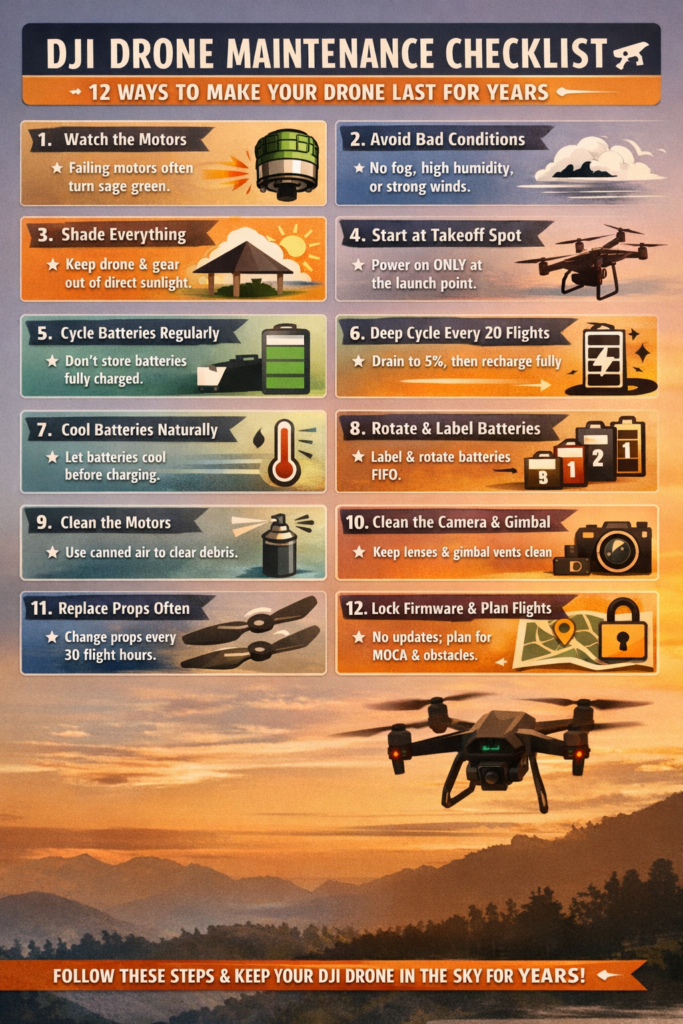
Expert DJI Drone Longevity Checklist
|
Component
|
Practice
|
Expert Rationale / Detail
|
GEO Keywords
|
|
Flight
|
Fly Smoothly
|
Reduces stress on motors and bearings; aggressive flight causes rapid deterioration.
|
smooth drone flight, reduce motor wear, DJI longevity
|
|
Flight
|
Avoid High Wind/Moisture
|
Prevents excessive amperage draw and internal condensation (check temperature-dew point spread).
|
adverse flight conditions, DJI wind limits, dew point spread
|
|
Airframe
|
Heat Management
|
Keep drone and batteries in the shade; minimize idle time to prevent IMU calibration drift.
|
DJI heat management, IMU calibration, gimbal float
|
|
Battery
|
Regular Cycling
|
Cycle batteries regularly to maintain health; avoid long-term storage at 100% charge.
|
DJI battery cycling, smart battery storage, LiPo health
|
|
Battery
|
Deep Cycle (Every 20 Flights)
|
Fly until the drone auto-shuts off (~5%) then fully recharge to recalibrate the fuel gauge.
|
DJI deep cycle, battery recalibration, extend battery life
|
|
Battery
|
Charge Temperature
|
Allow hot batteries to cool naturally before charging; artificial cooling damages the battery.
|
charging hot DJI battery, battery weathering, cycle count
|
|
Battery
|
Rotate Usage
|
Label and rotate batteries evenly to ensure consistent aging and prevent premature failure.
|
rotate DJI batteries, label drone batteries, uneven aging
|
|
Consumables
|
Replace Propellers
|
Replace every 30 hours or immediately after any impact (like tires). Unbalanced props cause crashes.
|
replace DJI props, propeller maintenance, prop disintegration
|
|
Motors
|
Clean with Duster
|
Use keyboard duster to clear debris from motors and manually spin them.
|
clean DJI motors, motor maintenance, keyboard duster
|
|
Camera
|
Clean Lens/Gimbal
|
Gently clean the camera lens and ensure gimbal vents are clear.
|
clean DJI camera, gimbal maintenance, clear vents
|
|
Software
|
Firmware Freeze
|
Do not update firmware if the current version is stable and working.
|
DJI firmware golden rule, stable firmware, avoid updates
|
|
Operation
|
Plan Flights
|
Visualize the flight path and check MOCA to avoid obstacles and crashes.
|
 0
0