
M3E vs M4E: Which DJI Enterprise Drone Is Better?
June 13, 2025
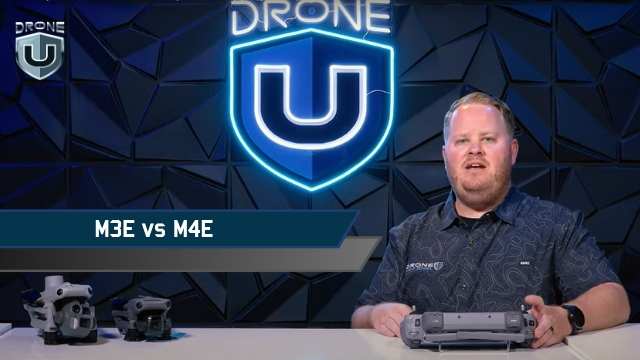
Picture this: You’ve got mapping jobs piling up, and you are looking to buy a solid enterprise drone.
You’ve got one big decision to make: Mavic 3 Enterprise(M3E) or Matrice 4 Enterprise(M4E)? Which one should you choose?
You’re not alone. I’ve been in a similar spot and did a ton of research on both of these birds.
Whether you’re mapping construction sites, inspecting infrastructure, or handling public safety missions, picking the right drone can make or break your workflow.
While the Matrice 4 Enterprise boasts flashy upgrades and a smart oblique mode that sounds like a game-changer, the Mavic 3 Enterprise comes with its proven ability and a no-nonsense approach.
The question remains: is it worth the switch?
So here’s what we did. We flew both the drones and subjected them to every possible scenario to come up with some cool insights.
In this guide, we’ll break down how both drones perform in terms of real-world flight data, so you can make a smart, confident choice.
Let’s first compare the core features of both drones.
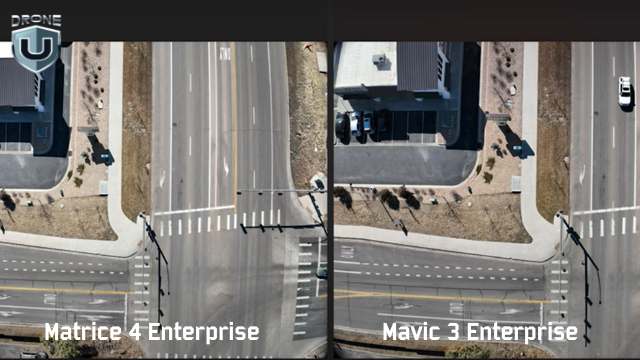
Picture Comparison between M4E and M3E
When comparing the Mavic 3 Enterprise to the Matrice 4 Enterprise, there is a lot more than meets the eye. DJI engineered key components that affect how you map, model, and deliver results. Here’s how the drones differ:
1. Camera system
Both drones have high-resolution sensors, but the M4E introduces a new JPEG recipe. M4E produces sharper images with better shadows, higher contrast, and less barrel distortion.
2. RTK integration
The M4E comes with a built-in Real-Time Kinetic (RTK) module, while the M3E requires a $1,200 add-on. This single feature shifts your setup time, your budget, and your accuracy.
3. Speed
The M3E maxes out at 33 mph on waypoint missions. The M4E pushes that cap up to 47 mph. This 14 mph delta adds up fast on large-area mapping jobs, especially when paired with the M4E’s 0.5-second shutter for rapid image capture.
4. The controller
The M4E controller is brighter, more rugged, and HDMI-ready. You can also fly it with sunglasses on and still see your screen.
So yes, while both drones are part of DJI’s enterprise lineup. But when it comes to mapping-grade performance, they play in different leagues.
When you’re mapping or modeling, your deliverables are only as good as your raw images. The quality of that data shapes everything that follows, from tie points to final textures. Let’s look at how each drone captures the visual data that powers everything else.
Great mapping starts with great images. When it comes to raw visual data, the M4E gives you clearer, more detailed images.
Here’s how they compare side-by-side:
| Image Quality Factor | Mavic 3 Enterprise (M3E) | Matrice 4 Enterprise (M4E) | What It Means |
| Distortion | Visible barrel distortion on straight edges and structures | Minimal distortion; lines stay sharp and straight | Less warping = more accurate stitching and cleaner models |
| Shadow Detail | Limited, darker areas lose definition | High detail in shaded areas | Better visibility of small features (cars, rooftops, corners) |
| JPEG Compression | Standard recipe with more noise and inconsistent exposure | Optimized JPEG recipe with less noise, better consistency | Saves time in post; fewer artifacts during processing |
| Color & Exposure | It can vary between shots | Uniform across all images | Better model texture and reduced color correction time |
| Modeling Impact | More cleanup is required in the photogrammetry software | Cleaner tie points and denser 3D models | Higher accuracy and faster delivery on every job |
Sharp photos are one thing. But how well does the camera hold calibration during processing? That’s where the numbers tell the real story.
Photogrammetry software relies on internal camera calibration to stitch together accurate maps and models. If those internal parameters shift too much during processing, your outputs suffer, no matter how good the image looks.
In side-by-side Pix4D quality reports, the difference between these two drones is massive.
| Drone | Relative Difference (Initial vs. Optimized Camera Parameters) | Impact on Processing |
| M3E | 9.1% | More guesswork = fewer tie points, noisier point clouds |
| M4E | 0.25% | Minimal correction = denser models, fewer errors, faster cleanup |
In the M3E vs M4E comparison, this difference matters.
When the M3E shows a 9.1% difference, the software has to work harder to figure out what the camera was doing. That leads to noise, drift, and extra time fixing bad geometry
The M4E, on the other hand, stays locked in with a 0.25% variance. That tight calibration means better alignment, stronger geometry, and much cleaner data from the start.
If you are working on large models or high-accuracy deliverables, the M4E is a clear winner.
Next, let’s explore the feature that sets the M4E apart from other DJIs.
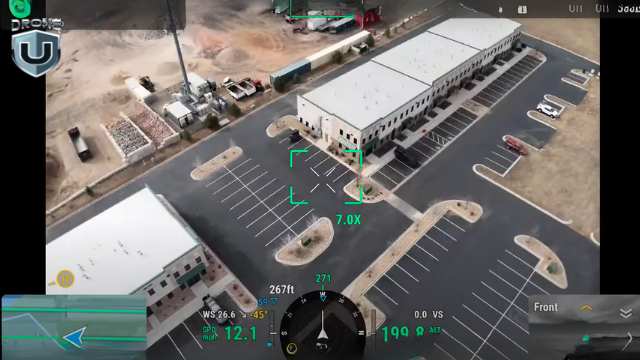
M4E’s Smart Oblique Mode
When I tested the Smart Oblique Mode, I was blown away. It simply shifts the mapping game to a whole new level.
Traditionally, oblique mapping meant flying multiple missions, often with customized camera angles. A typical “double grid” flight with the M3E might involve two perpendicular passes at a fixed angle.
DJI’s default oblique feature splits that into five separate flights: top-left, top-right, bottom-left, bottom-right, and nadir.
The result? Slower execution, more flight planning, and lots of overlap to manage.
Smart Oblique feature changes all this.
It allows the M4E to capture five images at every waypoint: top-down (nadir) plus all four diagonal angles. And the best part? It does this in one smooth, continuous mission. Isn’t that great!
In the real world, this translates into:
What makes Smart Oblique special is how well the data is processed. Even with all the varied camera angles, the output loads cleanly in tools like Pix4D and RealityCapture.
You get sharp corners, detailed textures, and fully formed geometry, all from a single flight.
Okay, the Smart Oblique images sound impressive, but you might ask – “how much time does it save?”
Now that’s a smart question we need to answer.
Which brings us to the Flight Efficiency Comparison.
Smart features are only valuable if they save time or improve output. In the case of Smart Oblique on the Matrice 4 Enterprise, you get both.
Let’s look at a real-world test on a 55-acre site. Below is a breakdown of how long each drone takes, how many photos it can capture, and how efficient each method is.
| Mapping Method | Drone | Flight Time | Photo Count | Notes |
| Smart Oblique | M43 | 22 min 31 sec | ~1,400 | Captures 5 angles per waypoint in a single mission. |
| Double Grid (Manual Oblique) | M3E | ~20 minutes | ~900 | Two separate grid flights with custom camera angles. |
| DJI Oblique (Default Mode) | M3E | 34 min 48 sec | 1,267 | Requires five separate missions; more setup, less efficient overall. |
So what does this mean for you?
You might expect Smart Oblique to overwhelm your photogrammetry software. Five camera angles per waypoint? That sounds like a lot to manage.
Tools like Pix4D and RealityCapture handle the data with ease. The software stitches the images cleanly, aligns them quickly, and keeps everything on track.
Processing also stays fast. The M4E’s precise camera calibration and clean JPEG output mean your software spends less time correcting distortion or fixing alignment errors.
RealityCapture models built from Smart Oblique datasets produce the cleanest 3D point clouds and textures.
In short, Smart Oblique isn’t just flight-side magic. It’s fully compatible with your processing stack and makes your workflows leaner and faster.
Better images are great, but how fast can each drone cover ground and collect usable data?
We’ll analyze that in the next section.
In mapping, every minute in the air and every step in post affects your delivery timeline. This is where performance differences between the M3E and M4E start to show up in real terms: speed, precision, and overall efficiency.
| Feature | M3E | M4E | Why It Matters |
| Max Flight Speed | 33 mph | 47 mph | Covers large sites faster; less time in the air |
| Shutter Speed | Slower | 0.5-second mechanical shutter | Captures clear images at higher speeds |
| RTK Support | Optional (~$1,200 add-on) | Built-in RTK | Eliminates extra cost and simplifies setup |
| Capture Efficiency | Fewer angles, more flights per mission | Five angles per waypoint, fewer flights needed | Shorter missions, more complete models |
| Mapping Outcome | Slower workflow, more cleanup | Faster missions, cleaner models | Higher quality outputs in less time |
To sum it up, the M3E handles basic mapping well, but the M4E was built to move faster, capture better data, and reduce back-end work. Over time, that efficiency translates into real savings and stronger deliverables.
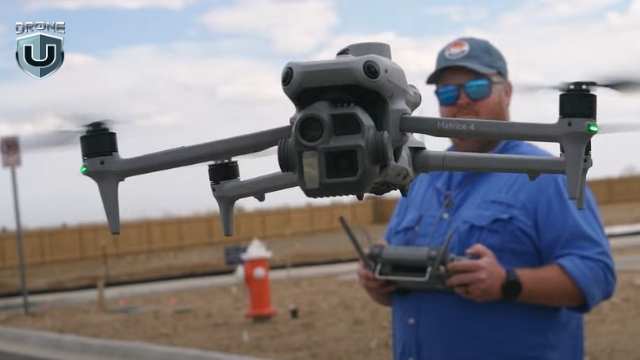
M4E- Remote Controller Experience
Flight performance matters, but so does everything around it. From the moment you power on to the final data upload, your controller, screen, and software either help you work faster or slow you down.
Let’s look at what it’s actually like to use these drones in the field.
The remote is your command center, and when you’re working long hours in tough conditions, every detail matters.
That’s where the M4E remote pulls ahead. Here’s what you get with the M4E’s controller:
While the Mavic 3 Enterprise remote gets the job done, it feels more like a consumer-grade setup. The M4E’s remote is truly enterprise-grade, as it is built for professionals who fly daily and can’t afford second-rate usability.
In short, DJI took real pilot frustrations, like screen glare and limited ports, and engineered a remote that removes friction from field operations.
When you fly often and in tough conditions, these upgrades help you work better.
With such a solid offering inside M4E, there is one big question left to be addressed – the user experience and the software running in the back-end.
While both the Mavic 3 Enterprise and the Matrice 4 Enterprise run on DJI Pilot 2, the user experience you get with each drone is noticeably different.
The M4E streamlines complex mapping tasks, while the M3E still relies on more manual setup and multiple workarounds. Here’s how they compare:
| Aspect | M3E | M4E | What That Means For You |
| Mission Planning | Manual double-grid setup required | Smart Oblique auto-configured | Plan once, capture everything. No angle guesswork |
| Oblique Workflow | Multiple flights with custom camera angles | 5-angle capture per waypoint in one mission | Reduces complexity and saves time |
| Screen Visibility | Standard interface, harder to use in sunlight | Bright display, glare-resistant | Easier to see and interact with during fieldwork |
| Workflow Efficiency | Slower setup, more menus | Streamlined, fewer taps | Faster planning, fewer errors, less time on site |
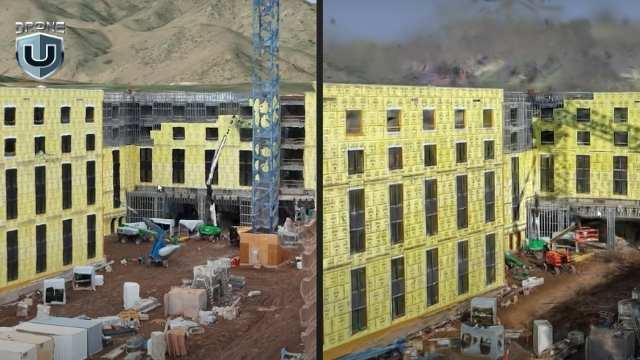
M3E vs M4E: Real World Drone Mapping Results
The M4E consistently produces the cleanest 3D models DJI has to offer. And you see the difference the moment you process your data.
Here’s how M4E works in the field:
In the M3E vs M4E comparison, the M4E generates denser, sharper, and cleaner point clouds. You get fewer holes, smoother geometry, and stronger structure, especially along vertical surfaces like walls, facades, and vehicles.
Texture quality from the M4E comes out crisp. Due to the improved JPEG recipe and better image capture angles, you get sharper lines, more accurate edges, and fewer distortions. Even reflective surfaces, which are notoriously tricky, hold up better in model rendering.
When Smart Oblique data from the M4E is processed in RealityCapture and converted into Gaussian splats, the difference is dramatic. The splats look photorealistic. The density and detail outperform anything from the M3E. One pilot even called them “the cleanest ever seen from a DJI drone.
Despite capturing five times more angles, the M4E doesn’t slow down post-processing. The higher image quality and tighter camera calibration reduce the need for software corrections, resulting in faster overall processing.
When the quality of your final deliverables defines your reputation and revenue, the M4E simply delivers more, faster, and with less hassle.
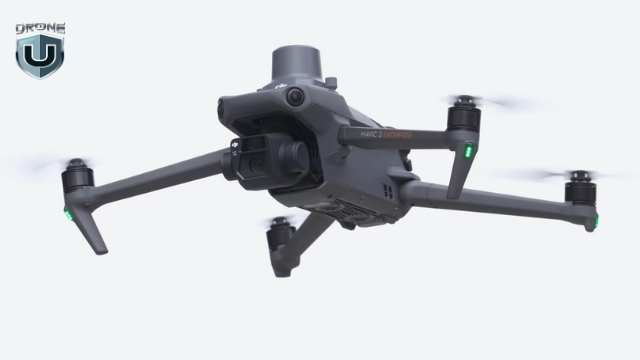
M3E: Reliable 2D Mapping Drone
Let’s be clear: the Mavic 3 Enterprise isn’t obsolete. Depending on your mission type, budget, or operational style, it’s a better tool.
Here’s where the M3E shines:
The M3E is lighter, smaller, and quicker to pack. If you’re bouncing between job sites or flying solo, that matters. You unfold it, fire it up, and get to work. No bulky cases or long setup required.
In emergencies, like public safety callouts, post-storm assessments, or quick inspections, the M3E gets in the air faster. You spend less time prepping and more time collecting data.
The M3E keeps your upfront costs lower. Even with the RTK module, it’s still more affordable than the M4E. For smaller firms or contractors just starting, that makes a big difference.
If your jobs mostly involve flat terrain, orthophotos, or simple elevation models, the M3E is an ideal choice. You don’t need Smart Oblique to deliver clean top-down maps.
Simply put, the M3E still holds serious value, especially when speed, simplicity, or portability take priority. It’s not the top-tier mapping machine that the M4E is, but it’s practical, reliable, and efficient.
DJI vs Domestic Drones
Not every mapping job is about speed or image quality. Sometimes, it’s about where you’re allowed to fly—or what kind of detail your drone can capture.
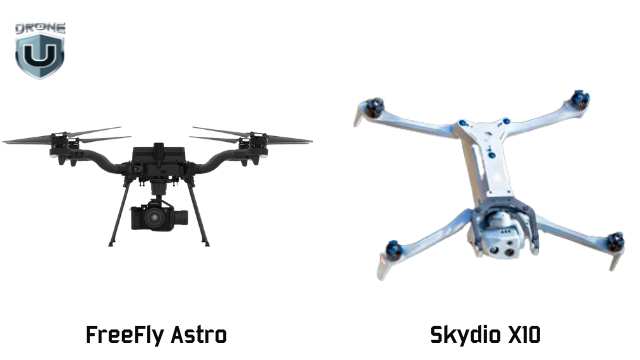
That’s where American-made drones like the Freefly Astro and Skydio X10 step in—and, in some cases, pull ahead.
Freefly Astro dominates in 2D mapping. Its larger sensor allows you to capture more accurate imagery at higher altitudes and lower GSD (Ground Sampling Distance).
For wide-area orthophotos, the Astro wins on speed, clarity, and efficiency.
The Skydio X10 excels in 3D infrastructure inspection, especially in complex environments.
Need to map under a bridge? Capture a dam’s underside? See upward into a structure? The Skydio X10 is your only option. Its Zenith-facing camera makes it possible and opens up various categories of work that DJI drones simply can’t access.
As a result, you can capture unmatched detail under structures, exposing power lines, rebar, cracking, and more. And because it’s NDAA-compliant, the X10 qualifies for federal contracts, which offer a major edge in public sector work.
Choosing a drone isn’t just about features. It’s about what it helps you earn and how fast it pays for itself.
Here’s how the M3E vs M4E and Skydio X10 stack up when you factor in cost, value, and ideal use cases:
| Drone | Upfront Cost | Included Features | Best For | ROI Potential |
| M3E | Lower base price + $1,200 for RTK module | Lightweight, fast to deploy, optional RTK | 2D mapping, real estate, and quick inspections | Ideal for small jobs and startups; low cost, fast setup |
| M4E | Higher upfront cost (RTK included) | Built-in RTK, Smart Oblique, sharper imaging | 3D mapping, large sites, high-volume deliverables | Delivers cleaner data faster—pays off in speed, quality, and efficiency |
| Skydio X10 | Highest cost | NDAA-compliant, upward-facing (Zenith) imaging | Infrastructure inspection, federal/public sector work | Grants access to premium contracts others can’t touch |
Choosing between the Mavic 3 Enterprise, Matrice 4 Enterprise, and Skydio X10 isn’t just a technical decision. It’s a reflection of how you work and where you want your drone business to go.
If you prioritize speed, portability, and a quick setup, the M3E is still a smart, efficient choice for basic mapping and inspections.
If you value precision, speed, and the ability to take on larger, more demanding deliverables without bottlenecks, the M4E aligns better with a scaling business model.
If your work demands sharper 3D models, faster processing, and streamlined field operations, the M4E gives you the edge you need to level up.
And if you’re working under bridges, inside federal compliance zones, or in critical infrastructure environments, the X10 gives you access to jobs other drones can’t take.
Want to build a skillset that matches your drone’s potential?
Explore hands-on mapping and modeling classes at DroneU’s in-person training. Learn from experts, fly real missions, and sharpen your edge.
 5
5