
Why Pix4Dreact is a Must-Have Tool for Base Mapping
May 23, 2025
Natural disasters, emergencies, and conflicts are hitting harder and faster than ever before. These events not only put lives at risk but also damage critical infrastructure and property. When chaos strikes, rescue teams don’t have hours to wait, they need accurate, real-time insights they can act on immediately.
That’s where 2D drone mapping software like Pix4DReact steps in.
In this article, we’ll dive into why Pix4Dreact has become a go-to tool for drone mapping.
We’ll uncover what Pix4Dreact can do that will save you time, simplify your workflow, and help you deliver better results faster.
Let’s kick things off by breaking down the basics.
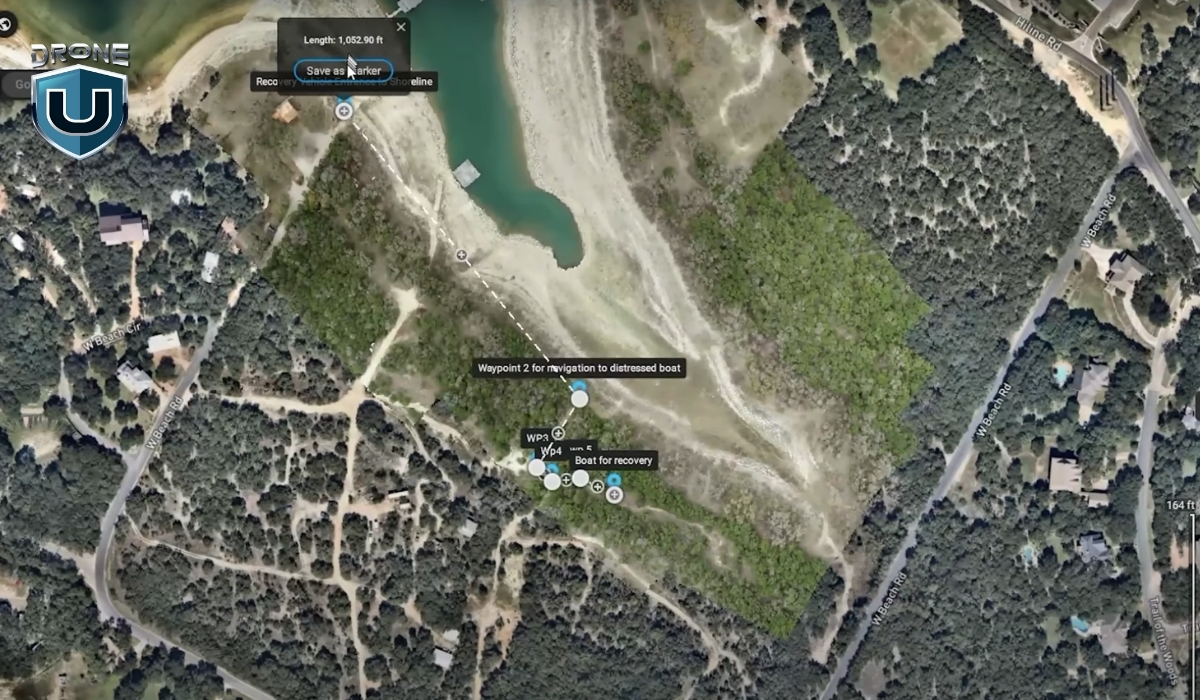
Pix4Dreact is a 2D drone mapping tool specifically designed for speed and simplicity.
Unlike heavy photogrammetry programs that require hours of processing and powerful computers, Pix4Dreact lets you turn drone images into detailed, usable maps in just minutes.
For Example: Imagine you are called to assist in a search operation in a rural area after a storm. With Pix4Dreact installed on your laptop and a set of drone images, you can quickly create a full overview map of the damaged zone, without needing internet access or specialized hardware.
In simple words, Pix4Dreact is designed for creating flat, accurate representations of the ground. You capture a series of overlapping aerial images with your drone. Then, you upload them into Pix4Dreact, which stitches them together into a high-quality orthomosaic.
This orthomosaic serves as a real-world map that you can analyze, measure, annotate, and share.
Here’s how Pix4Dreact works step-by-step:
The best part? Pix4Dreact works entirely offline.
You don’t need an internet connection to process maps, which makes it ideal for emergency responders, field surveyors, and any pilot working in remote areas.
Now that you know what Pix4Dreact is and how it works, let’s look at why it stands out from other 2D drone mapping tools.
When you’re new to drone mapping, it’s easy to feel overwhelmed by the sheer number of software options out there.
Pix4Dreact cuts through all that noise.
It’s designed for speed, simplicity, and reliability, three things that matter the most when you’re working in the real world. Let’s understand them one by one:
One of the first things you’ll notice about Pix4Dreact is how fast it works.
Here’s why that matters: Imagine you’re supporting a military search and rescue operation. Every minute you spend waiting for a map to process is a minute lost finding survivors. You need tools that move as fast as the situation demands.
Pix4Dreact was built with that urgency in mind. It skips the heavy 3D modeling that most full-suite photogrammetry software focuses on, and instead zeroes in on producing clean, flat, 2D maps as quickly as possible.
Speed is great, but it doesn’t mean much if your map isn’t accurate.
Pix4Dreact strikes a balance between speed and precision that’s ideal for many real-world uses like disaster response, construction surveys, and emergency infrastructure inspections.
While it’s not designed to compete with ultra-high-precision survey software like Pix4Dmapper or specialized LiDAR systems, Pix4Dreact consistently delivers enough accuracy for fieldwork where time is the top priority.
For example, you can measure distances, mark damaged areas, plan logistics routes, and even create printable, georeferenced maps directly from your laptop.
You can install Pix4Dreact on a regular Windows laptop and run it entirely offline, no internet connection required.
Other mapping tools often require cloud uploads, remote servers, or subscription logins to process images. But with Pix4Dreact, everything happens locally. You’re in full control of your data, start to finish.
This is a huge game-changer for drone pilots who want to map disaster zones or rural areas without internet access.
Next up, let’s see how Pix4Dreact performs against some of the best-known drone mapping software options out there.
There’s no shortage of mapping software for drone pilots today. Platforms like Pix4Dmapper, DroneDeploy, and Agisoft Metashape offer powerful capabilities.
However, not every project needs heavy, complex software, and not every beginner pilot wants to spend hours setting it up or learning advanced settings.
Here’s how Pix4D carves out its space in a competitive market:
One of the biggest barriers to getting started with high-end drone mapping tools is the hardware load.
Most professional mapping tools like Pix4Dmapper and DroneDeploy demand strong GPUs, high RAM, and lots of hard drive space to run smoothly. Some even require constant cloud syncing and massive file uploads.
Pix4Dreact is different.
You can install it on almost any modern Windows laptop without needing a powerful gaming setup. A basic laptop with 8GB RAM and a decent CPU can easily process a full mission’s worth of images. No need to invest thousands into a high-end workstation just to create maps.
Another area where Pix4Dreact shines is price.
Full-featured platforms like DroneDeploy are amazing for large construction or agriculture projects, but they often come with steep monthly fees or expensive annual subscriptions.
Same with Pix4Dmapper, which targets high-end survey and engineering users.
Pix4Dreact, on the other hand, offers a one-time licensing model. You pay once, and you own it (no worrying about recurring fees eating into your profits).
This is a game-changer for smaller teams, volunteer groups, municipal agencies, or anyone working with tight budgets but still needing professional-grade mapping capabilities.
If you’ve ever opened a high-end mapping platform and felt immediately overwhelmed by endless tabs, layers, and settings, you’re not alone.
Professional-grade software often assumes you’ve already had formal GIS training. And if you haven’t? The learning curve can be steep.
Pix4Dreact bridges this gap.
Its clean, simple user interface is designed so that even brand-new drone pilots can upload images and process maps without feeling lost.
There’s no need to customize complicated flight parameters or dig through advanced rendering settings. The workflow is basically:
That’s it.
This is why Pix4Dreact is such a smart choice for anyone who values speed, quick action, and efficiency.

We have understood what Pix4Dreact is, why it stands out, and how it’s better in comparison to other top mapping tools. Now let’s look at some of the real-world scenarios where it truly shines.
Using a basic drone and Pix4Dreact, you can quickly create updated, detailed maps of damaged areas. These maps help responders identify safe paths, locate survivors, plan evacuations, and prioritize repairs.
Construction sites are busy, constantly changing environments.
Project managers, engineers, and contractors need up-to-date visuals to track progress, manage resources, and keep everything on schedule.
Pix4Dreact gives you a simple way to capture aerial overviews of a construction site in minutes. Instead of waiting for a third-party survey or satellite update, you can create your own site maps weekly—or even daily.
Maintaining roads, bridges, pipelines, and powerlines requires constant attention, and accurate, timely mapping is a big part of that.
Pix4Dreact lets you map long stretches of roadway, inspect bridges for visible damage, or create maps of critical utility infrastructure without needing expensive survey teams or heavy equipment.
If you’re just getting started with drone mapping, you probably don’t have time to wrestle with complicated software or wait hours for cloud-based processing. That’s exactly where Pix4Dreact stands out. It’s lightweight, fast, and easy to learn, making it ideal for both beginner pilots and seasoned operators.
While other tools may be better suited for ultra-high-end 3D modeling or advanced analytics, Pix4Dreact excels when you need simple, efficient 2D drone mapping. It’s a reliable, go-to solution for professionals who value speed and simplicity without sacrificing quality.
But great results aren’t just about having the right software—they also depend on having the right training.
At DroneU, we offer hands-on, real-world drone pilot courses that teach you exactly how to plan flights, capture the right data, and use tools like Pix4Dreact to deliver professional results.
Ready to take your drone mapping skills to the next level?
Check out DroneU’s drone training programs here.
Pix4Dmapper creates high-quality 3D maps and models from drone images. Professionals use it for surveying, construction, mining, and precision agriculture projects.
The best drone mapping software depends on your project needs. Pix4Dreact is best for fast 2D mapping, while Pix4Dmapper or DroneDeploy fit larger, high-accuracy 3D mapping projects.
Pix4Dmapper builds detailed 2D and 3D models for professional surveying, while Pix4Dreact focuses on creating fast, easy-to-use 2D maps for emergency and field use.
Pix4Dreact processes all your drone images locally on your laptop. SO, you don’t need an internet connection to generate or view your maps.
No, PIX4Dreact does not support multispectral image processing. It can process thermal images in .jpg format; however, these are treated as standard RGB images. As a result, the generated orthomosaic provides only a visual representation of temperature variations and does not allow the extraction of precise temperature values for specific objects or pixels.
 2
2