
The Future of Construction Drone Technology
Drones are changing how construction projects are pitched, tracked, and delivered.
Talking about the future of drones in construction, there is a lot to uncover. And it is limited to tracking construction progression or land surveying.
We are talking about much more advanced construction drone technology, such as immersive visualizations, BIM overlays, and using tools like Unreal Engine.
This article, drawn from a candid conversation between Brian Owens and Paul from Drone U, explores the practical, tactical, and deeply human journey of how construction drone technology is redefining workflows across the industry.
Whether you’re a drone service provider looking to break into construction or a contractor still relying on progress photos from the ground, this story will provide you with the roadmap.
First, let’s find out who Brian Owens is and why mentioning him in this article is so important.
Brian’s Journey Into Construction Drone Technology
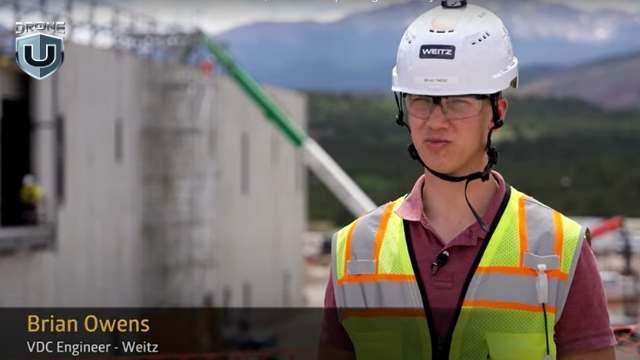
Brian Owen’s- VDC at The Weitz Company
Brian isn’t your typical drone pilot. He’s a mechanical engineer, a lifelong tinkerer. Today, he serves as VDC Engineer II at The Weitz Company, where he leads field solutions.
Brian Owens grew up milking cows in Eagar, Arizona. Never thought of a career in construction technology.
His curiosity showed up early. He pulled apart anything with wires or moving parts and usually put it back together, learning something new each time.
By high school, he was living in Idaho and building robots. He ran the 800-meter race with the same grit that would later fuel his success in tech and engineering. After a two-year mission in Hawaii, Brian earned his mechanical engineering degree from BYU–Idaho. While in school, he immersed himself in mechatronics, a discipline that combines mechanical and electrical engineering.
That’s when he asked his wife, “Can I spend a few hundred bucks to build a drone?”
She said yes. That hobby quickly evolved into a professional pursuit.
Brian taught himself to fly FPV drones through trial and error. What began as a side project to learn electronics evolved into a passion that sharpened his instincts for modeling, simulation, and spatial data.
Joining Weitz: From VDC Newbie to Field Solutions Leader
If you had told Brian during college that he’d end up in construction, he probably would’ve laughed. He pictured himself designing products, not buildings. But fate had other plans.
It started with a flight, just not the drone kind.
Joshua Marriott, Director at The Weitz Company and Drone U alum, happened to sit next to Brian’s father-in-law on a plane. They struck up a conversation about drones and engineering. That talk led to introductions. Over the next six months, Brian and Joshua stayed in touch.
As graduation approached, Brian had job offers from several companies. But he held out for the Weitz. And the Weitz did something unusual. They didn’t just hire Brian. They created a role specifically for him.
Officially, he joined as a VDC (Virtual Design and Construction) Engineer. Unofficially, he became the go-to person for drone tech, laser scanning, and robotic field solutions.
In his new role, he quickly saw the potential to do more than fly drones or model structures. He became a connector. He linked tools, teams, and data. His goal was to bring real-world construction and digital design into tighter alignment, using drones as the bridge.
And that is how the future of drones in construction begins taking shape.
Construction Drone Technology That Powers the Field
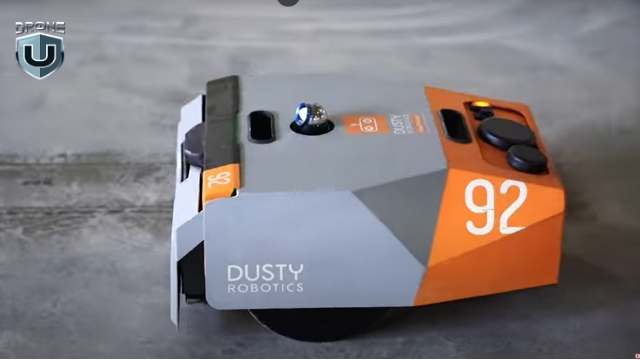
Dusty Robotics Field Printer
When you hear “construction,” your mind might go to hard hats and cranes. But for Brian Owens and the Field Solutions team at Weitz, the real action starts with scanners, robots, and drones.
Together, these tools create a smooth, end-to-end digital workflow.
Here’s what that looks like.
1. Laser Scanners and Point Clouds
One of the most critical tools in Brian’s tech stack is the laser scanner. These devices emit light pulses and record the time it takes each pulse to reflect from surrounding surfaces. The result is millions of precise data points that form a 3D “point cloud.”
It’s like having X-ray vision for buildings. The scanner helps teams measure site conditions, verify installations, and catch errors before they turn into costly rework.
2. Dusty Robotics Field Printer
The Dusty field printer is a wheeled robot that reads architectural plans to print layouts directly onto the jobsite floor. It marks outlines for walls, plumbing, and even overhead Mechanical, Electrical, and Plumbing (MEP) systems. The robot moves with sub-inch accuracy and uses total stations that sync with the digital model.
This process reduces measuring time, lowers the chance of layout errors, and keeps design and field execution closely aligned.
3. Navisworks + Unreal Engine for BIM Visualization
Brian uses Navisworks for model coordination and Unreal Engine for photorealistic rendering. Unreal allows the team to blend drone-captured site data with BIM models. Stakeholders can toggle between the current progress and the final design.
“It’s like giving someone a time machine,” Brian said. “You can show them what’s physically built today and what it’s going to look like in the future.”
4. Drones as the Eyes of the Site
The Mavic 3 Enterprise drones handle most jobs. FPV rigs capture cinematic flythroughs. DJI Mini drones are perfect for indoor scans and tight spaces. Brian’s team flies missions for mapping, inspection, safety, estimating, and stakeholder updates.
But the power doesn’t stop at the hardware. The team processes orthomosaics in DroneDeploy, overlays PDFs, and utility data. It also generates custom 3D models and splat renders. The result is high-quality visuals that everyone on the jobsite can use, understand, and act on.
This approach to construction drone technology ensures drones are embedded into every phase, not just as tools for visuals, but as engines for insight.
So, how do drones fit into the day-to-day of a construction project?
Let’s explore that in the next section
Construction Drone Technology in Action
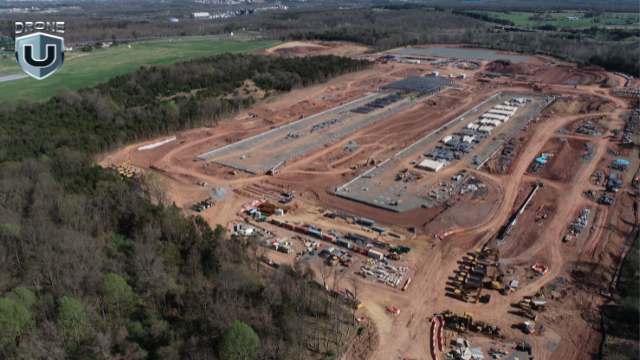
Mapping the Construction Site
To Brian Owens, drones are a standard. Not an extra line item, but a core operational tool. And their value compounds across every phase of a project.
1. Pursuit Phase
Before a shovel hits the ground, drones are already in the air.
Brian and his team use drones to map potential sites during the pursuit phase. They capture topography, identify access points, and help estimate logistics, cut-and-fill requirements, and travel paths.
It’s not just about flashy visuals. It’s about giving estimators, developers, and decision-makers the real-world context they need to submit accurate, competitive bids and win the job.
2. Preconstruction and Planning
Once a project moves forward, drones help fine-tune logistics.
Brian’s team uses drone-generated maps to plan staging zones, evaluate soil conditions, and overlay utility lines. They even help teams align penetrations before pouring concrete.
In some cases, a simple orthomosaic image can prevent a costly mistake by revealing a misaligned trench or misplaced slab layout.
3. Document Everything, Risk Less
This is where drones prove their worth.
“We try to fly weekly,” Brian says. “It’s risk management, pure and simple.”
Drones capture as-built conditions with time-stamped and geo-referenced images.
So when a client claims, “This wasn’t installed on time,” the project team can pull up drone data and show exactly when work was completed. It creates a visual record that’s both permanent and indisputable.
Drones also improve safety and utility coordination. Teams overlay underground utility plans onto drone maps to prevent cable strikes. They use drones for façade inspections that would otherwise require dangerous lift work.
They also provide regular updates for both internal teams and external stakeholders.
4. Closeout and Marketing
By the end of the project, the drone footage evolves from simple documentation into a compelling narrative.
With FPV flythroughs, cinematic edit reels, and splat models, Brian transforms technical captures into powerful communication tools.
Marketing teams use visuals to showcase their work. Project managers present them in stakeholder briefings. Executives use them to pitch future phases or pursue new opportunities.
Great flights mean nothing without great deliverables.
Are you still wondering what kind of drone outputs are used on a jobsite and which ones truly impress?
We’ll analyze that in the upcoming section.
Drone Deliverables in Construction
Splat Models
Brian Owens is clear on one thing: drone data only matters if it’s usable. And that starts with deliverables that teams rely on.
Here’s how he makes the data count.
1. Orthomosaics: The Baseline Every Project Needs
Every drone flight at Weitz begins with an orthomosaic map. It’s not optional. These high-resolution, geo-referenced images serve as a shared source of truth. Teams use them to monitor progress, resolve disputes, verify timelines, and support inspections.
“They’re used every day,” Brian said. “From QA and QC to owner updates, orthos are the foundation.”
2. Photo and Video Loops: Clear, Consistent Visuals
Brian’s standard workflow also includes ISO photo loops, which are angled perimeter shots and orbit-style video captures.
These files go into a shared cloud folder, where marketing teams, executives, and project managers can access and use them as needed.
3. Video Updates: Storytelling for Stakeholders
Some projects take it a step further with edited video updates. These combine aerial loops, ground-level shots, and interior walkthroughs into short, documentary-style summaries.
These videos serve as biweekly progress reports for larger clients, which are easier to understand and share than a PDF or traditional reports.
4. Splat Models: The Next Level of Immersion
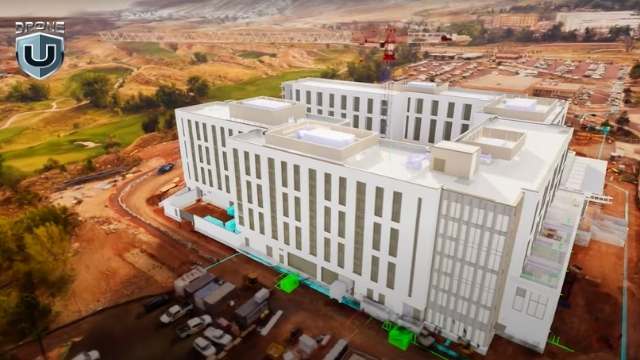
Brian recently added something new to his toolkit: Gaussian splat models. These are highly photorealistic 3D scenes built from drone images and video.
“It’s like photogrammetry, but more realistic,” he explained. “The trees look better, the steel looks better. Everything just pops.”
But he doesn’t stop there. Brian overlays BIM models into the splat environment using Unreal Engine. This allows clients to see both the current build and the final design in one seamless view.
Once the splat model is built, his team hosts it online and shares a secure link. Teams, stakeholders, and even community members can explore the model from any browser.
No special software or downloads required.
None of this works at scale without the right people and culture behind the tools. Let’s break down how the Weitz Company built a 40-drone pilot program.
How The Weitz Company Built a Drone Program

The Weitz Company Logo
At a company the size of Weitz, with more than 1,400 employees and dozens of active job sites, scaling drone operations takes more than buying hardware. It requires a mindset shift. That’s where Brian’s role extends beyond engineering.
1. 40+ Pilots, One Philosophy
Today, Weitz has over 40 drone pilots operating across national projects. Most of them are project managers, engineers, and superintendents who integrate drones into their day-to-day work.
“It’s like 5% of their week, maybe,” Brian said. “But they use the data every single day.”
To support them, Weitz has built a clear command structure for its drone program. Each business unit designates a drone champion. That person handles training, oversight, and helps keep pilots up to speed.
Every quarter, pilots attend mandatory training sessions. Monthly meetings keep drone champions aligned. And when issues come up during the week, Brian stays on call to help.
2. The Power of Internal Relationships
Brian knows that influence grows with trust.
He treats every internal team as a client. For him, every jobsite interaction is a chance to show how drones can solve problems, not just capture progress photos.
Whether it’s a BIM overlay or a pre-concrete flyover, Brian and his team deliver drone data as a service. And the more teams see the results, the more they want in.
“We’ve got superintendents who didn’t care about drones two years ago,” he said. “Now they’re asking for splat models every week.”
3. Training Over Policing
Unlike many enterprise programs, Weitz doesn’t enforce a minimum flight hour policy. Instead, the company fosters a culture built on mentorship, support, and steady communication.
Brian doesn’t focus on enforcing rules. He focuses on sparking curiosity. Once people see what drones can do, they rarely need convincing.
Future of Construction Drone Technology and Media
Brian Owens doesn’t just fly drones. He thinks like a product designer, codes like a tinkerer, and pitches like a creative director. That blend is shaping what comes next, not just for The Weitz Company but for the entire construction industry.
1. From Documentation to Experience
Drone media in construction used to focus on documentation: maps, photos, and maybe a timelapse if the marketing team got involved.
But Brian sees a shift.
Clients no longer want raw data. They want clarity. They want to walk through a project before it’s built. They want to compare real-world conditions to the BIM model in real time. They need spatial context, not just 2D drawings.
That’s where construction drone technology, paired with tools like Unreal Engine and Gaussian splatting, creates a new layer of communication.
2. Real-Time Project Visibility
Brian envisions a world where anyone, from owners and stakeholders to city officials, can open a secure link, toggle between aerial views and 3D models, and explore the site virtually. There’s no login required, no software to install. Just fast, frictionless visibility.
Picture this: you’re a developer. Instead of asking for a progress update, you open a dashboard that shows the live site, last week’s drone overlay, and the BIM schedule, all in one place.
That’s the kind of experience Brian is building.
3. Making Drone Data Useful
For Brian, usefulness is the goal.
“If no one’s using it,” Brian said, “it doesn’t matter how cool the flythrough is. It’s wasted effort.”
His goal isn’t just better visuals. He’s creating tools that drive decisions. That’s why he focuses on standardizing deliverables, streamlining workflows, and plugging drone outputs directly into platforms that teams already rely on.
Drone media, in his hands, becomes more than just content. It becomes operational intelligence.
Thinking about using your drone skills in construction? Brian has some hard-earned advice.
How to Break Into Construction With Drone Technology
For drone pilots hoping to work in construction, Brian’s message is simple: know your craft, but more importantly, know your audience.
1. It’s Not About the Drone. It’s About the Deliverable.
“Flying the drone is the easy part,” Brian said. “Knowing what deliverables to give, when to give them, and how to make them useful. That’s what separates a good pilot from someone who’s just flying a drone.”
You don’t need every certification or the latest drone. What matters is understanding what project managers, VDC engineers, and superintendents need.
Most of the time, that means orthomosaics, PDF overlays, clean photo loops, and data they can drop into tools like Procore or Bluebeam.
2. Learn the Construction Language
If you want to get hired, start by learning how construction teams think and talk.
That means understanding rebar layout, submittals, MEP sequencing, and why teams fly before a concrete pour.
Brian recommends walking job sites, asking questions, and watching how decisions get made in the field.
3. Don’t Sell Cinematics. Sell Solutions.
Yes, Brian builds cinematic splat models and Unreal overlays. But he didn’t start there. He earned trust by solving real problems: faster layout, better documentation, fewer mistakes.
“You could have the coolest looking deliverable in the world,” Brian said, “but if your client doesn’t know how to use it, what’s the point?”
4. Stay Curious and Scrappy
Construction changes constantly. Technology moves fast. What worked last year might be irrelevant today.
That’s why Brian encourages new pilots to stay curious, test workflows, crash a few drones, and keep asking, “What problem am I solving?”
And “If you want to break into construction,” Brian said, “don’t send a cinematic reel. Send a PDF with usable deliverables. Show a good orthomosaic, a photo loop, and explain how it helped someone make a decision.”
Conclusion
Construction drone technology isn’t just about flying smarter. It’s about thinking deeper. Knowing when to map, what to deliver, and how to plug into the decisions that matter.
And I think that’s the bigger takeaway from this article.
If you’re a drone pilot trying to find your place in the industry, take a page from Brian’s playbook: start with the problem, deliver with purpose, and never stop learning.
Because in the future of construction, the best drone pilots won’t just fly. They’ll build.
Are you ready to lead drone operations on real construction sites?
Explore Drone U’s Construction Bundle and learn the exact skills top contractors look for.
 5
5
M3E vs M4E: Which DJI Enterprise Drone Is Better?
Picture this: You’ve got mapping jobs piling up, and you are looking to buy a solid enterprise drone.
You’ve got one big decision to make: Mavic 3 Enterprise(M3E) or Matrice 4 Enterprise(M4E)? Which one should you choose?
You’re not alone. I’ve been in a similar spot and did a ton of research on both of these birds.
Whether you’re mapping construction sites, inspecting infrastructure, or handling public safety missions, picking the right drone can make or break your workflow.
While the Matrice 4 Enterprise boasts flashy upgrades and a smart oblique mode that sounds like a game-changer, the Mavic 3 Enterprise comes with its proven ability and a no-nonsense approach.
The question remains: is it worth the switch?
So here’s what we did. We flew both the drones and subjected them to every possible scenario to come up with some cool insights.
In this guide, we’ll break down how both drones perform in terms of real-world flight data, so you can make a smart, confident choice.
Let’s first compare the core features of both drones.
M3E vs M4E: Specs at a Glance
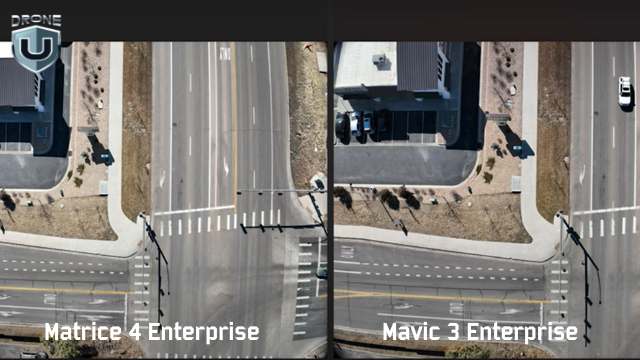
Picture Comparison between M4E and M3E
When comparing the Mavic 3 Enterprise to the Matrice 4 Enterprise, there is a lot more than meets the eye. DJI engineered key components that affect how you map, model, and deliver results. Here’s how the drones differ:
1. Camera system
Both drones have high-resolution sensors, but the M4E introduces a new JPEG recipe. M4E produces sharper images with better shadows, higher contrast, and less barrel distortion.
2. RTK integration
The M4E comes with a built-in Real-Time Kinetic (RTK) module, while the M3E requires a $1,200 add-on. This single feature shifts your setup time, your budget, and your accuracy.
3. Speed
The M3E maxes out at 33 mph on waypoint missions. The M4E pushes that cap up to 47 mph. This 14 mph delta adds up fast on large-area mapping jobs, especially when paired with the M4E’s 0.5-second shutter for rapid image capture.
4. The controller
The M4E controller is brighter, more rugged, and HDMI-ready. You can also fly it with sunglasses on and still see your screen.
So yes, while both drones are part of DJI’s enterprise lineup. But when it comes to mapping-grade performance, they play in different leagues.
M3E vs M4E: Image and Sensor Comparison
When you’re mapping or modeling, your deliverables are only as good as your raw images. The quality of that data shapes everything that follows, from tie points to final textures. Let’s look at how each drone captures the visual data that powers everything else.
Camera Sensor Specs and JPEG Output
Great mapping starts with great images. When it comes to raw visual data, the M4E gives you clearer, more detailed images.
Here’s how they compare side-by-side:
| Image Quality Factor | Mavic 3 Enterprise (M3E) | Matrice 4 Enterprise (M4E) | What It Means |
| Distortion | Visible barrel distortion on straight edges and structures | Minimal distortion; lines stay sharp and straight | Less warping = more accurate stitching and cleaner models |
| Shadow Detail | Limited, darker areas lose definition | High detail in shaded areas | Better visibility of small features (cars, rooftops, corners) |
| JPEG Compression | Standard recipe with more noise and inconsistent exposure | Optimized JPEG recipe with less noise, better consistency | Saves time in post; fewer artifacts during processing |
| Color & Exposure | It can vary between shots | Uniform across all images | Better model texture and reduced color correction time |
| Modeling Impact | More cleanup is required in the photogrammetry software | Cleaner tie points and denser 3D models | Higher accuracy and faster delivery on every job |
Sharp photos are one thing. But how well does the camera hold calibration during processing? That’s where the numbers tell the real story.
Relative Accuracy in Photogrammetry
Photogrammetry software relies on internal camera calibration to stitch together accurate maps and models. If those internal parameters shift too much during processing, your outputs suffer, no matter how good the image looks.
In side-by-side Pix4D quality reports, the difference between these two drones is massive.
| Drone | Relative Difference (Initial vs. Optimized Camera Parameters) | Impact on Processing |
| M3E | 9.1% | More guesswork = fewer tie points, noisier point clouds |
| M4E | 0.25% | Minimal correction = denser models, fewer errors, faster cleanup |
In the M3E vs M4E comparison, this difference matters.
When the M3E shows a 9.1% difference, the software has to work harder to figure out what the camera was doing. That leads to noise, drift, and extra time fixing bad geometry
The M4E, on the other hand, stays locked in with a 0.25% variance. That tight calibration means better alignment, stronger geometry, and much cleaner data from the start.
If you are working on large models or high-accuracy deliverables, the M4E is a clear winner.
Next, let’s explore the feature that sets the M4E apart from other DJIs.
Smart Oblique Mode: The M4E’s Killer Feature
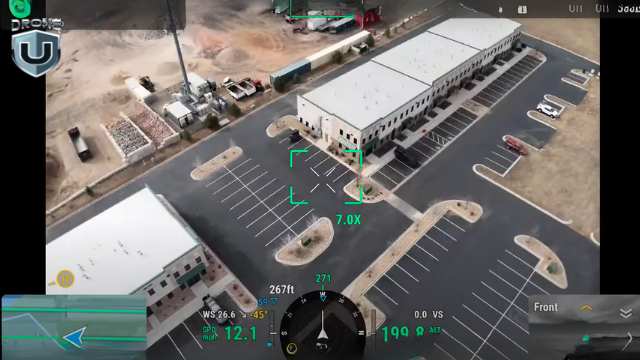
M4E’s Smart Oblique Mode
When I tested the Smart Oblique Mode, I was blown away. It simply shifts the mapping game to a whole new level.
Traditionally, oblique mapping meant flying multiple missions, often with customized camera angles. A typical “double grid” flight with the M3E might involve two perpendicular passes at a fixed angle.
DJI’s default oblique feature splits that into five separate flights: top-left, top-right, bottom-left, bottom-right, and nadir.
The result? Slower execution, more flight planning, and lots of overlap to manage.
Smart Oblique feature changes all this.
It allows the M4E to capture five images at every waypoint: top-down (nadir) plus all four diagonal angles. And the best part? It does this in one smooth, continuous mission. Isn’t that great!
In the real world, this translates into:
- Less time in the air
- Fewer missions to plan
- More angles per structure
- And cleaner 3D models with fewer gaps
What makes Smart Oblique special is how well the data is processed. Even with all the varied camera angles, the output loads cleanly in tools like Pix4D and RealityCapture.
You get sharp corners, detailed textures, and fully formed geometry, all from a single flight.
Okay, the Smart Oblique images sound impressive, but you might ask – “how much time does it save?”
Now that’s a smart question we need to answer.
Which brings us to the Flight Efficiency Comparison.
Flight Efficiency Comparison
Smart features are only valuable if they save time or improve output. In the case of Smart Oblique on the Matrice 4 Enterprise, you get both.
Let’s look at a real-world test on a 55-acre site. Below is a breakdown of how long each drone takes, how many photos it can capture, and how efficient each method is.
| Mapping Method | Drone | Flight Time | Photo Count | Notes |
| Smart Oblique | M43 | 22 min 31 sec | ~1,400 | Captures 5 angles per waypoint in a single mission. |
| Double Grid (Manual Oblique) | M3E | ~20 minutes | ~900 | Two separate grid flights with custom camera angles. |
| DJI Oblique (Default Mode) | M3E | 34 min 48 sec | 1,267 | Requires five separate missions; more setup, less efficient overall. |
So what does this mean for you?
- With Smart Oblique, you plan once, fly once, and get full coverage.
- You capture more comprehensive data in less time.
- Smart Oblique models turn out more complete, with less stitching and cleanup.
Software Compatibility and Processing Results
You might expect Smart Oblique to overwhelm your photogrammetry software. Five camera angles per waypoint? That sounds like a lot to manage.
Tools like Pix4D and RealityCapture handle the data with ease. The software stitches the images cleanly, aligns them quickly, and keeps everything on track.
Processing also stays fast. The M4E’s precise camera calibration and clean JPEG output mean your software spends less time correcting distortion or fixing alignment errors.
RealityCapture models built from Smart Oblique datasets produce the cleanest 3D point clouds and textures.
In short, Smart Oblique isn’t just flight-side magic. It’s fully compatible with your processing stack and makes your workflows leaner and faster.
Better images are great, but how fast can each drone cover ground and collect usable data?
We’ll analyze that in the next section.
M3E vs M4E: Mapping Performance and Speed
In mapping, every minute in the air and every step in post affects your delivery timeline. This is where performance differences between the M3E and M4E start to show up in real terms: speed, precision, and overall efficiency.
| Feature | M3E | M4E | Why It Matters |
| Max Flight Speed | 33 mph | 47 mph | Covers large sites faster; less time in the air |
| Shutter Speed | Slower | 0.5-second mechanical shutter | Captures clear images at higher speeds |
| RTK Support | Optional (~$1,200 add-on) | Built-in RTK | Eliminates extra cost and simplifies setup |
| Capture Efficiency | Fewer angles, more flights per mission | Five angles per waypoint, fewer flights needed | Shorter missions, more complete models |
| Mapping Outcome | Slower workflow, more cleanup | Faster missions, cleaner models | Higher quality outputs in less time |
To sum it up, the M3E handles basic mapping well, but the M4E was built to move faster, capture better data, and reduce back-end work. Over time, that efficiency translates into real savings and stronger deliverables.
M3E vs M4E in the Field: Usability and Control
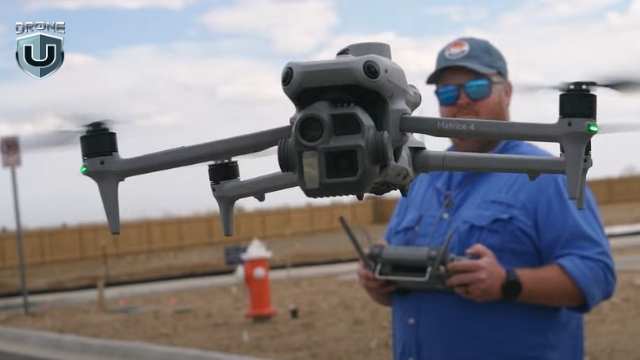
M4E- Remote Controller Experience
Flight performance matters, but so does everything around it. From the moment you power on to the final data upload, your controller, screen, and software either help you work faster or slow you down.
Let’s look at what it’s actually like to use these drones in the field.
The Remote Controller Experience
The remote is your command center, and when you’re working long hours in tough conditions, every detail matters.
That’s where the M4E remote pulls ahead. Here’s what you get with the M4E’s controller:
- Better screen visibility: You can finally fly while wearing sunglasses and still see the screen. It sounds minor, but in the field, it’s huge.
- Built-in HDMI out: You can plug directly into a monitor or live broadcast setup. No adapters needed.
- Stronger build and controls: The buttons, layout, and tactile feedback feel more responsive, designed for serious flight operations.
While the Mavic 3 Enterprise remote gets the job done, it feels more like a consumer-grade setup. The M4E’s remote is truly enterprise-grade, as it is built for professionals who fly daily and can’t afford second-rate usability.
In short, DJI took real pilot frustrations, like screen glare and limited ports, and engineered a remote that removes friction from field operations.
When you fly often and in tough conditions, these upgrades help you work better.
Flight Software, Mission Planning, and UX
With such a solid offering inside M4E, there is one big question left to be addressed – the user experience and the software running in the back-end.
While both the Mavic 3 Enterprise and the Matrice 4 Enterprise run on DJI Pilot 2, the user experience you get with each drone is noticeably different.
The M4E streamlines complex mapping tasks, while the M3E still relies on more manual setup and multiple workarounds. Here’s how they compare:
| Aspect | M3E | M4E | What That Means For You |
| Mission Planning | Manual double-grid setup required | Smart Oblique auto-configured | Plan once, capture everything. No angle guesswork |
| Oblique Workflow | Multiple flights with custom camera angles | 5-angle capture per waypoint in one mission | Reduces complexity and saves time |
| Screen Visibility | Standard interface, harder to use in sunlight | Bright display, glare-resistant | Easier to see and interact with during fieldwork |
| Workflow Efficiency | Slower setup, more menus | Streamlined, fewer taps | Faster planning, fewer errors, less time on site |
Real-World Mapping Results
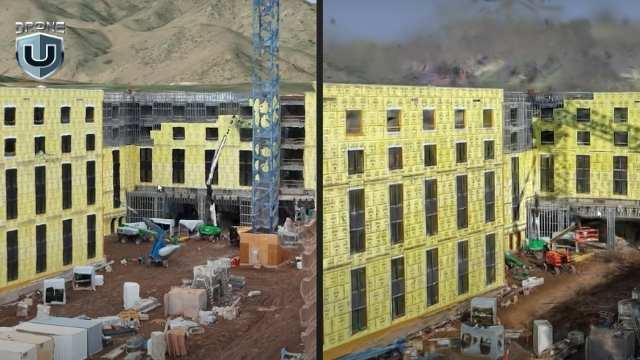
M3E vs M4E: Real World Drone Mapping Results
The M4E consistently produces the cleanest 3D models DJI has to offer. And you see the difference the moment you process your data.
Here’s how M4E works in the field:
Point Clouds
In the M3E vs M4E comparison, the M4E generates denser, sharper, and cleaner point clouds. You get fewer holes, smoother geometry, and stronger structure, especially along vertical surfaces like walls, facades, and vehicles.
3D Mesh Textures
Texture quality from the M4E comes out crisp. Due to the improved JPEG recipe and better image capture angles, you get sharper lines, more accurate edges, and fewer distortions. Even reflective surfaces, which are notoriously tricky, hold up better in model rendering.
Gaussian Splats in RealityCapture
When Smart Oblique data from the M4E is processed in RealityCapture and converted into Gaussian splats, the difference is dramatic. The splats look photorealistic. The density and detail outperform anything from the M3E. One pilot even called them “the cleanest ever seen from a DJI drone.
Processing Time
Despite capturing five times more angles, the M4E doesn’t slow down post-processing. The higher image quality and tighter camera calibration reduce the need for software corrections, resulting in faster overall processing.
When the quality of your final deliverables defines your reputation and revenue, the M4E simply delivers more, faster, and with less hassle.
When M3E Beats the M4E
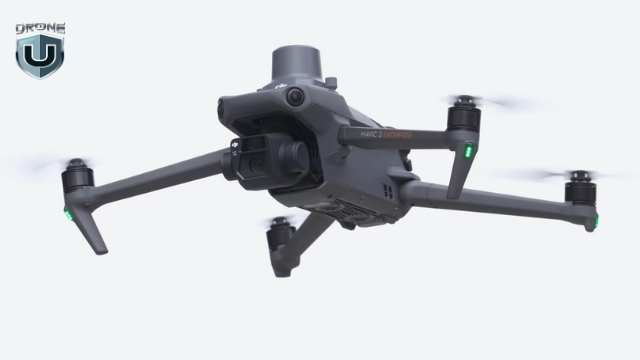
M3E: Reliable 2D Mapping Drone
Let’s be clear: the Mavic 3 Enterprise isn’t obsolete. Depending on your mission type, budget, or operational style, it’s a better tool.
Here’s where the M3E shines:
Portability
The M3E is lighter, smaller, and quicker to pack. If you’re bouncing between job sites or flying solo, that matters. You unfold it, fire it up, and get to work. No bulky cases or long setup required.
Rapid Deployment
In emergencies, like public safety callouts, post-storm assessments, or quick inspections, the M3E gets in the air faster. You spend less time prepping and more time collecting data.
Budget-Friendly
The M3E keeps your upfront costs lower. Even with the RTK module, it’s still more affordable than the M4E. For smaller firms or contractors just starting, that makes a big difference.
Enough for Basic 2D Mapping
If your jobs mostly involve flat terrain, orthophotos, or simple elevation models, the M3E is an ideal choice. You don’t need Smart Oblique to deliver clean top-down maps.
Simply put, the M3E still holds serious value, especially when speed, simplicity, or portability take priority. It’s not the top-tier mapping machine that the M4E is, but it’s practical, reliable, and efficient.
Beyond M3E vs M4E: DJI vs Domestic Drones
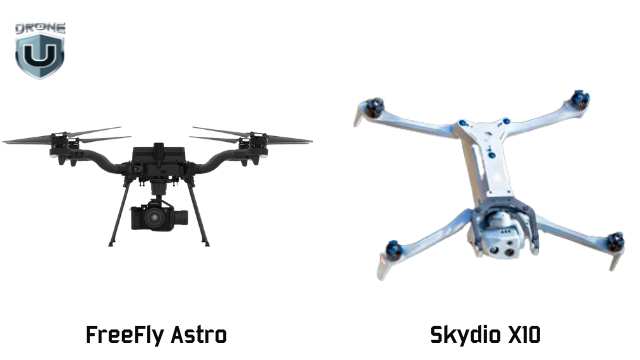
DJI vs Domestic Drones
Not every mapping job is about speed or image quality. Sometimes, it’s about where you’re allowed to fly—or what kind of detail your drone can capture.
That’s where American-made drones like the Freefly Astro and Skydio X10 step in—and, in some cases, pull ahead.
1. Freefly Astro: The 2D Speed King
Freefly Astro dominates in 2D mapping. Its larger sensor allows you to capture more accurate imagery at higher altitudes and lower GSD (Ground Sampling Distance).
For wide-area orthophotos, the Astro wins on speed, clarity, and efficiency.
2. Skydio X10:Infrastructure’s Best Friend
The Skydio X10 excels in 3D infrastructure inspection, especially in complex environments.
Need to map under a bridge? Capture a dam’s underside? See upward into a structure? The Skydio X10 is your only option. Its Zenith-facing camera makes it possible and opens up various categories of work that DJI drones simply can’t access.
As a result, you can capture unmatched detail under structures, exposing power lines, rebar, cracking, and more. And because it’s NDAA-compliant, the X10 qualifies for federal contracts, which offer a major edge in public sector work.
M3E vs M4E: ROI, Pricing, and Use Case Fit
Choosing a drone isn’t just about features. It’s about what it helps you earn and how fast it pays for itself.
Here’s how the M3E vs M4E and Skydio X10 stack up when you factor in cost, value, and ideal use cases:
| Drone | Upfront Cost | Included Features | Best For | ROI Potential |
| M3E | Lower base price + $1,200 for RTK module | Lightweight, fast to deploy, optional RTK | 2D mapping, real estate, and quick inspections | Ideal for small jobs and startups; low cost, fast setup |
| M4E | Higher upfront cost (RTK included) | Built-in RTK, Smart Oblique, sharper imaging | 3D mapping, large sites, high-volume deliverables | Delivers cleaner data faster—pays off in speed, quality, and efficiency |
| Skydio X10 | Highest cost | NDAA-compliant, upward-facing (Zenith) imaging | Infrastructure inspection, federal/public sector work | Grants access to premium contracts others can’t touch |
Conclusion
Choosing between the Mavic 3 Enterprise, Matrice 4 Enterprise, and Skydio X10 isn’t just a technical decision. It’s a reflection of how you work and where you want your drone business to go.
If you prioritize speed, portability, and a quick setup, the M3E is still a smart, efficient choice for basic mapping and inspections.
If you value precision, speed, and the ability to take on larger, more demanding deliverables without bottlenecks, the M4E aligns better with a scaling business model.
If your work demands sharper 3D models, faster processing, and streamlined field operations, the M4E gives you the edge you need to level up.
And if you’re working under bridges, inside federal compliance zones, or in critical infrastructure environments, the X10 gives you access to jobs other drones can’t take.
Want to build a skillset that matches your drone’s potential?
Explore hands-on mapping and modeling classes at DroneU’s in-person training. Learn from experts, fly real missions, and sharpen your edge.
5
How Much Does a Good Drone Cost?
So you’re ready to buy a drone, but not just any drone. You want something reliable, capable, and camera-ready! But here’s the big question: how much does a good drone cost?
That question trips up almost every new drone buyer. With prices ranging from $50 to over $50,000, it’s easy to feel overwhelmed when it comes to buying a good drone on a budget.
And here is the bummer – It is harder to figure out what “good” really means. Well, this guide is created to help you answer these questions.
You will discover the drones that’ll give you the most bang for your buck if you’re shopping under $1,000.
Let’s take off!
Price Ranges by Drone Category
The drone market can feel like a maze. You’ll find models priced under $100 and others priced like used cars. So, how do you make sense of it all?
To clear the air, let’s categorize drones based on their price and intended purpose.
1. Toy & Beginner Drones ($30–$300)
These are entry-level drones made for indoor flying or casual outdoor use. They’re light, simple, and often lack GPS. Most have basic 720p cameras, if they have a camera at all. Flight time is around 8 to 15 minutes.
If you’ve never flown before and want to get a feel for the controls without worrying about an expensive crash, this is a great place to start. Just know: you’ll likely outgrow these quickly.
Looking for more compact and beginner-friendly options? Check out our picks for mini drones for beginners.
You can also check out the best drones under $200 with a camera.
2. Budget Camera Drones ($300–$1,000)
- 2.7K or 4K video
- GPS stabilization
- Return-to-home functions
- 20–30 minutes of flight time
They often fold up for portability and use brushless motors for smoother flight. This is the sweet spot for most beginners and hobbyists who want reliable flying and decent footage.
Examples: DJI Mini 2 SE, DJI Mini 3, Autel EVO Nano+, Potensic Atom SE.
3. Prosumer Drones ($1,000–$2,000)
These drones incorporate semi-professional features. They offer higher-end specs like:
- 1-inch camera sensors
- Obstacle avoidance sensors
- Advanced tracking features
- Higher frame rates and color profiles
- They’re great for content creators, real estate work, and anyone taking their flying more seriously.
Examples: DJI Air 3, DJI Mavic 3 Classic, Autel EVO Lite+
4. Professional or Enterprise Drones ($2,000+)
These are purpose-built machines for professionals. They carry thermal cameras, LiDAR sensors, RTK positioning, or large interchangeable payloads.
Often used in surveying, search and rescue, agriculture, and cinematography, they require training and usually a Part 107 certification in the U.S.
Examples: DJI Matrice 30T, Freefly Alta X, JOUAV CW Series.
When it comes to drone pricing, there’s more at play than just the brand name or camera specs. We’ll explore that in the next section.
What Determines Drone Cost?
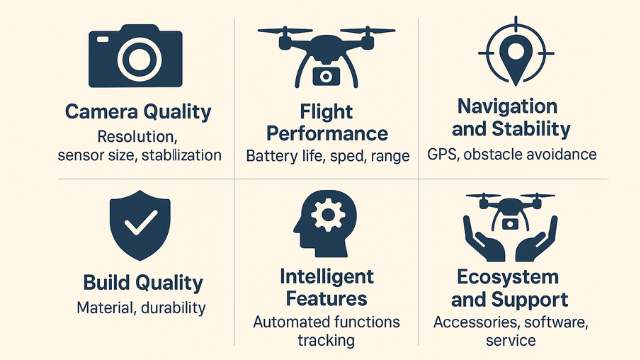
Factors Affecting Drone Cost
If you’re new to the world of drones, you might have this question: “Why do some drones cost $300 and others $3,000?”
Answering this question can help you avoid overpaying and make a smarter choice.
Let us find out what drives the drone cost:
1. Camera Quality
This is often the first spec people check in a good drone. A drone with a 2.7K camera will cost far less than one with a 1-inch sensor shooting 5.4K video.
Higher-end cameras also come with better image processors, larger sensors for low-light performance, and mechanical gimbals for buttery-smooth footage.
If you’re into photography or want to create professional-looking video, this is one area where it’s worth investing.
2. Flight Performance
Cheaper drones usually fly for 10–15 minutes. Step up a bit, and you’ll find drones offering 30+ minutes of flight per battery, along with better wind resistance, higher top speeds, and more stable hovering.
Why does that matter? Because longer flight time means fewer battery swaps and more room to focus on getting your shot.
Range also varies. A toy drone might stay within 100 feet, while a GPS drone could fly several miles and still come home safely.
3. Navigation and Stability
The presence of GPS, GLONASS, or Galileo makes a huge difference. These positioning systems allow your drone to hover in place, return home automatically, and fly pre-programmed paths.
More expensive models often include obstacle avoidance sensors and terrain-following features to prevent crashes and enable smarter flights.
4. Build Quality
Cheaper drones are usually made of lightweight plastic that doesn’t hold up well in crashes. Premium drones use reinforced plastic, carbon fiber, and more efficient propeller designs.
That adds cost, but also adds lifespan.
5. Intelligent Features
Want ActiveTrack to follow you on a hike? Or QuickShots for automated cinematic movements? These software features depend on powerful onboard processors and stable firmware.
You can find them in drones with reliable flight apps, customizable settings, and regular firmware updates. These features are more common in premium drone models.
6. Ecosystem and Support
A DJI drone offers more than hardware. You get access to an entire ecosystem of accessories, flight software, community support, and firmware improvements. That support is baked into the price.
You might find cheaper off-brand drones, but they often lack support, replacement parts, or trustworthy tutorials.
Next, let’s explore what it costs to own and operate a drone.
Full Cost of Ownership
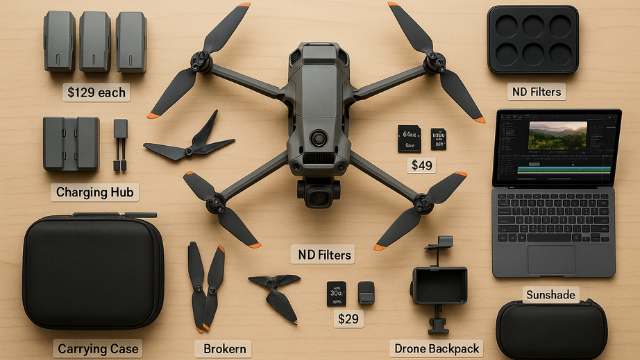
Real Cost of Operating a Drone
Buying the drone is just the beginning. If you’re serious about flying, you’ll need to factor in a few extra expenses. These aren’t always obvious when you’re first shopping, but they add up quickly.
1. Extra Batteries
Most drones include just one battery. As a result, flight time usually tops out at 25–30 minutes per charge. In real-world conditions, like wind or recording video, it often drops to 20 minutes.
If you want to spend a full afternoon flying, keep at least two extra batteries.
Depending on the model, each battery can cost anywhere from $50 for small drones like the DJI Mini 2 SE to over $200 for higher-end drones like the Mavic 3 series.
A multi-battery charging hub also helps keep you flying longer without long wait times.
2. Extra Propellers and Spare Parts
Propellers break; it’s just part of the learning curve. Fortunately, they’re cheap and easy to replace. Many drone kits include an extra set, but it’s best to keep backups on hand.
Crashes often damage parts like landing gear, gimbals, or arms. With high-end drones, you need to send them in for professional repairs, which increases long-term costs.
3. SD Cards
Most drones don’t include an SD card to store your video footage. However, slower cards can lead to dropped frames or corrupted files.
Look for a U3-rated microSD card, ideally 64GB or 128 GB. Having at least two is a smart move. Quality cards usually cost between $15 and $50.
4. Carrying Case or Backpack
A drone with foldable arms might fit in a pouch. But once you add batteries, chargers, and controllers, you may require a case or padded backpack for protection. A padded case can cost $40–$100, depending on size and features.
5. ND Filters and Accessories
ND (neutral density) filters act like sunglasses for your drone’s camera. They reduce harsh light and help capture smoother video in bright conditions.
For better control and protection, you can add accessories like landing pads, tablet mounts, prop guards, and sunshades.
6. Software & Editing Tools
Most drones include a free flight app. But if you plan to stitch panoramas, create maps, or edit cinematic video, you need to budget for additional software.
Some pilots use free editors like DaVinci Resolve, while others choose paid options like Final Cut Pro or Adobe Premiere.
Serious editing often adds $200 or more to your total cost.
Once you’ve factored in all the extras like batteries, accessories, and editing tools, the next step is choosing a drone that gives you the best value for your budget.
Best Drones Under $1,000
Once you understand the full cost, finding the right drone gets a lot easier.
Is your budget under $1,000? Well..I’ve got some good news for you.
You’re in one of the best spots to get real value without sacrificing flight performance or camera quality.
A good drone under $1,000 offers:
- High-quality 2.7K to 4K video
- 20–34 minutes of flight time
- Reliable GPS and return-to-home
- Compact, foldable design
- Beginner-friendly flight features like auto takeoff, hover assist, and quick shots
This is where most serious hobbyists and even some semi-pros get started.
Let’s take a look at the drones that deliver the most for the money.
1. DJI Mini 2 SE (~$339)
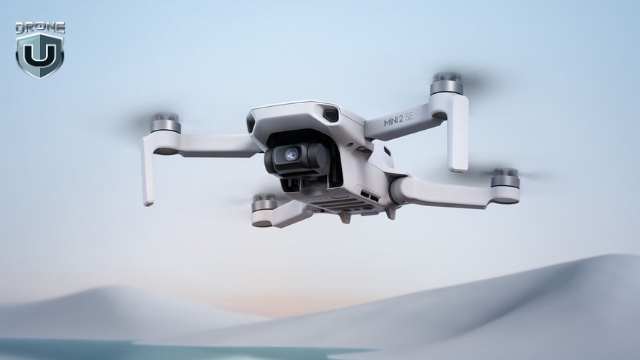
DJI Mini 2SE
DJI Mini 2 SE is a favorite for first-time flyers. It’s lightweight, which means you don’t need to register it with the FAA for recreational use. It shoots 2.7K video, handles wind better, and folds up to fit in a jacket pocket.
Battery life is about 31 minutes, and it uses DJI’s trusted flight app for stability and control—a perfect beginner drone.
2. DJI Mini 3 (~$559)
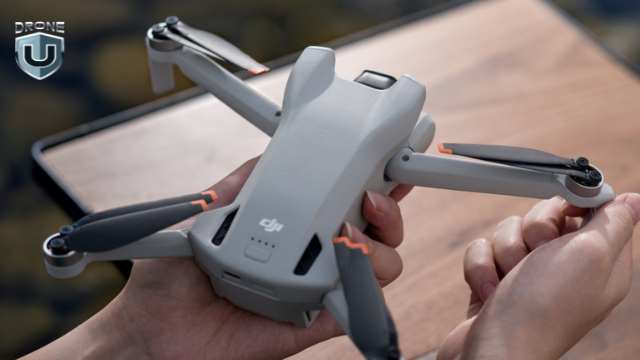
DJI Mini 3
A noticeable step up from the Mini 2 SE, the DJI Mini 3 offers true 4K video, vertical shooting (ideal for social media and content creators), and enhanced low-light performance.
It still weighs under 250g, so you can skip registration. Battery life is up to 38–51 minutes of flight time.
3. Autel EVO Nano+ (~$799)
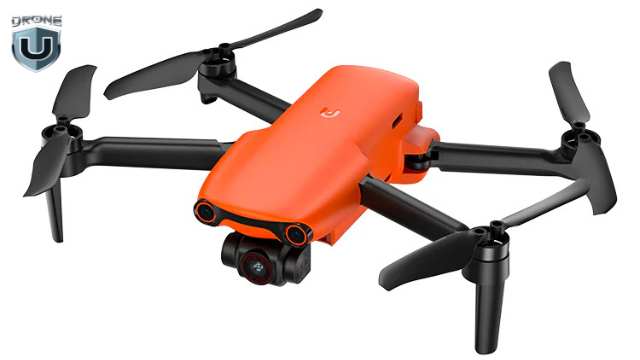
Autel EVO Nano+
Autel’s Nano+ is a powerful DJI alternative. It features a 1/1.28” sensor, which means better dynamic range and low-light shots.
You also get 4K/30fps video, obstacle avoidance sensors (rare at this price), and about 28 minutes of airtime. Plus, no account sign-in is required to fly.
4. DJI Air 2S (Refurbished or Sale: ~$999)
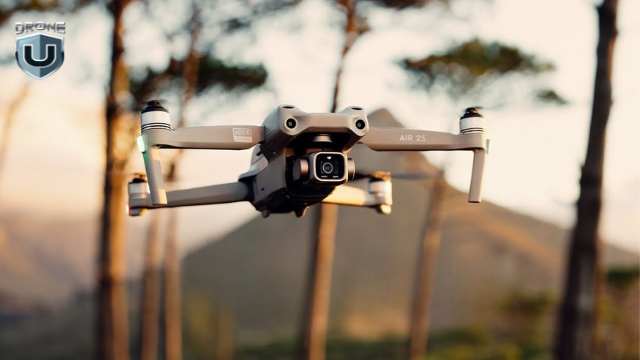
DJI Air 2S
If you can find a deal, this drone is a beast.
The DJI Air 2S has a 1-inch sensor, shoots 5.4K video, and includes intelligent features like MasterShots and ActiveTrack 4.0.
It weighs more than 250g, so you need to register it. But if you find a deal on a refurb or bundle, this drone delivers far more value than its cost suggests.
In this range, every dollar counts. A drone around $400 will fly and film, but a drone closer to $900 will track, dodge, and shoot cinematic footage. The key is choosing one that aligns with what you care about most, whether it’s portability, camera specs, or flight control.
Drone Cost Comparison Table
Drone pricing isn’t one-size-fits-all. A good drone cost depends on your goals, features, and how you plan to fly.
Here’s a quick comparison of the most common categories of drones.
| Category | Price Range | What You Get | Best For |
| Toy & Mini Drones | $30–$300 | Basic controls, short range, no GPS, limited camera | Kids, indoor flying, first-time fun |
| Budget Camera Drones | $300–$1,000 | 2.7K–4K video, GPS stabilization, 20–30 min flight, foldable, beginner-friendly | Hobbyists, travelers, and content creators |
| Prosumer Drones | $1,000–$2,000 | 1” sensor, obstacle avoidance, 4K/60fps+, long-range, pro apps | Freelancers, creators with goals |
| Pro & Commercial | $2,000–$10,000+ | Interchangeable payloads, thermal/LiDAR, RTK, smart tracking | Surveying, inspections, and enterprise use |
Want to explore more drone options under $1k?
Check out our in-depth guide on the best budget drones for beginners to choose the perfect drone for you.
Conclusion
A “good” drone doesn’t have to be expensive. However, it does require a little clarity on what you need.
If you’re just getting started, focus your search on the $300–$1,000 range. This is where the drones are easiest to fly, easiest to learn on, and most likely to give you solid photo and video results without blowing your budget.
But don’t forget: the real cost of flying includes more than just the drone. Just remember to plan for batteries, SD cards, and a few accessories.
If you buy smart, you’ll fly more often. And you’ll enjoy the experience a whole lot more.
So ask yourself: What do I want this drone to do for me?
If the answer is explore, learn, and start creating, then a good drone is absolutely within reach.
7
Weather Fronts: Why Weather Fronts Matter to Drone Pilots?
Weather fronts are essential to understanding how and why our weather changes. They form when air masses with different temperatures and humidity levels meet, creating a boundary where conditions can shift quickly. These interactions can lead to anything from drizzle to powerful thunderstorms, depending on the type of front involved.
By learning about weather fronts, we gain insight into how temperature and precipitation patterns develop, how to interpret weather maps, and how to prepare for sudden changes in the atmosphere.
In this article, we’ll explore the four major types of weather fronts — cold, warm, stationary, and occluded and examine how each one affects the weather we experience.
Let’s get started.
What is a Weather Front?
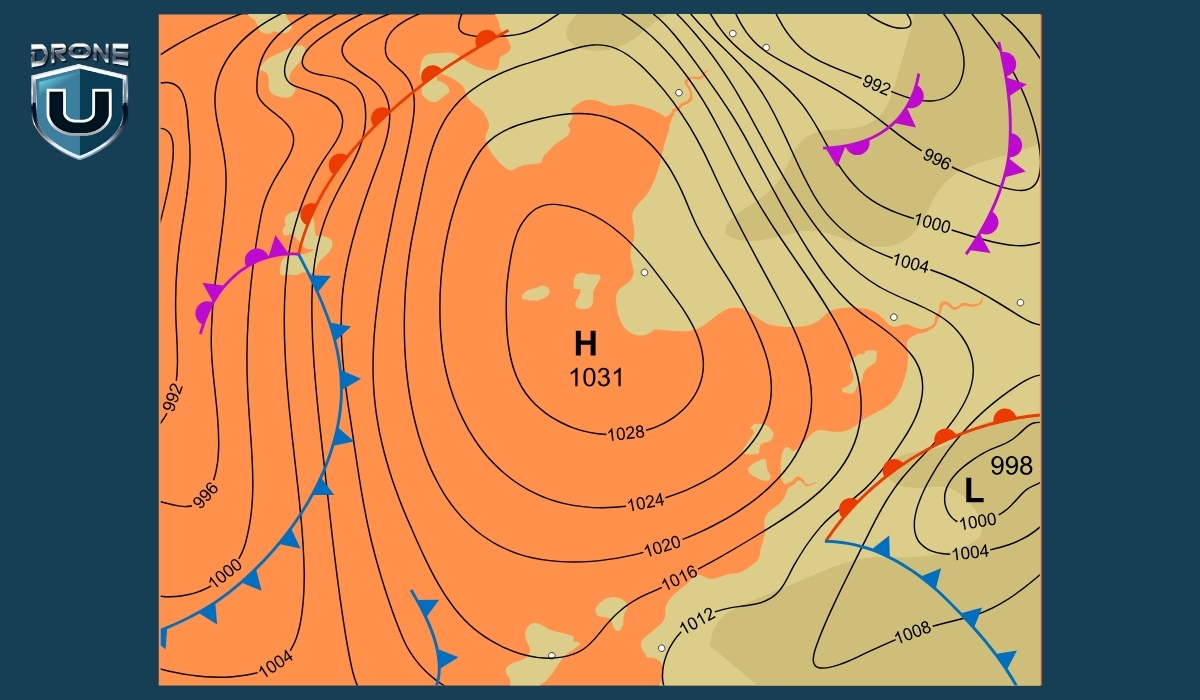
A weather front is the boundary where two different air masses meet, typically one that is warm and moist, and another that is cold and dry.
Because these air masses have different temperatures and humidity levels, they don’t mix easily.
Instead, the boundary between them becomes a zone of interaction, often leading to changes in weather.
When a front passes through an area, it can cause shifts in temperature, changes in wind direction, cloud formation, and various types of precipitation.
The type of weather that results depends on which air mass is advancing and how quickly the front is moving.
Let’s understand this with an example.
Example: The Tug of Air Masses
Imagine the atmosphere like a football field.
On one side, you’ve got Team Cold Air. They’re big, heavy, and strong — like linemen who charge forward with force.
On the other side is Team Warm Air — lighter, quicker, and trying to move in smoothly, like agile players trying to run a play.
The front is the line where they meet, like the line of scrimmage. Neither team wants to back down.
When one team pushes forward, it causes a bunch of action at the line, and that action is what we feel as wind, rain, storms, or snow.
- If Team Cold Air pushes forward and wins ground – it’s a cold front.
- If Team Warm Air moves ahead instead – it’s a warm front.
- If both sides hold their ground and nothing moves – it’s a stationary front.
- If cold air catches up to warm air already moving – it becomes an occluded front.
It’s like a tug-of-war or a play in football. The weather changes depending on which “team” is gaining ground.
Types of Weather Fronts
There are four main types of weather fronts, each with distinct characteristics and weather patterns. They’re classified based on how air masses interact and which one is advancing.
Let’s understand them one by one:
1. Cold Front
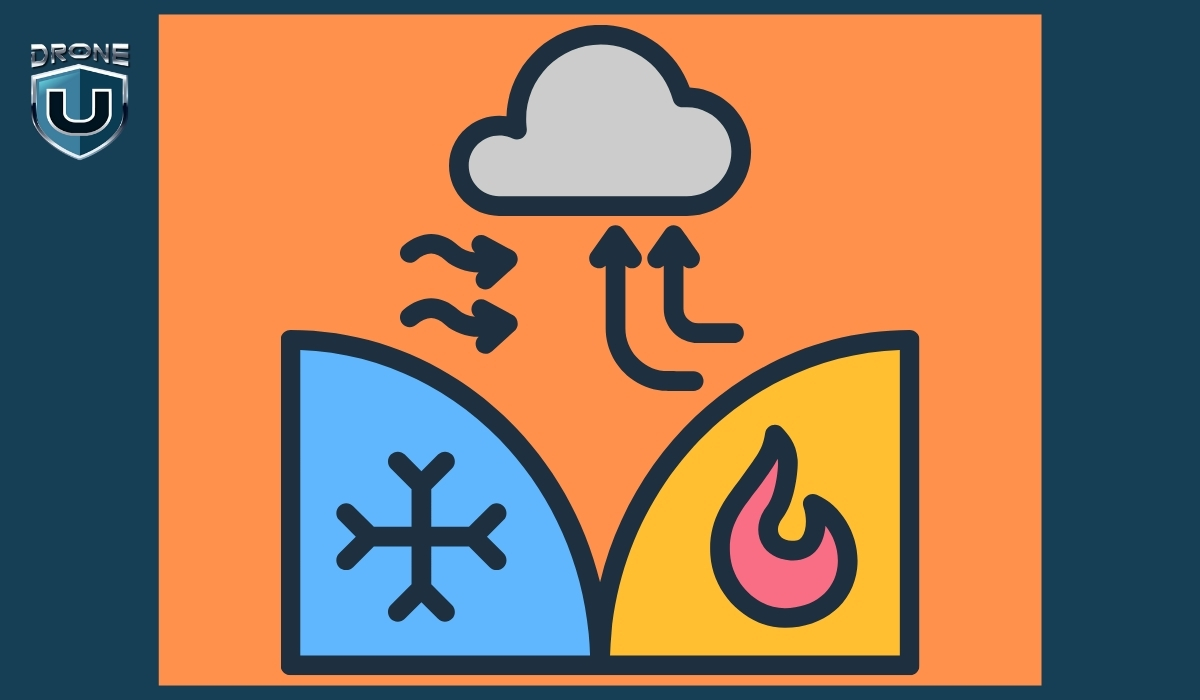
A cold front occurs when a cold air mass moves in and pushes underneath a warmer air mass. Because cold air is denser, it forces the warm air to rise quickly.
Weather Effects & Symbol
- Sudden drop in temperature
- Tall, dark cumulonimbus clouds
- Heavy rain, thunderstorms, or even hail
- Clearer skies and cooler, drier air after the front passes
- Blue line with triangles pointing in the direction of movement
Example
A cold front sweeping across the Midwest U.S. may bring an intense line of thunderstorms followed by clear skies and a temperature drop of 10–15°C.
2. Warm Front

A warm front forms when a warm air mass moves in and slides over a cold air mass. Since warm air is lighter, it gently rises above the cold air.
Weather Effects & Symbol
- Gradual warming
- Widespread light to moderate rain or snow
- Layered clouds like stratus and nimbostratus
- Warmer, more humid conditions after the front passes
- Red line with semi-circles pointing in the direction of movement
Example
A warm front moving through Europe might bring a grey, drizzly morning followed by a warm and sunny afternoon.
3. Stationary Front

A stationary front occurs when two air masses meet but neither has enough force to move the other. The front stays in place for hours or even days.
Weather Effects & Symbol
- Persistent cloud cover
- Steady rain or light snow
- High humidity
- Can lead to flooding if it stalls too long
- Alternating blue triangles and red semi-circles, on opposite sides of the line
Example
In the U.S. Southeast, stationary fronts can sit for days, creating gloomy, wet conditions across multiple states.
4. Occluded Front

An occluded front forms when a cold front catches up to a warm front. The warm air is lifted off the ground by the colder air on both sides.
Weather Effects & Symbol
- A mix of weather: rain, thunderstorms, gusty winds
- Followed by cooler, stable air
- Common in mature low-pressure systems
- Purple line with both triangles and semi-circles on the same side
Example
In northern Europe or the northeastern U.S., occluded fronts bring stormy weather during complex systems like mid-latitude cyclones.
Weather Fronts Comparison Table
| Feature | Cold Front | Warm Front | Stationary Front | Occluded Front |
| Definition | Cold air pushes under warm air | Warm air slides over cold air | Neither air mass moves significantly | Cold front overtakes warm front |
| Movement | Fast-moving | Slower than cold front | Little to no movement | Complex; part of mature low-pressure systems |
| Air Mass Interaction | Cold air replaces warm air | Warm air replaces cold air | Air masses meet but don’t move | Warm air is lifted above two cold air masses |
| Cloud Types | Cumulonimbus, towering clouds | Stratus, nimbostratus (layered clouds) | Stratus, nimbostratus | Cumulonimbus, altostratus |
| Weather Before | Warm, humid, increasing clouds | Cool, increasing cloud cover and drizzle | Cloudy, wet, humid | Rainy or stormy |
| Weather During | Heavy rain, thunderstorms, gusty winds | Light rain or snow, steady precipitation | Continued light rain or drizzle | Rain, storms, gusty winds |
| Weather After | Cooler, clear skies | Warmer, partly cloudy | No major change | Cooler, drier air |
| Map Symbol | Blue line with triangles | Red line with semi-circles | Red/blue line with alternating shapes | Purple line with triangles & semi-circles |
| Common Location | Leading edge of a cold air mass | Leading edge of a warm air mass | Along slow-moving systems (e.g., Gulf Coast) | Mid-latitude cyclone zones |
Why Weather Fronts Matter to Drone Pilots?
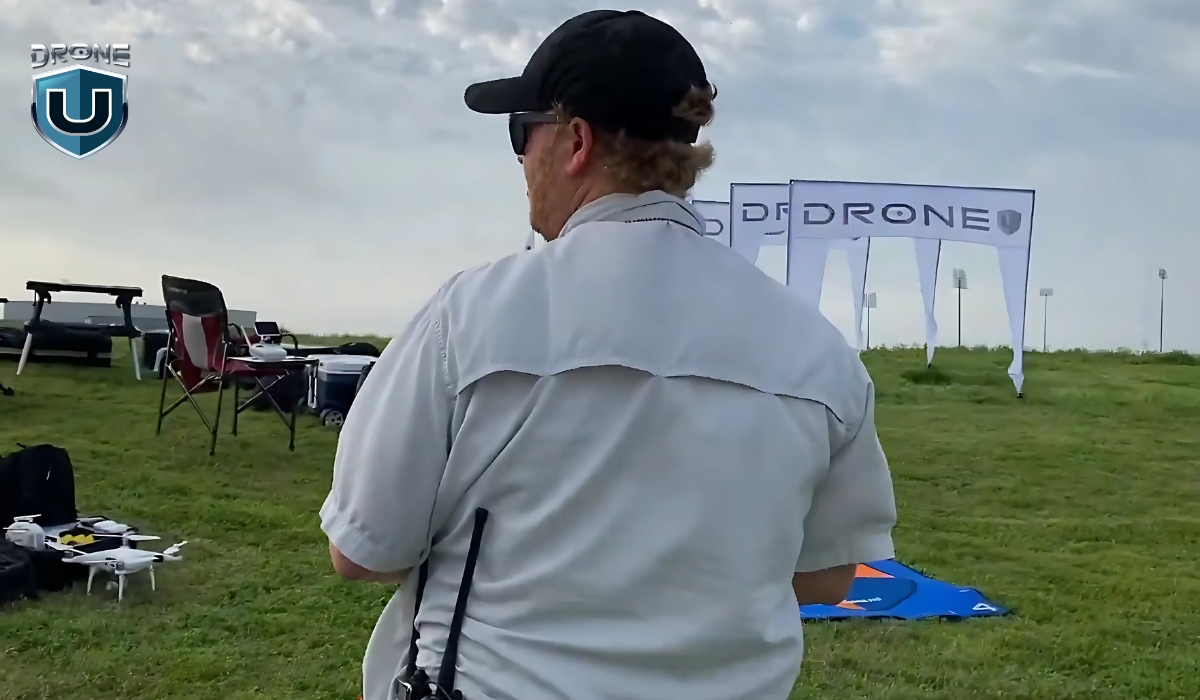
Weather is one of the most critical variables in drone operations, and weather fronts are particularly important.
For drone pilots, understanding how these atmospheric shifts affect flight safety is essential:
1. How Weather Fronts Affect Drone Flights
As a front approaches or passes through, the atmosphere can become unstable. Cold fronts often bring rapid wind shifts, gusts, and even thunderstorms, which can destabilize drones mid-flight. Warm fronts tend to create extended periods of rain, low cloud cover, and reduced visibility—conditions that can disrupt GPS signals and sensor performance.
Stationary fronts present a different challenge. They linger over areas, causing hours or even days of fog or drizzle, which can delay missions or disrupt commercial drone schedules.
2. Wind Changes and Flight Stability
Wind is the single most critical weather element for drones, and fronts often bring sharp shifts in both speed and direction. Cold fronts, in particular, can create turbulent air as dense, cold air undercuts warmer air masses, producing gusts and downdrafts that drain battery life and strain motors.
While warm fronts bring milder winds, they often increase humidity, which can cause condensation on drone components, potentially damaging sensitive electronics if maintenance is neglected.
3. Visibility and Sensor Accuracy
Flying near a front usually means dealing with reduced visibility due to fog, low clouds, or rain. These conditions affect visual and non-visual sensors alike: cameras lose clarity, LiDAR and ultrasonic sensors can be thrown off by moisture, and GPS signals may weaken.
This degradation in sensor performance makes drones less responsive and increases the risk of crashes, flyaways, or missed objectives in drone mapping or drone inspection tasks.
4. Flight Planning and Risk Management
Understanding weather fronts helps drone pilots make better decisions about flight timing and location. By reading weather maps, noting shifts in wind or temperature, and analyzing radar or satellite data, pilots can proactively avoid hazardous conditions.
For commercial operators, this kind of planning minimizes costly downtime and helps meet project timelines, especially in sectors where weather opportunities are limited.
5. Regulatory and Legal Considerations
Most aviation authorities require drone operators to avoid flying in unsafe weather. Failing to account for a passing front may result in not only mission failure but also regulatory penalties. Being able to interpret weather fronts and adapt your flight plan accordingly is part of being a responsible, compliant pilot.
Conclusion
Weather fronts aren’t just abstract meteorological concepts; they signal real, rapid changes in flight conditions. For drone pilots, understanding and anticipating these changes can be the difference between a safe mission and a risky one.
By learning to recognize front types and track their movement, pilots can plan flights around safer weather windows, reduce the risk of accidents caused by turbulence or poor visibility, and ensure compliance with regulations.
This knowledge isn’t just about avoiding bad weather—it’s about making informed decisions that protect your drone, maximize flight efficiency, and ultimately help you become a more confident, responsible pilot.
5
Topographic Surveying Explained: Definition, Process, & Why It Matters?
If you’ve ever seen someone with a tripod and a strange-looking device at a construction site, chances are you were looking at a topographic survey in action. It may not seem exciting, but it’s one of the most important steps in shaping the spaces we live and work in.
Before any road is built, any building designed, or any land developed, there needs to be a clear understanding of the terrain. That’s exactly what topographic surveying delivers.
While newer technologies, such as drone mapping and LiDAR, often take center stage, topographic surveying remains the foundation. It’s how we turn the natural landscape into accurate, usable data. Without it, engineers can’t plan drainage systems, architects can’t design structures, and construction crews don’t know where to begin.
In this article, we’ll explore what topographic surveying is, how it works, and why it still plays a critical role in land development today.
Let’s delve in.
What is Topographic Surveying?
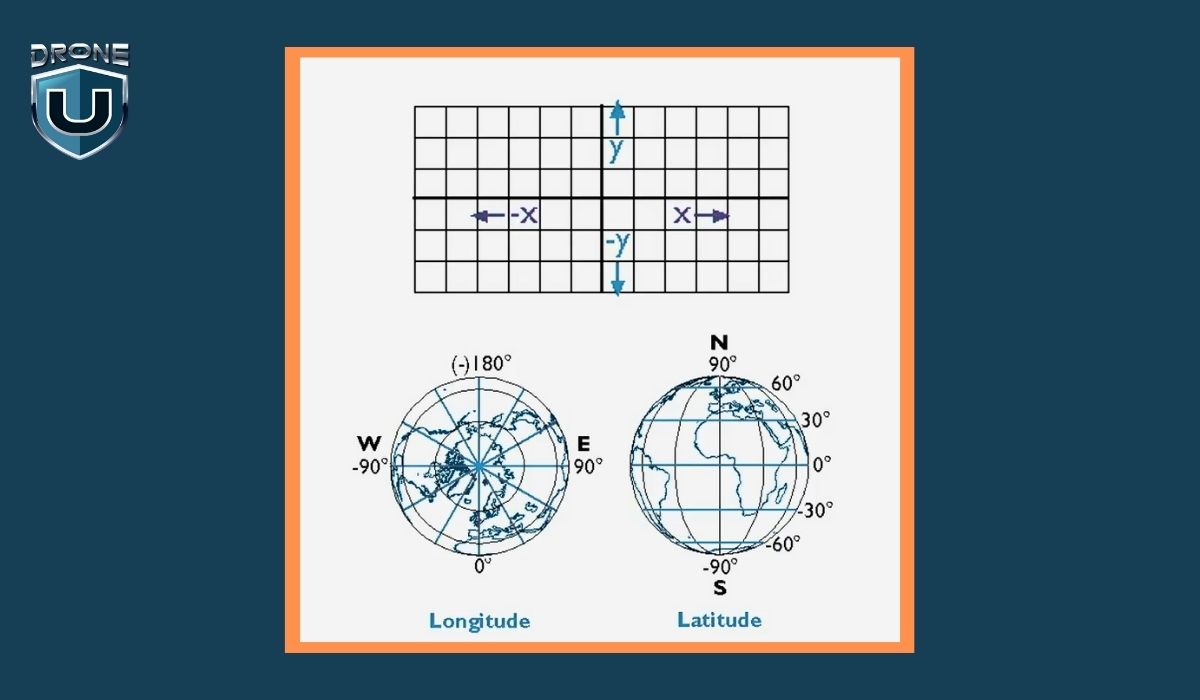
Topographic surveying is the process of measuring and mapping the shape and features of the land. It records both horizontal positions (X and Y) and vertical elevation (Z) of everything on a site, including hills, trees, and rivers, as well as man-made features such as roads, buildings, fences, and drainage ditches.
The result is usually a topographic map. This map shows the surface of the land in detail, using contour lines to represent elevation changes, and symbols or labels to mark important features.
In simple terms, A topographic survey shows you what the land looks like, where everything is, and how the ground rises or falls across the area.
Why are Topographic Surveys Important?
Imagine a company is building a new neighborhood. One of the biggest challenges is managing rainwater so it doesn’t flood the streets or damage houses.
To solve this, engineers need to know exactly how the land slopes — where it’s high and where it’s low. This helps them design a drainage system that guides water safely away from homes.
Additionally, Surveyors measure the land’s elevation and locate important features like ditches, culverts, and roads. This data forms a detailed map showing how water will flow naturally across the site.
Without this survey, engineers might guess the slopes and drainage points. This guesswork can cause water to pool in the wrong places, leading to flooding, costly repairs, and even legal problems.
Example: STRABAG found that using drones for surveys makes the process 80% faster than traditional methods. This big time-saving makes their surveying work for construction projects much more efficient.
Topographic Surveying vs. LiDAR: Understanding the Differences
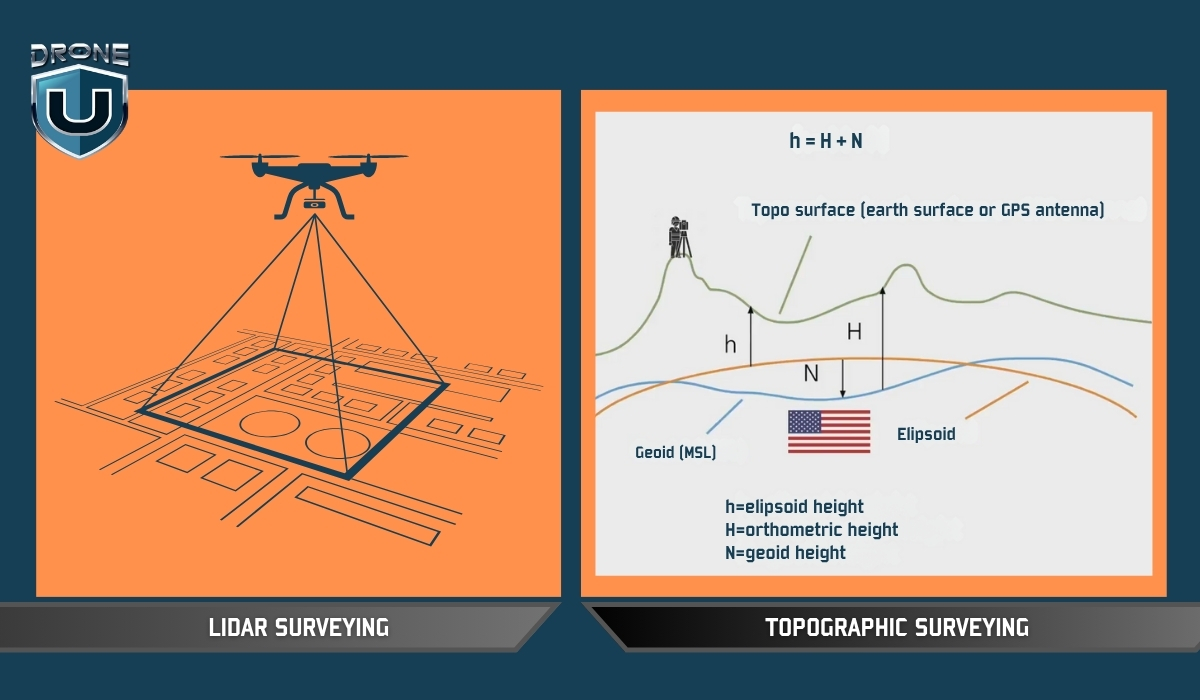
It’s easy to confuse topographic surveying with terms like drone surveying or LiDAR scanning because they often get mentioned together. But they’re not the same, and understanding how they differ is key to knowing which method suits your project best.
| Aspect | Topographic Surveying | LiDAR Surveying |
| What It Is | A survey process focused on mapping elevation and features | A sensor technology that measures distances using lasers |
| Primary Tools | Total stations, GNSS, levels | LiDAR scanners (airborne or terrestrial) |
| Output | Topographic maps with contours, elevations, and site features | Dense point clouds, elevation models |
| Key Difference | Focuses on what is measured | Focuses on what sensor is used to collect elevation |
| Example | Surveyor uses GNSS to map a sloped construction site | LiDAR scanner generates a terrain model beneath the forest cover |
Topographic surveying is about what data you need—the shape and features of the land. LiDAR describes how or with what technology you gather that data.
How Do Drones Help with Topographic Surveying?
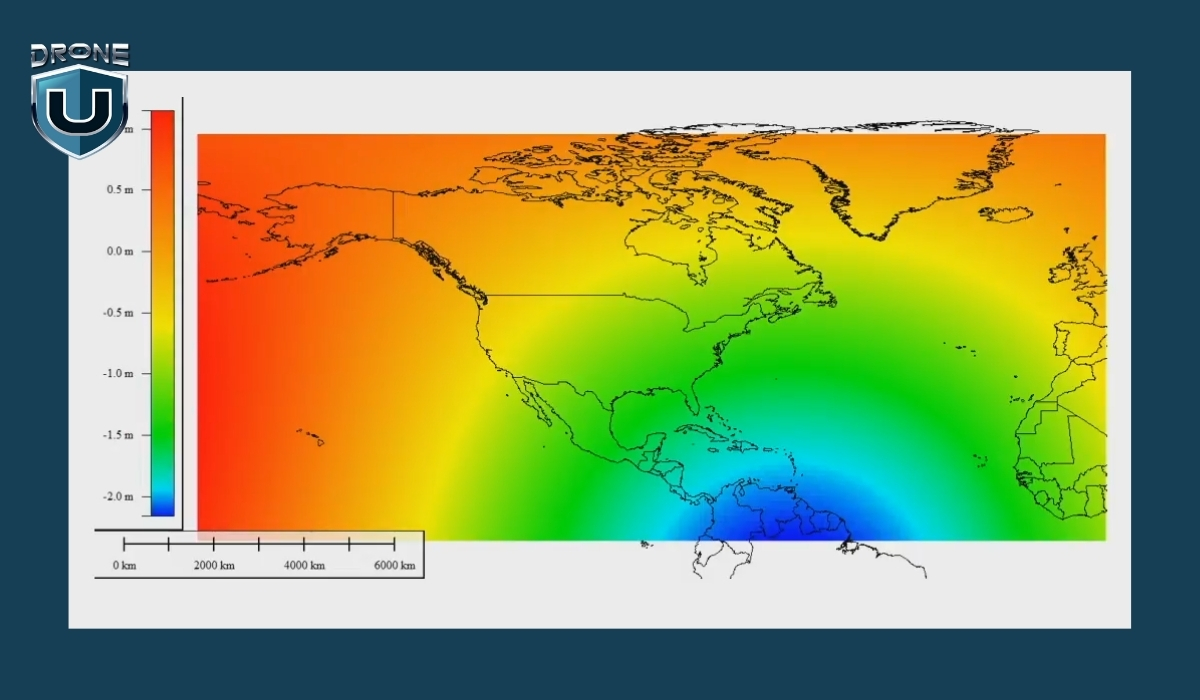
Modern topographic surveying has been significantly enhanced by drone technology, offering faster, safer, and often more accurate data collection over large or complex terrains.
Here’s how drone-based topographic surveys are conducted and why each stage is important:
1. Planning the Drone Mission
The process begins with a thorough reconnaissance phase. Instead of a traditional walkover survey, this stage involves analyzing satellite imagery, reviewing site access, and checking for airspace restrictions or obstacles like power lines, tall trees, or buildings that could interfere with drone flight.
Surveyors also assess weather conditions and light levels, which affect the quality of aerial imagery. Proper planning ensures that the drone mission is efficient, legal, and safe, with minimal risk of data gaps or flight failure.
2. Establishing Ground Control Points (GCPs)
Although drones capture aerial data, they still rely on precise reference points on the ground to ensure positional accuracy. Surveyors set up Ground Control Points (GCPs)—marked targets with known GPS coordinates—spread strategically across the site. These are recorded using high-precision GNSS equipment.
The drone imagery is later georeferenced to these GCPs, anchoring the aerial data to real-world coordinates and enhancing the survey’s spatial accuracy.
3. Drone Flight & Data Acquisition
Next, the drone is flown over the site in a pre-programmed flight path, capturing high-resolution aerial images and sometimes LiDAR point cloud data, depending on the equipment used.
Photogrammetry drones use overlapping images to create 3D models and elevation data, while drones equipped with LiDAR sensors can penetrate dense vegetation and provide highly detailed elevation data even in forested or uneven areas. This phase is usually faster than traditional ground surveys and reduces the need for surveyors to navigate difficult terrain directly.
4. Data Processing & Map Creation
Once the data is collected, it is imported into specialized photogrammetry or GIS software. The software processes the images to generate orthophotos, digital elevation models (DEMs), contour lines, and 3D surface models.
If LiDAR data was collected, it is processed to classify ground points and strip out vegetation or structures as needed. The result is a comprehensive, georeferenced topographic map ready for engineering, planning, or construction use.
5. Accuracy Verification & Quality Control
Despite the speed of drone surveys, quality control remains essential. Surveyors cross-check the drone-derived outputs with the GCP data to verify accuracy. Any discrepancies are analyzed and corrected through software adjustments or re-flights if needed.
This step ensures that the data meets required tolerances and is suitable for high-stakes applications like design or land development.
6. Timeline & Efficiency
Drone-based topographic surveys dramatically reduce the time required compared to traditional methods. A site that might take several days to survey on foot can often be flown and mapped in a few hours.
However, the timeline still depends on factors like site size, terrain complexity, weather conditions, and the extent of data processing required. When optimized, drones can deliver complete, quality-controlled maps within 24–72 hours for many projects.
Conclusion
Topographic surveying isn’t just a technical step—it’s the foundation of every smart, risk-aware decision in construction and land development.
Today, drones have redefined what’s possible, delivering high-resolution data over vast or difficult terrain in a fraction of the time. But the value isn’t in the drone—it’s in the accuracy, insight, and foresight that a well-executed survey provides.
With the rise of drone technology, surveyors can now capture complex terrain data faster and more safely, without compromising accuracy.
But drones don’t replace the need for expert insight—they amplify it.
This reduces risk, prevents costly design errors, and ensures that every structure is built on data that reflects the real world.
5
7 Features U.S. Drones Need to Compete Globally
The drone industry is evolving at breakneck speed, but one thing is becoming increasingly clear: American drone manufacturers are struggling to keep pace with global leaders.
While the U.S. leads in innovation across many tech sectors, it often falls short when it comes to Drones. Yes, we’re talking about building drones in our country that are practical, deliver great performance, and are affordable.
I couldn’t help but talk about the most important features US drones need right now. So, a big shout-out to the American drone manufacturers who can do this. All we need is a little more pragmatic approach and a firm commitment to serve the masses.
Let’s talk about our feature bucket list..shall we?
1. Advanced Photo Modes, AEB, and Hyperlapse
US drones need to integrate Auto Exposure Bracketing (AEB). I know it may sound like a feature straight from a sci-fi movie. In simple terms, AEB is a mode where the drone captures multiple images at different exposures to create high-dynamic-range (HDR) photos. This is standard in many professional setups and should be a baseline feature in both commercial and prosumer drones.
Another key mode is Hyperlapse, a time-lapse technique where the drone moves through space while capturing footage at set intervals. This feature is crucial for mapping, real estate, and storytelling applications, and should be embedded into all serious aerial platforms.
2. Reliable Obstacle Avoidance and Autonomy
Intelligent optical obstacle avoidance systems, especially in low-light or complex environments, are an area where American drones are still lagging behind. We need dynamic responsiveness, which is critical for both safety and autonomous missions. These systems should also include nighttime obstacle avoidance without needing to shell out more money from our pockets.
3. Longer-Lasting, Self-Healing Batteries
Battery technology is another key battleground. U.S. drones need self-healing or more resilient batteries that provide longer flight times and maintain performance over hundreds of charge cycles. Longer endurance is a must for commercial applications like inspections, surveying, and emergency response.
4. Robust, Long-Range Transmission Systems
One of the most frustrating limitations with many U.S.-made drones is the unreliable radio and video transmission systems. Drones should be able to stream a steady, low-latency feed over distances exceeding five miles, without relying on cellular networks. The ability to maintain consistent communication is critical in mission-critical operations.
5. Fair, Non-Subscription-Based Pricing
Perhaps one of the most user-unfriendly trends in American drone tech is the subscription model. Unlike foreign competitors, many U.S. manufacturers (notably Skydio) lock essential features like 3D scanning, cloud access, and nighttime flying behind recurring annual fees. This model frustrates professionals and discourages adoption. These core features should be part of the purchase—no hidden fees, no subscriptions.
6. High-Quality Video at Competitive Specs
Today’s users expect professional-grade imaging. Drones should natively support 4K at 120fps, 8K at 30fps, and 4K at 60fps as standard. If Sony’s LR1 camera payload—essentially an FX3 in drone form- can manage these specs, there’s no reason American drones shouldn’t as well.
7. Competitive Pricing and Accessibility
Finally, all of these features must be packaged at a competitive price point. The global market demands cost-effective yet powerful solutions. Without lowering entry barriers, American drone makers will continue to lose ground to more agile and affordable international brands.
Conclusion
American drone companies have the talent, resources, and innovation potential to lead the industry. But that leadership won’t come from half-measures or subscription paywalls. It will come from building drones that professionals can rely on – drones that offer advanced imaging, autonomous capabilities, long-range communication, and fair pricing without compromise.
If U.S. manufacturers want to regain the trust and market share they’ve lost, the roadmap is clear: focus less on monetizing features and more on solving real problems.
4
Drone Surveying Guide: Why UAV Surveying is the Future?
In the past, land surveying was a time-consuming and expensive task. But with the advent of drone surveying, a new era of efficiency and accuracy has begun.
Imagine soaring over vast landscapes, capturing intricate details of terrain with pinpoint accuracy – all at the touch of a button.
Drone surveying has revolutionized how land surveys are conducted, providing previously unimaginable benefits.
In this comprehensive guide, we’ll explore what drone surveying is, its significance, how it works, its benefits, limitations, and various applications.
Disclaimer: In most U.S. states, drone pilots can’t directly offer surveying services. However, drone pilots work for surveyors and provide deliverables that surveyors verify.
Let’s start with the basics.
What is Drone Surveying?
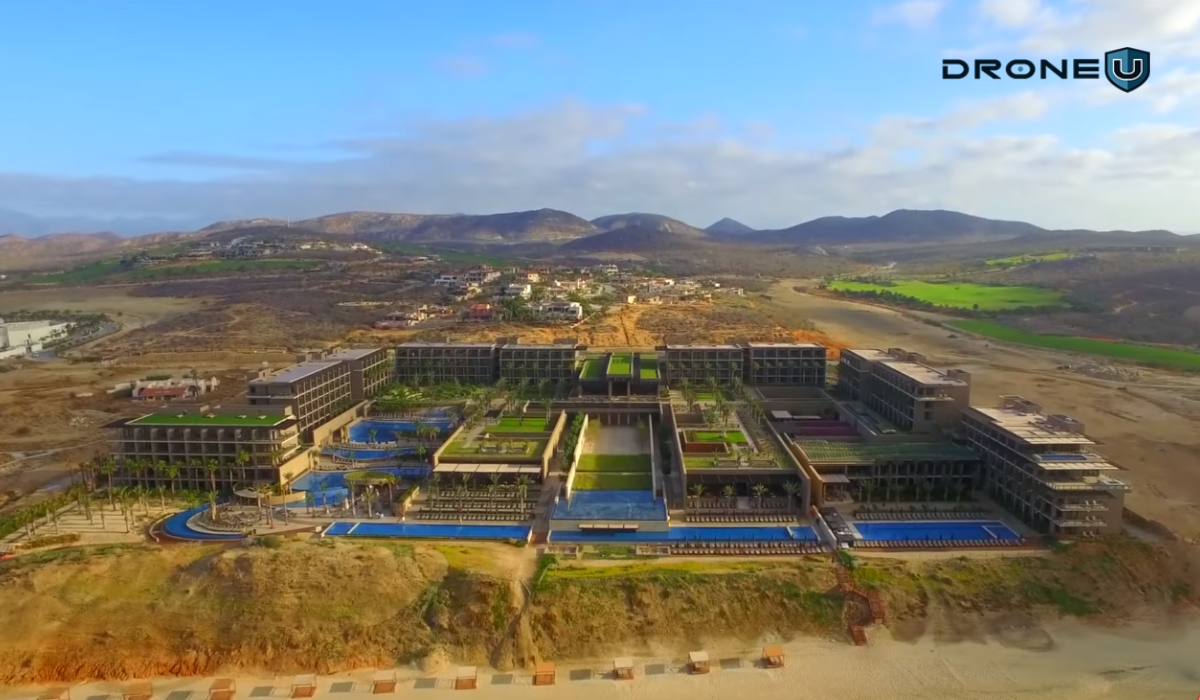
Drone surveying is the process of using a drone (UAV) to capture accurate measurements of land or structures from above.
These drones carry powerful tools, like high-resolution cameras, LiDAR sensors (which use laser light to measure distances), or multispectral sensors (which detect light beyond what our eyes can see).
Together, these tools help capture detailed data about the ground, elevations, buildings, and natural features.
Once the drone collects the data, it’s processed using special software to create maps, 3D models, surface measurements, and even volume calculations.
Surveyors and engineers use this information for land development, construction planning, mining, agriculture, and much more.
Using drones for land surveying feels like leveling up because you’re collecting real, measurable data that professionals can use to build or manage projects.
But here’s where a lot of new pilots get confused…
Drone Surveying vs. Drone Mapping: What’s the Difference?
You’ll often hear people use drone surveying and drone mapping like they are the same. And to be fair, there’s a lot of overlap.
Both use drones. Both involve capturing aerial data. And both rely on photogrammetry software or similar tools to process that data.
But the purpose and output are where things get different.
Let’s break it down:
| Factor | Drone Surveying | Drone Mapping |
| Purpose | The primary purpose of drone surveying is to collect precise spatial data and measurements of terrain, structures, or landscapes. The focus is on obtaining accurate information for analysis, modeling, and decision-making. | Drone mapping is specifically focused on creating detailed maps or orthomosaics of an area using aerial imagery captured by drones. The emphasis is on generating visual representations of the surveyed area for different applications. |
| Data Collection and Analysis | In drone surveying, data collection often involves using specialized sensors such as LiDAR, multispectral cameras, or high-resolution cameras to capture detailed information about the terrain and structures. The collected data are then processed and analyzed to extract specific parameters such as elevation, contours, volumes, or features. | Drone mapping primarily relies on capturing high-resolution images of the surveyed area using drones equipped with cameras. These images are processed to create orthomosaics, which are georeferenced aerial images or 3D models of the terrain. The focus is on visualizing the landscape and identifying patterns or changes over time. |
| Applications | Drone surveying is commonly used in industries such as construction, mining, agriculture, land development, and infrastructure management. | Drone mapping finds applications in areas such as agriculture, forestry, urban planning, disaster response, environmental monitoring, and archaeology. |
So, if you’re working with a licensed surveyor and need exact terrain data to support permits, designs, or boundary work, that’s drone surveying.
But if your goal is to build a map, track crop health, or visualize a project site, you’re probably doing drone mapping.
Of course, in the real world, both are often used together. You might map a construction site visually, then survey it with LiDAR to measure progress or materials.
Significance of Drone Surveying
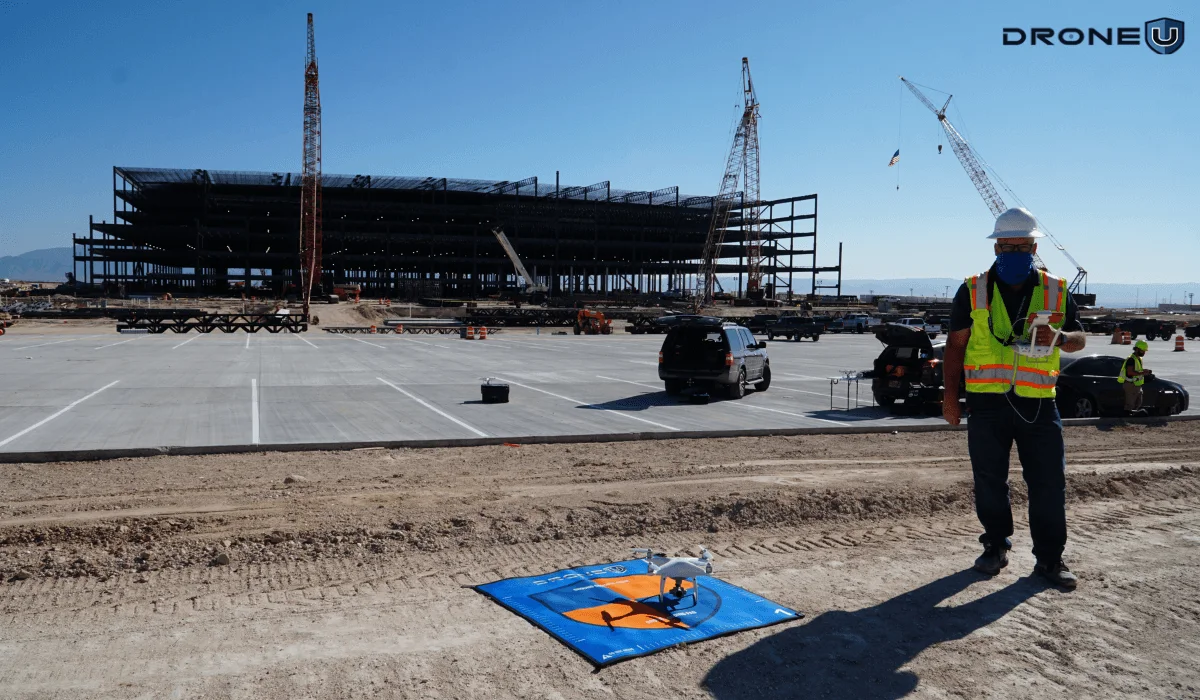
The traditional way of doing surveys was slow, expensive, and needed a lot of manpower. Drones overcome these challenges by making surveys faster, more accurate, and cheaper.
This new technology has opened doors for surveyors in many fields, like construction, farming, and even archaeology.
Here are five significant factors highlighting the importance of drone surveying:
1. Cost-Effectiveness:
Drone surveying significantly reduces the costs associated with traditional surveying methods. It eliminates the need for expensive manned aircraft or ground-based equipment and requires fewer pilots for data collection, leading to overall cost savings.
2. Time-Saving:
Drones can rapidly cover large areas and collect data more quickly than conventional surveying methods. This time-saving aspect allows for faster project completion, quicker decision-making, and timely monitoring of changes in the surveyed area.
3. Improved Safety:
By minimizing the need for personnel to enter hazardous or hard-to-reach areas, drone surveying enhances safety during data collection. It reduces risks associated with working in challenging environments such as construction sites, mining areas, or disaster zones.
4. High Precision and Accuracy:
Drone technology, coupled with advanced sensors and data processing techniques, enables precise and accurate data collection. This high level of precision is essential for applications such as land surveying, infrastructure inspection, and volumetric measurements.
5. Versatility and Accessibility:
Drones can be equipped with various sensors and payloads to gather different types of data for a wide range of applications. They can access remote or inaccessible areas, providing valuable insights into terrain, infrastructure, and environmental conditions that may not be easily accessible by other means.
Drone surveying makes data collection faster, safer, and cheaper. This helps people in many industries make better decisions. As technology advances, surveying with drones is expected to become increasingly integrated into everyday practices, offering new opportunities for innovation and growth.
With this understanding, let’s walk through how land surveying with drones actually works.
How Drone Surveying Works?
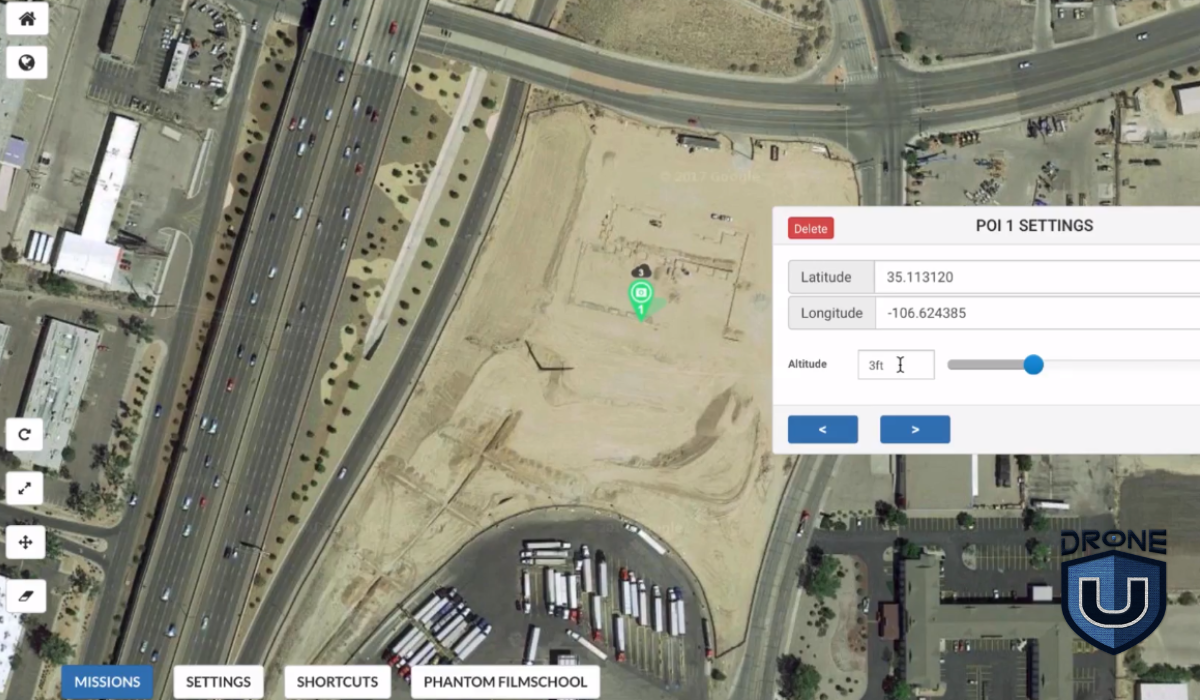
The process of drone surveying typically involves the following steps:
Step 1: Mission Planning
Before the drone flight, surveyors plan the mission by defining the area to be surveyed and determining the flight path and altitude of the drone. The surveyor defines the survey area and sets up ground control points, which are reference points on the ground used to calibrate the drone’s data.
Factors such as the desired level of detail, terrain features, and safety considerations are taken into account during mission planning.
Step 2: Data Capture
Once the mission is planned, the drone is deployed to fly over the designated area while capturing high-resolution images or other sensor data. The drone follows the pre-programmed flight path, ensuring comprehensive coverage of the survey area.
Step 3: Image Processing
Once the images are captured, they are processed using specialized photogrammetry software. This step of image processing involves stitching together individual images, georeferencing them, and creating orthomosaics (georeferenced aerial images) or 3D models of the surveyed area.
Step 4: Data Analysis
The processed data is then analyzed to extract valuable information such as topographic features, elevation data, contours, land cover classifications, or volumetric measurements. Images can be edited and analyzed in software programs to extract valuable information such as height measurements, surface areas, and contour lines.
This information can be used for various applications, including land planning, site analysis, infrastructure design, environmental monitoring, and precision agriculture.
Step 5: Reporting and Visualization
Finally, the results of the drone survey are often presented in the form of maps, reports, or visualizations that provide insights into the surveyed area. These outputs help stakeholders make informed decisions and take appropriate actions based on the survey findings.
Having understood the process, let’s explore the applications of drone surveying.
Applications of Drone Surveying
Using drones to gather data has revolutionized surveying by providing a safe, efficient, and cost-effective method.
Watch this video to know if surveying small properties with drones is feasible
Here are some of the industries that have benefited from surveying with drones:
1. Construction
Site planning and progress monitoring: Drones provide aerial imagery that helps visualize site conditions, monitor construction progress, and track changes over time. This allows for better planning, resource allocation, and project management.
Volume calculations and stockpile measurements: Drones equipped with specialized sensors can measure stockpiles of materials like soil, sand, and gravel with high accuracy. It is useful for cost estimation, material management, and progress tracking.
Roof inspections and building condition assessments: Drones can safely access rooftops and capture detailed images to identify potential problems like leaks, cracks, and loose shingles. In comparison with traditional methods, it can save you time and resources.
2. Land Surveying and Mapping
Topographic mapping and terrain modeling: Drones can capture high-resolution aerial imagery used to generate detailed topographic maps and 3D terrain models. These models are essential for land development, infrastructure planning, and environmental studies.
Boundary demarcation and land use planning: Drones provide accurate maps of property boundaries and land use, assisting with land registration, development planning, and environmental impact assessments.
Cadastral surveys and volumetric measurements: Drones can be used for cadastral surveys, which create official records of land ownership. Additionally, they can measure the volume of material in stockpiles or excavation sites.
3. Infrastructure Inspection
Bridges, pipelines, power lines, and communication towers: Drones can inspect critical infrastructure like bridges, pipelines, power lines, and communication towers for damage, wear, and potential safety hazards. It is effective for early detection and rectification of issues, preventing costly repairs, and ensuring public safety.
Identifying damage, wear, and potential safety hazards: Drones equipped with high-resolution cameras and specialized sensors can identify corrosion, cracks, and other structural issues in infrastructure, making repairs and maintenance more timely.
Progress monitoring and maintenance planning: Drones can help you monitor infrastructure construction progress and identify any deviations from the plan. This information helps in timely course correction and ensures efficient project completion.
4. Agriculture
Crop health monitoring and yield estimation: By capturing multispectral images, drones can assess crop health, identify diseases and pests, and estimate potential yield. It helps farmers to take timely and targeted actions to improve crop health and productivity.
Field mapping and irrigation planning: Drones can create detailed field maps, helping farmers in planning and optimizing irrigation systems for efficient water usage.
Precision agriculture applications: Drones are used for targeted application of fertilizers, pesticides, and herbicides, reducing waste and minimizing environmental impact. UAVs also play a role in collecting data for soil analysis and variable rate applications.
5. Other Applications
Mining and quarry surveying: Using drones to map mining and quarry sites, measure stockpile volumes, and monitor blasting operations can improve safety and productivity.
Environmental monitoring and disaster response: Drones are useful for monitoring environmental changes, assessing the impact of natural disasters, and assisting in search and rescue operations. They can also be used for wildlife habitat mapping and conservation efforts.
Search and rescue operations: Drones are useful for finding missing people in hard-to-reach places, saving valuable time and improving rescue chances.
Archaeological surveys and cultural heritage documentation: Drones can capture high-resolution imagery and 3D models of archaeological sites and cultural heritage monuments, allowing for detailed documentation and preservation efforts.
As technology continues to evolve, we can expect even more innovative and efficient uses for drones in various industries in the future.
Let’s understand the pros and cons of surveying with drones.
Pros and Cons of Drone Surveying
Like any tool, drone surveying comes with its strengths and trade-offs.
While it offers speed, safety, and incredible precision, there are still some real-world limitations to keep in mind, like battery life, weather, and flight restrictions.
Let’s take a quick look at the biggest pros and cons, so you can decide if it’s the right fit for your project or business.
| Pros | Cons |
| 1. Drone surveying eliminates the need for extensive manual labor and significantly reduces the time required for surveys. This results in cost savings for surveying projects. | 1. Adverse weather conditions, such as strong winds and rainfall, can hinder drone operations and affect data quality. |
| 2. Drones equipped with advanced sensors and GPS technology can capture highly precise data. The resulting 3D models and measurements are more accurate compared to traditional methods. | 2. Drones have limited battery life, which restricts their flight time and surveying capabilities, especially for larger areas. |
| 3. Drones can access remote or hazardous areas that may be difficult or unsafe for surveyors to reach. This enables surveys in rugged terrains, construction sites, or areas affected by natural disasters. | 3. Drone regulations may limit flight altitudes and distances, or even require drone operators to obtain special permits in some areas. |
Having understood the importance, let’s look at the factors to consider.
Considerations for Surveying with Drones
While the significance of drone surveying is undeniable, several crucial factors require careful consideration before deploying this technology.
Take a look at this video on navigating the surveying industry as a drone pilot
1. Regulatory Landscape:
To maintain legal compliance and avoid any potential safety hazards, you must comply with ever-evolving regulatory landscapes. Obtaining necessary permits and adhering to airspace restrictions are essential. Each area may have its own regulations, so it is important to stay informed about local and national guidelines.
2. Weather Conditions:
In drone operations, the weather plays an important role. During high winds, images may be blurred, and data quality may be compromised.
Rain, snow, and fog can further hinder data collection and pose safety risks. Keeping track of weather forecasts and scheduling flights during optimal conditions is essential.
3. Data Privacy and Security:
Data privacy and security are imperative when capturing and storing sensitive data. It is crucial to implement robust security measures to protect sensitive data, such as adhering to relevant data privacy regulations and using secure data storage practices.
4. Choosing the Right Equipment:
Drones and equipment must be selected according to the specific requirements of the project. The ideal drone type depends on factors such as the size and complexity of the area, the desired data resolution, and the payload requirements (camera, sensors). It is also important to balance budget considerations with equipment capabilities to achieve optimal value.
5. Pilot Experience and Training:
An operation’s success and safety are strongly influenced by the expertise of the drone pilot. An experienced and qualified pilot with rigorous training and relevant licenses is always a plus. Having a thorough understanding of safe flight practices, data collection, and emergency procedures ensures efficient data collection and minimizes risks.
With drone surveying, what kinds of deliverables can you expect? That’s covered in the next section.
Deliverables of Drone Surveying
The specific deliverables you receive will depend on the scope of your project and the agreement with your drone surveying service provider. But here are some generally included:
2D Outputs:
Orthomosaic Maps: These are high-resolution aerial images stitched together to form a single, accurate map. They are geometrically corrected to remove distortion and represent the true scale of the ground. These maps can be used for measuring distances, calculating areas, and creating detailed plans.
Digital Surface Models (DSMs): These are 2D representations of the terrain surface, including vegetation and buildings. They are created by processing drone imagery and provide information about surface elevation.
Contour Lines: These are lines connecting points of equal elevation on a map, creating a visual representation of the topography.
3D Outputs:
Digital Elevation Models (DEMs): Similar to DSMs, DEMs represent the bare earth elevation, excluding vegetation and structures. These are valuable for analyzing terrain, calculating volumes, and engineering design.
Point Clouds: These are dense collections of 3D points representing the location and elevation of objects on the ground. They provide a highly detailed representation of the surveyed area and can be used for various applications like environmental assessments, monitoring, and leak detection.
3D Models and Animations: These are detailed digital representations of the surveyed area in 3D. They can be used to create fly-through animations and virtual tours, providing a realistic and immersive view of the site.
Additional Deliverables:
Progress Reports: In some cases, drone surveying companies may provide progress reports throughout the project, updating clients on data collection and processing stages.
Data Files: Depending on the project requirements and agreement, raw data like captured images and processed point clouds might be delivered to the client.
Watch this video to find out if providing drone services to surveyors is worth it
Conclusion
Drone surveying has emerged as a game-changer, offering a safe, efficient, and cost-effective way to gather data across diverse industries.
Looking ahead, the future of drone surveying is brimming with potential. Technological advancements in sensors, data processing, and autonomous flight capabilities are constantly pushing the boundaries of what this technology can achieve.
We can expect even wider adoption and integration with other cutting-edge technologies like AI and machine learning.
Check out this page to learn about our exclusive training programs and become a certified drone pilot.
Frequently Asked Questions
Q1: Are there any legal requirements for operating drones for surveying purposes?
Yes, operating drones for commercial surveying purposes may require permits, licenses, or certifications. It is important to be aware of and comply with the regulations specific to your country or region.
Q2: How accurate are the measurements obtained from drone surveying?
Aerial surveying can achieve high accuracy levels, often within a few centimeters. However, accuracy depends on various factors such as the camera quality, the drone’s positioning system, ground control points, and image processing quality.
Q3: Can drones be used in areas with limited GPS coverage?
Yes, drones equipped with advanced technologies like RTK (Real-Time Kinematics) or PPK (Post-Processed Kinematics) can operate in areas with limited GPS coverage by relying on ground control points or additional positioning systems.
3

Why Pix4Dreact is a Must-Have Tool for Base Mapping
Natural disasters, emergencies, and conflicts are hitting harder and faster than ever before. These events not only put lives at risk but also damage critical infrastructure and property. When chaos strikes, rescue teams don’t have hours to wait, they need accurate, real-time insights they can act on immediately.
That’s where 2D drone mapping software like Pix4DReact steps in.
In this article, we’ll dive into why Pix4Dreact has become a go-to tool for drone mapping.
We’ll uncover what Pix4Dreact can do that will save you time, simplify your workflow, and help you deliver better results faster.
Let’s kick things off by breaking down the basics.
What is Pix4Dreact?
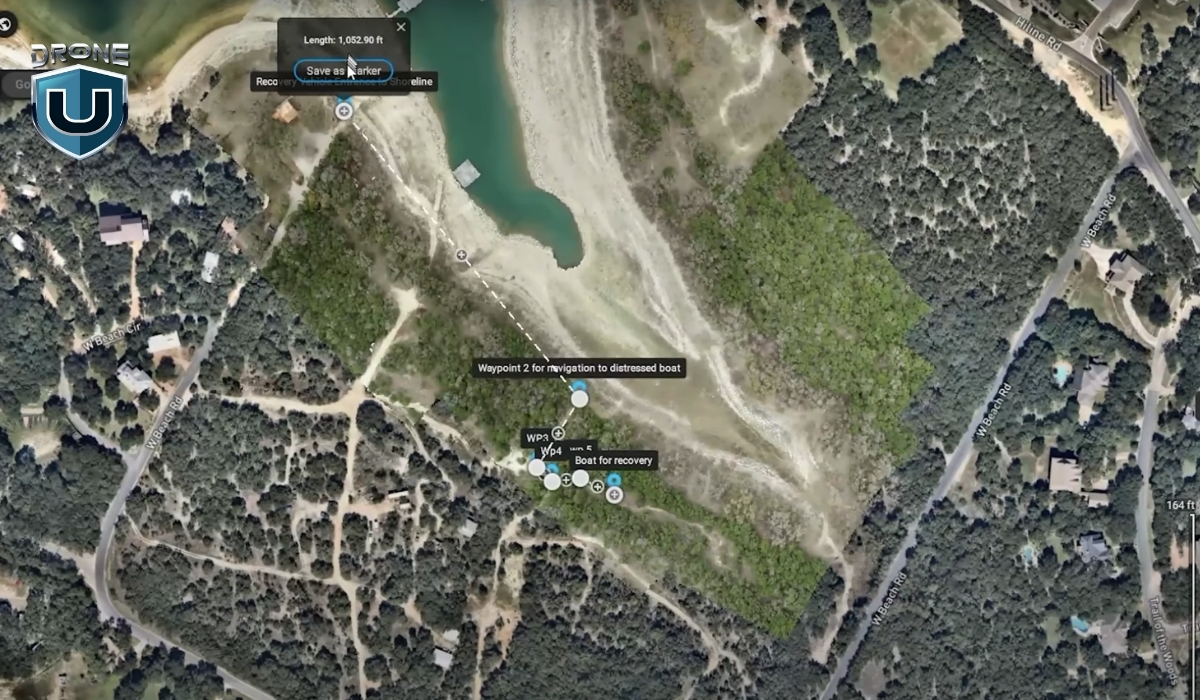
Pix4Dreact is a 2D drone mapping tool specifically designed for speed and simplicity.
Unlike heavy photogrammetry programs that require hours of processing and powerful computers, Pix4Dreact lets you turn drone images into detailed, usable maps in just minutes.
For Example: Imagine you are called to assist in a search operation in a rural area after a storm. With Pix4Dreact installed on your laptop and a set of drone images, you can quickly create a full overview map of the damaged zone, without needing internet access or specialized hardware.
In simple words, Pix4Dreact is designed for creating flat, accurate representations of the ground. You capture a series of overlapping aerial images with your drone. Then, you upload them into Pix4Dreact, which stitches them together into a high-quality orthomosaic.
This orthomosaic serves as a real-world map that you can analyze, measure, annotate, and share.
Here’s how Pix4Dreact works step-by-step:
- Capture images with your drone: Fly a simple grid mission using any basic mapping drone. Make sure your photos have at least 70–80% front and side overlap for best results.
- Upload images to Pix4Dreact: Drag and drop your image set into the software. No need for cloud processing or complicated setup.
- Process the orthomosaic: Click a single button to begin. In just a few minutes (depending on how many images you have), Pix4Dreact generates a full 2D map.
- Analyze and export: Add measurements, mark key points, and export your map in different formats (like GeoTIFF or PDF) for sharing or field use.
The best part? Pix4Dreact works entirely offline.
You don’t need an internet connection to process maps, which makes it ideal for emergency responders, field surveyors, and any pilot working in remote areas.
Now that you know what Pix4Dreact is and how it works, let’s look at why it stands out from other 2D drone mapping tools.
Why Pix4Dreact Stands Out Among 2D Mapping Tools
When you’re new to drone mapping, it’s easy to feel overwhelmed by the sheer number of software options out there.
Pix4Dreact cuts through all that noise.
It’s designed for speed, simplicity, and reliability, three things that matter the most when you’re working in the real world. Let’s understand them one by one:
1. Speed and Simplicity: Mapping in Minutes, Not Hours
One of the first things you’ll notice about Pix4Dreact is how fast it works.
Here’s why that matters: Imagine you’re supporting a military search and rescue operation. Every minute you spend waiting for a map to process is a minute lost finding survivors. You need tools that move as fast as the situation demands.
Pix4Dreact was built with that urgency in mind. It skips the heavy 3D modeling that most full-suite photogrammetry software focuses on, and instead zeroes in on producing clean, flat, 2D maps as quickly as possible.
2. Accuracy That Meets the Needs of Real-World Base Mapping
Speed is great, but it doesn’t mean much if your map isn’t accurate.
Pix4Dreact strikes a balance between speed and precision that’s ideal for many real-world uses like disaster response, construction surveys, and emergency infrastructure inspections.
While it’s not designed to compete with ultra-high-precision survey software like Pix4Dmapper or specialized LiDAR systems, Pix4Dreact consistently delivers enough accuracy for fieldwork where time is the top priority.
For example, you can measure distances, mark damaged areas, plan logistics routes, and even create printable, georeferenced maps directly from your laptop.
3. Offline Capability: Reliable Mapping When Internet Fails
You can install Pix4Dreact on a regular Windows laptop and run it entirely offline, no internet connection required.
Other mapping tools often require cloud uploads, remote servers, or subscription logins to process images. But with Pix4Dreact, everything happens locally. You’re in full control of your data, start to finish.
This is a huge game-changer for drone pilots who want to map disaster zones or rural areas without internet access.
Next up, let’s see how Pix4Dreact performs against some of the best-known drone mapping software options out there.
How Pix4Dreact Compares to the Best Base Mapping Software
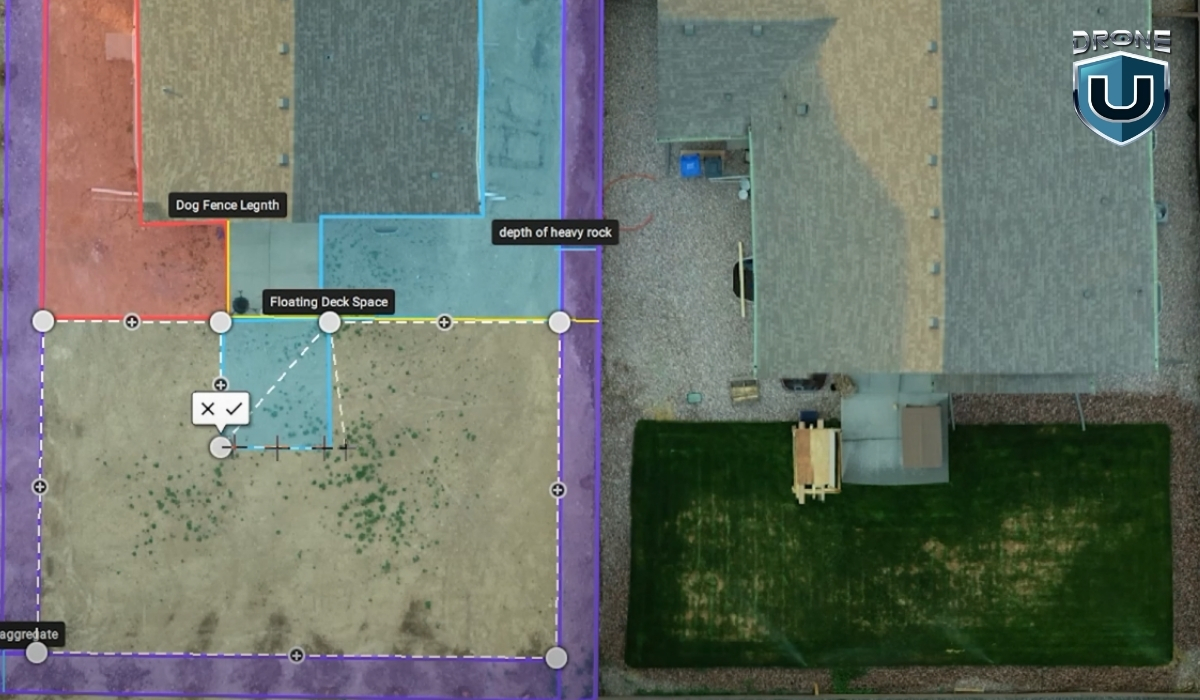
There’s no shortage of mapping software for drone pilots today. Platforms like Pix4Dmapper, DroneDeploy, and Agisoft Metashape offer powerful capabilities.
However, not every project needs heavy, complex software, and not every beginner pilot wants to spend hours setting it up or learning advanced settings.
Here’s how Pix4D carves out its space in a competitive market:
1. Minimal Hardware Requirements
One of the biggest barriers to getting started with high-end drone mapping tools is the hardware load.
Most professional mapping tools like Pix4Dmapper and DroneDeploy demand strong GPUs, high RAM, and lots of hard drive space to run smoothly. Some even require constant cloud syncing and massive file uploads.
Pix4Dreact is different.
You can install it on almost any modern Windows laptop without needing a powerful gaming setup. A basic laptop with 8GB RAM and a decent CPU can easily process a full mission’s worth of images. No need to invest thousands into a high-end workstation just to create maps.
2. Cost-Effectiveness for Emergency Responders and Survey Teams
Another area where Pix4Dreact shines is price.
Full-featured platforms like DroneDeploy are amazing for large construction or agriculture projects, but they often come with steep monthly fees or expensive annual subscriptions.
Same with Pix4Dmapper, which targets high-end survey and engineering users.
Pix4Dreact, on the other hand, offers a one-time licensing model. You pay once, and you own it (no worrying about recurring fees eating into your profits).
This is a game-changer for smaller teams, volunteer groups, municipal agencies, or anyone working with tight budgets but still needing professional-grade mapping capabilities.
3. Intuitive User Interface Designed for Rapid Deployment
If you’ve ever opened a high-end mapping platform and felt immediately overwhelmed by endless tabs, layers, and settings, you’re not alone.
Professional-grade software often assumes you’ve already had formal GIS training. And if you haven’t? The learning curve can be steep.
Pix4Dreact bridges this gap.
Its clean, simple user interface is designed so that even brand-new drone pilots can upload images and process maps without feeling lost.
There’s no need to customize complicated flight parameters or dig through advanced rendering settings. The workflow is basically:
- Upload photos
- Hit “Process”
- View and export your map
That’s it.
This is why Pix4Dreact is such a smart choice for anyone who values speed, quick action, and efficiency.
Applications Where Pix4Dreact Shines in Base Mapping

We have understood what Pix4Dreact is, why it stands out, and how it’s better in comparison to other top mapping tools. Now let’s look at some of the real-world scenarios where it truly shines.
1. Disaster Response and Search & Rescue Operations
Using a basic drone and Pix4Dreact, you can quickly create updated, detailed maps of damaged areas. These maps help responders identify safe paths, locate survivors, plan evacuations, and prioritize repairs.
2. Construction Site Mapping
Construction sites are busy, constantly changing environments.
Project managers, engineers, and contractors need up-to-date visuals to track progress, manage resources, and keep everything on schedule.
Pix4Dreact gives you a simple way to capture aerial overviews of a construction site in minutes. Instead of waiting for a third-party survey or satellite update, you can create your own site maps weekly—or even daily.
3. Infrastructure Inspection
Maintaining roads, bridges, pipelines, and powerlines requires constant attention, and accurate, timely mapping is a big part of that.
Pix4Dreact lets you map long stretches of roadway, inspect bridges for visible damage, or create maps of critical utility infrastructure without needing expensive survey teams or heavy equipment.
Conclusion
If you’re just getting started with drone mapping, you probably don’t have time to wrestle with complicated software or wait hours for cloud-based processing. That’s exactly where Pix4Dreact stands out. It’s lightweight, fast, and easy to learn, making it ideal for both beginner pilots and seasoned operators.
While other tools may be better suited for ultra-high-end 3D modeling or advanced analytics, Pix4Dreact excels when you need simple, efficient 2D drone mapping. It’s a reliable, go-to solution for professionals who value speed and simplicity without sacrificing quality.
But great results aren’t just about having the right software—they also depend on having the right training.
At DroneU, we offer hands-on, real-world drone pilot courses that teach you exactly how to plan flights, capture the right data, and use tools like Pix4Dreact to deliver professional results.
Ready to take your drone mapping skills to the next level?
Check out DroneU’s drone training programs here.
Frequently Asked Questions
1. What is Pix4D Mapper used for?
Pix4Dmapper creates high-quality 3D maps and models from drone images. Professionals use it for surveying, construction, mining, and precision agriculture projects.
2. What is the best drone mapping software?
The best drone mapping software depends on your project needs. Pix4Dreact is best for fast 2D mapping, while Pix4Dmapper or DroneDeploy fit larger, high-accuracy 3D mapping projects.
3. What is the difference between PIX4Dmapper and PIX4Dreact?
Pix4Dmapper builds detailed 2D and 3D models for professional surveying, while Pix4Dreact focuses on creating fast, easy-to-use 2D maps for emergency and field use.
4. Does PIX4Dreact process the data on the cloud or locally?
Pix4Dreact processes all your drone images locally on your laptop. SO, you don’t need an internet connection to generate or view your maps.
5. Does PIX4Dreact process multispectral and thermal images?
No, PIX4Dreact does not support multispectral image processing. It can process thermal images in .jpg format; however, these are treated as standard RGB images. As a result, the generated orthomosaic provides only a visual representation of temperature variations and does not allow the extraction of precise temperature values for specific objects or pixels.
2
Two New Drone Bills You Must Know [2025]
The drone industry in the United States is growing rapidly, and so are the regulations. In 2025, two new proposed regulations could potentially slow the momentum and reduce the pace of growth in the drone industry.
One law has already been passed in Florida, and another is being considered at the Federal level. If you’re a drone operator, understanding these developments is crucial.
Let’s dive in.
Law 1: Florida’s “Reasonable Force” Drone Law
In 2024, Florida lawmakers introduced Senate Bill 1422 (SB 1422). One part of that bill caused immediate alarm: it would have allowed residents to use “reasonable force” to bring down drones they believed were invading their privacy.
But before the bill passed, that clause was removed. The final version, known as House Bill 1121, no longer includes any language about physically stopping or shooting down drones. That part is officially off for now.
Still, HB 1121 bans drone flights over specific types of “critical infrastructure”.
This “reasonable force” law directly conflicts with federal law, specifically 18 U.S. Code § 32, which makes it a felony to damage or destroy any aircraft, including drones. That’s because drones have been legally defined as aircraft since the FAA Modernization and Reform Act of 2012.
If someone uses force to knock a drone out of the sky, even if they think it’s spying on them, they could face federal charges. That puts drone operators and civilians in a legal gray area that can turn dangerous fast.
In short, Florida’s law goes against federal precedent and may encourage illegal behavior by making people think it’s okay to bring down drones.
Where You Can’t Fly Over in Florida (As of 2025)
Here’s a simplified list of the facilities now considered off-limits to drone pilots in Florida:
- Power generation stations and substations
- Electrical control centers
- Water treatment facilities and pump stations
- Gas or oil pipelines and processing plants
- Chemical and rubber manufacturing plants
- Prisons, detention centers, and jails
- Airports and seaports
- Military bases and armories
- Dams, locks, and floodgates
- Spaceports
- Wireless and wired communication towers
However, many of these sites are not marked, geo-fenced, or visible in apps like B4UFLY or Aloft. You can read more about Florida drone laws here.
Law 2: The Drone Integration and Zoning Act
The second law to watch is Senate Bill 1249, also known as the Drone Integration and Zoning Act. This proposed federal bill would allow state and local governments to regulate the airspace under 200 feet.
At first glance, it may seem reasonable to give local communities more control, but the consequences would be chaotic.
Why Could This Be a Disaster?
- 90,000+ different drone laws: Each city, county, and state could pass its own rules. That means a drone flight legal in one area might be illegal just a few miles away.
- Massive confusion for pilots: Drone operators would need to check local ordinances before every flight, creating compliance headaches.
- Disruption of FAA authority: Currently, the FAA regulates all airspace in the U.S. from the ground up. Letting local governments claim control of airspace undermines this system.
Why the FAA Never Defined “Navigable Airspace”
The FAA often states it controls all airspace “from the blades of grass to the heavens,” but it has never clearly defined navigable airspace in a legal sense. Generally, it refers to airspace above tree level (around 200 feet) where manned aircraft fly.
Ironically, some FPV and cinewhoop pilots have used this ambiguity to claim they don’t need a Part 107 license if they stay below that level. But if this bill passes, we might finally get a clear definition, but at the cost of national consistency.
Final Thoughts
The rise of drones is more than a tech trend. It’s transforming industries, enabling creativity, and opening new career paths.
However, these two proposed laws could undo years of progress by creating fear, confusion, and unnecessary legal risks for responsible drone operators.
The drone community must come together to push for clear, consistent, and innovation-friendly laws that protect both airspace and privacy, without stifling opportunity.
This isn’t just about flying drones. It’s about protecting the future of how we build, inspect, film, farm, deliver, and explore.
2
Can You Make $46K/Day with a Drone Business?
Is it possible to make $46,000 in a single day with your drone business?
Before I say ‘yes’, here is a tiny but important disclaimer. These 5-figure drone jobs aren’t overnight successes. There are steps that lead to these incredible paydays.
We are going to talk about those baby steps in this article. Stay with me and read until the end because every bit of this information is packed to build lasting value for your drone business.
First, here is a quick reality check.
Many drone pilots make between $2,500 and $4,500 a month flying drones like the Mini 4 Pro.
But the potential to generate a solid income with a Drone is much more. In fact, the income opportunity with drones is getting bigger and bigger each year.
According to Grand View Research, in 2024, the commercial drone market made up over 74% of the total market. Filming and photography alone accounted for 32% of this segment.
Before we dive into how it all came together, let’s take a look at the back story of this incredible drone project.
The Back Story
It all started with a simple idea: using drones to assist first responders in critical situations.
The goal was to film stunning footage and create real-time, high-quality content that would help first responders make faster and more informed decisions in emergencies.
The team was highly skilled and deeply committed to the mission. We worked tirelessly to ensure every shot was perfect, capturing footage that was both visually striking and practical in its application.
This collaboration between drones, ground operations, and the team helped in making a real-world impact through filmmaking.
The project opened doors to high-value contracts, especially after establishing long-term partnerships with major players like Intel and TD Sonic. These relationships allowed the team to consistently secure large-scale, high-paying projects, paving the way for success.
Let’s look at how this project came to life.
Unlocking the $46K/Day Opportunity
This didn’t happen overnight.
We invested time building relationships, showing up for smaller jobs, and proving our expertise. When this project came up, we were ready, and the client trusted us to deliver.
This $46K day came from a commercial shoot.
It was an opportunity to showcase the power of drone technology. The focus was on how drone technology helps first responders. We were brought in to capture real-time footage using drones and on-ground support.
With consistency, the right partnerships, and readiness when the moment comes, big days like this can happen.
Here is how we did it:
1. Teamwork: The Key to Big Profits
So, how do you land a $46K job for a single day of work? It starts with the right team. You simply can’t do it alone.
Drone work requires more than just piloting the drone. It takes a group of skilled professionals who each bring their own expertise to the table. Every role matters.
For this production, Jake Levesque played a key part. He’s not only a seasoned drone instructor but also a public information officer for the North Las Vegas Fire Department. His background in both drone operations and emergency response made him invaluable on set. Jake didn’t just operate the camera, he understood how to follow creative direction and elevate each shot with purpose. His input improved the overall quality of the production, which was done by our friend, Steve Delasantos.
Brandon Hess also worked closely with Jake to capture the right angles and ensure we got the footage we needed. Rob Burdick flew the drone and captured additional B-roll, rounding out the visual story. Each person brought something important, and together, the results were far better than anything one person could’ve done alone.
2. The Role of Equipment
Good gear doesn’t make a good story, but it does help you tell it better.
In a project like this, the right gear matters just as much as the team behind it. I saw that firsthand.
We used the Sony FX3 and A7S III to capture clean, cinematic footage, even in low-light conditions. For the aerial shots, we flew the DJI Inspire 2 and the M30T drones. Both delivered the stability, image quality, and flexibility we needed to keep up with the fast pace of the production.
We also used anamorphic lenses and custom drone setups to give the footage a more cinematic feel. That visual quality was essential for meeting the expectations of a high-end commercial client.
From experience, I’ve learned that investing in the right equipment isn’t about chasing specs. It’s about having the tools that let you deliver when it counts.
3. Forging Deeper Partnerships
Skill and gear matter, but the people you work with can open the biggest doors.
For this project, we partnered with TD Sonic and Intel. These relationships didn’t happen overnight. We built trust over time by delivering consistent results, staying flexible, and understanding what high-level clients actually need.
Working with established teams gave us access to bigger opportunities and helped us land jobs that pay well and come with long-term potential.
In many cases, it’s these ongoing partnerships that create a steady flow of high-value work.
In my experience, showing up professionally, communicating clearly, and doing great work consistently is what keeps those partnerships strong. And when the right project comes along, those connections can make all the difference.
Roadmap to a Five-Figure Drone Business
According to the Global Drone Market Report 2025-2030, the commercial drone industry is expected to reach $57.8 billion by 2030, with high-demand sectors like mapping, surveying, and inspection driving substantial growth.
Here is the roadmap you can use to start along in this journey.
1. Build a Strong Team
Assemble a team of skilled individuals who work well together and bring diverse expertise to the table. Having a reliable, skilled team is crucial for executing large-scale commercial productions.
On the Intel project, each person brought a different strength to the table, from drone operations to camera work to on-the-ground coordination. Having a team you trust makes it easier to scale, work efficiently, and meet the demands of high-paying clients.
2. Use Great Equipment
Top-tier clients expect top-tier results. That means using professional drones and cameras, like the DJI Inspire 2, M30T, or Sony FX3, that can deliver under pressure.
Use the best drones and cameras to capture stunning visuals that meet high client expectations. Invest in quality equipment to ensure top-notch footage.
And I am not asking to buy this equipments. You can rent them based on the project’s needs.
3. Form Strategic Partnerships
We didn’t just get lucky. We worked with vendors like TD Sonic and built long-term relationships that led to bigger projects.
Instead of constantly chasing new clients, align with partners who can connect you to consistent, large-scale work.
4. Master the Art of Storytelling
Technical skill gets you in the door. Storytelling is what sets your work apart. You must also be able to tell a compelling story through your footage. That means syncing aerial footage with ground-level shots, voiceover, and a clear creative direction.
5. Invest in Drone Training
Confidence and skill come from training. Sharpen your skills with professional drone training to position yourself for larger, higher-paying contracts. Whether you’re just starting or refining your expertise, training gives you the knowledge and confidence to land big opportunities.
Conclusion
Making $46K a day is about having the right strategy and executing on it meticulously. It isn’t just about your drone gear, your team, or your skills. It is about combining the art of fostering deeper relationships and delivering high-quality results.
In this business, trust and consistency open more doors than gear ever will.
With the right mindset, strategic partnerships, and a commitment to excellence, you can grow your drone business into a profitable and impactful venture.
Ready to scale your drone business and work on high-impact projects.
Frequently Asked Questions
1. How can I start a high-paying drone business?
To start a high-paying drone business, focus on building a skilled team, investing in top-tier equipment, and forming partnerships with large companies.
2. What are the best drones for commercial use?
The DJI Inspire 2, M-30T, and Sony FX3 are excellent choices for capturing cinematic-quality footage, especially for high-end commercial projects.
3. Can I really make $46K in one day with drone work?
Yes, with the right team, equipment, and high-profile commercial projects, it is possible to make $46K in a day. Scaling your business and networking are key.
4. What skills are required to succeed in a high-paying drone business?
Successful drone business owners need technical piloting skills, strong storytelling abilities, team management, and expertise in video production and post-processing.
4

-
 Brinc Admits, We Caused the DJI Drone Ban! EXCLUSIVE
-
 Brinc Admits they're behind DJI Ban | Auterion Creates Drone Swarm Brain
-
 Trump Card on the DJI Ban, May be Best drone news of 2025. Will he tiktok DJI?
-
 This Drone Trick Makes Real Estate Videos Awesome!
-
 Exploring Drone Security: Opportunities and Challenges
More on Hot Topics