
How to Start a Drone Mapping Business in the USA (2025 Guide)
| Disclaimer: Any reference to “surveying” or “survey” work in this article is for general informational purposes only. Surveying is a regulated profession, and requirements vary by state. Any work that legally constitutes surveying must be performed or approved by a licensed professional surveyor, in accordance with applicable state laws. |
Drone mapping is one of the most profitable niches in the drone services industry. But starting a drone mapping business is more than just technical skills.
It requires a plan, a defined market focus, and a professional approach that builds trust with clients who need accurate data.
This guide is for drone pilots who already have a basic understanding of mapping and want to take the next step: a profitable drone mapping business.
Instead of going into the mapping workflows (we’ve covered this in this drone mapping guide), this article will focus on the business-building essentials.
We’ll cover how to choose the right niche, meet industry expectations, invest wisely, and position yourself as a trusted service provider.
Let’s get started.
What Clients Expect: Drone Mapping as a Business
Drone mapping involves capturing aerial images and converting them into georeferenced datasets, such as orthomosaics, 2D site maps, digital elevation models, and 3D reconstructions.
These deliverables are used by industries that need spatial data for planning, monitoring, and documentation.
From a business perspective, mapping is a service, not just a set of images or models. Clients don’t pay for drone flights; they pay for actionable, accurate data that solves specific problems.
This creates real demand across industries like:
- Construction (progress tracking, as-builts, stockpile volumes)
- Land development and civil engineering
- Mining and aggregates
- Agriculture (crop health, field boundaries)
- Environmental monitoring and site assessments
However, knowing how to fly isn’t enough.
One of the biggest gaps in this space is that drone operators often jump in without understanding the data accuracy standards of the industries they’re trying to serve.
A project manager doesn’t just want a map; they want confidence in that map’s precision and compliance with workflows they already trust.
Before launching your drone business, take time to understand how professionals in your chosen vertical use mapping data. Learn how accuracy is measured and what deliverables they expect.
This is the foundation of becoming a drone mapping service provider.
Choose a Niche and Learn the Workflow
One of the fastest ways to fail in drone mapping is trying to offer everything to everyone. Standing out requires focusing on a specific industry niche.
This could be land surveying, agriculture, or construction. Every sector has different expectations, standards, and workflows – choose a sector and commit.
For instance, Land Surveying is a precision-driven field. You’ll likely need to work with RTK or PPK workflows and understand how to meet sub-inch accuracy standards.
This is where many new drone business owners fall short.
It’s not hard to teach a licensed surveyor how to fly a drone, but it’s very hard to teach a drone pilot how to meet the data expectations of a surveyor.
Clients don’t care how good your drone is; they care whether your data fits into their existing processes and meets their accuracy standards.
Get the Right Gear (Without Overspending)
You don’t need the most expensive drone or top-tier survey equipment to get started, but you do need the right gear for the work you plan to do.
1. Start with One Good Mapping Drone
Choose a drone that fits your niche and has consistent image quality and flight stability. You don’t need RTK from day one unless your clients require survey-grade deliverables.
Focus on a mapping-capable drone that produces sharp imagery, has automated flight, and good battery life.
What’s more important at the beginning is learning how to fly missions with repeatable results.
For most beginners, something like the DJI Air 2S, Phantom 4 Pro, or Mavic 3E is a good starting point.
2. Add Precision Tools as Your Services Grow
As your business grows (or your target industry demands higher accuracy), you can invest in:
- GCPs (Ground Control Points)
Use GCPs when accuracy is critical, like construction, engineering, surveying, or agriculture. They’re physical markers placed on the ground, measured with a GPS receiver, and manually marked in your software to “anchor” the map to real-world coordinates.
Good for: Jobs that require sub-inch to centimeter-level accuracy.
- RTK (Real-Time Kinematic)
RTK drones receive correction data during the flight, usually from a base station or a network (like NTRIP). This allows them to geo-tag each image with much higher accuracy.
Good for: Real-time, accurate data collection on sites with cell service or access to a base station.
- PPK (Post-Processed Kinematic)
PPK is similar to RTK, but corrections are applied after the flight. This is useful when you’re flying in remote areas without a stable cellular connection.
Good for: Rural mapping jobs or locations with weak signals.
- Base Stations
A base station is used with RTK/PPK to log correction data. You’ll need one if your RTK drone doesn’t have access to a local correction network.
Recommended tools: DJI D-RTK 2, Emlid Reach RS2
Quick Tip: GCPs still outperform RTK in many scenarios, especially when clients expect survey-grade results. Some professionals even use both RTK and GCPs together to reduce errors and cover their bases.
If you’re just starting and working on general construction or land development projects (not tied to legal boundaries), you may not need GCPs or RTK on day one.
You can still offer valuable visual maps and measurements while you build experience.
3. What If You’re Using a Mac?
If you’re using a Mac, be aware that most drone mapping software is Windows-based. If you’re on a MacBook, here are a few practical options:
a. Start with Cloud Platforms
The easiest option is to use web-based tools like DroneDeploy or Pix4Dcloud. These run in your browser and don’t require any installation, great for early projects or simple workflows.
b. Run Windows on Your Mac
If you need full desktop software like Pix4Dmapper, you’ll need Windows. Here’s how:
- For Apple Silicon Macs (M1–M4): Use Parallels Desktop to run Windows in a virtual machine.
- For Intel Macs: You can install Windows natively using Boot Camp.
Both options work, but processing can be slow without the right hardware.
c. Upgrade Your Specs if Needed
If you’re using virtualization (like Parallels), performance matters. For smoother processing:
- Use a MacBook Pro
- Aim for 32GB+ RAM
- Make sure you have fast SSD storage
Before choosing your software or setup, check compatibility with your preferred apps. Some tools only run on Windows, and not all features work through virtualization.
4. Don’t Cut Corners on Accuracy
In terms of mapping, one of your company’s biggest selling points should and always will be accuracy, so don’t cut corners.
- Always Manually Mark GCPs: Never rely on auto-marking from cloud platforms. These shortcuts often produce subpar results that don’t meet client accuracy expectations.
- Cloud Tools Limit Precision: Many platforms won’t let you zoom in to the pixel level when marking tie points. This affects your projection error and final map accuracy.
- Don’t Lose Your Data: Some platforms (like DroneDeploy) may remove your deliverables if you cancel your subscription. Always download and back up your exports.
Build a Real Drone Mapping Business Plan
A business plan doesn’t have to be complicated, but it does need to help you make smart decisions, communicate with clients, and stay profitable.
1. Define What You Actually Offer
Start by defining exactly what services you’re offering. Since we’re talking about drone mapping, don’t get distracted with general aerial photography or videography. Stay in your lane.
Your deliverables might include:
- 2D orthomosaic maps
- 3D models and textured meshes
- Stockpile volume reports
- Topographic overlays
- Progress documentation for construction sites
The more specific you are, the easier it is to explain your value to potential clients.
2. Identify Your Core Markets
Now identify which industries need those deliverables. For example, a construction company may want monthly maps of its site to track progress.
A mining operation may need volume measurements of stockpiles, and a solar developer may require terrain and elevation data for planning purposes.
Your plan should match your services to real-world, ongoing problems that companies are already spending money to solve.
Pick one or two and learn what they really need. That’s where your opportunity lies.
3. Price for Your Time and Value
Pricing is another key part of your business plan. Too many drone pilots underprice their services because they only think about flight time.
Mapping is more technical; it includes planning, travel, setup, flying, processing data, exporting deliverables, revising them, and communicating results.
Every project has overhead. Your plan should reflect this by setting minimum project rates that actually cover your time and tools.
4. Prepare Key Business Assets
Lastly, prepare the materials you’ll use to communicate with clients. This includes a short, well-designed proposal that outlines what you’ll deliver, along with a clear contract that protects both parties.
You should also have a standardized report format that professionally presents your maps and models.
These assets don’t just make you look more credible; they also save you time with each new client.
These foundational tools and documents will help you present your services professionally and win your first few clients with confidence.
But beyond appearances, your plan needs to function; it should guide your decisions, keep you focused, and make sure you’re solving real problems for paying clients.
To test whether your plan is actually practical, ask yourself the following five questions:
- What services do I provide, and who actually needs them?
- How often do those clients need the data I provide?
- What tools do I need (now and later) to deliver professional results?
- How will I package and price my services?
- What documents and systems will I use to onboard and manage clients?
Once you have clear answers to these, your business plan is already ahead of 90% of new drone operators.
Mini Case Study: What Does Success Look Like? 42 Acres | Construction Site | Colorado During one 35-minute flight, a Drone U™ pilot used a Mavic 3 Enterprise with RTK and 8 ground control points (GCPs) to capture detailed aerial images at 2.4 cm per pixel. The data was processed and quality-checked using 12 control shots, then delivered to the client within 36 hours. Revenue: $2,400 base fee + add-ons for volumes and web viewer. The Takeaway: You don’t need a $30K drone or a full survey crew. With the right process and positioning, you can deliver high-value results that clients trust. Want to Deliver Results Like This? Get the free Drone Mapping Startup Kit (PDF). It includes gear tiers, a sample proposal, an onboarding checklist, and workflow tips to help you go from zero to mapped. |
Master the End-to-End Business Workflow
Here’s a practical overview of the end-to-end workflow every mapping-focused drone business should understand from day one.
1. Plan Your Flight
Start with smart flight planning.
- Choose the right altitude, consistent lighting, and 70-80% overlap front and side.
For 3D modeling or as-built construction documentation projects, consider double-grid or oblique flight paths to capture better facade detail.
This makes sure that you’re collecting the right data from the start, something most underprepared pilots learn the hard way.
2. Capture Good Data
Fly with intention, which means using automated flight apps where possible to ensure consistency, especially for larger or recurring jobs.
Whether you’re flying over a construction site or farmland, clean, sharp, and well-overlapped imagery is the foundation of every map or model.
3. Process and Geo-Reference Your Data
Now comes the turning point, processing your imagery into maps, models, and measurable data.
If you’re going after clients who require precision (like surveyors or construction firms), your processing method matters more than you think.
Pix4D is often preferred for high-accuracy work because it gives you full control over geo-referencing and Ground Control Point (GCP) placement.
DroneDeploy is a popular and easy-to-use cloud-based tool that works well for basic 2D outputs like orthomosaics and volume estimates. But it can fall short when handling advanced 3D workflows or merging complex flight plans.
Another important takeaway: never rely on auto-marking GCPs, regardless of what platform you use. Manual marking is still the only way to reduce reprojection error and maintain integrity in your data.
If you’re on a Mac and concerned about software compatibility, some pilots use Parallels or Boot Camp to run Pix4D’s desktop version. This allows them to set up and geo-reference projects locally, then upload the final processing steps to the cloud.
It’s a bit of a workaround, but for many it’s a practical stepping stone until they can invest in a full Windows workstation.
4. Deliver What Your Client Needs
Your final deliverables will depend on what your client actually needs, not just what your software can create. Most drone mapping clients expect:
- Orthomosaics
- Elevation and contour maps
- Cut/fill and volume calculations
- 3D site models or inspection visualizations
- Deliverables that don’t disappear when the subscription runs out.
Final Thoughts: Deliver Value and Build Trust
Starting a drone mapping business isn’t about having the most expensive drone or the flashiest gear.
It’s about understanding your client’s problems and providing data that solves them.
If you want long-term success, invest more in learning the right workflows and industry standards than in chasing the latest hardware.
Don’t get stuck thinking you need to spend thousands to get started. You don’t.
Start with one good drone, a clear niche, and a solid understanding of your workflow.
Use cloud-based processing tools when you’re on a budget and focus on building relationships by delivering what clients actually need, not just what your software can output.
As you gain experience, scale your skills, upgrade your gear, and keep learning. That’s how real drone mapping businesses grow.
Join Drone U to become a confident pilot and start your own drone mapping business.
You May Like Reading:
- Guide on Part 107 License
- Best Budget Drones
- Guide on Drones Business Ideas
- Guide on Drone Insurance
- Drone Buying Guide
- How to Start a Drone Business
| Disclaimer: Any reference to “surveying” or “survey” work in this article is for general informational purposes only. Surveying is a regulated profession, and requirements vary by state. Any work that legally constitutes surveying must be performed or approved by a licensed professional surveyor, in accordance with applicable state laws. |
 1
1
7 Proven Drone Works in Rural Areas That Actually Make Money
When most people think about making money with drones, they picture big cities. Skyscrapers. Construction sites. Fast-paced events. But here’s the truth: some of the best drone jobs are out in the country.
Rural areas offer more than peace. For drone pilots, they offer real income opportunities, wide open spaces, unique properties, and likely fewer competitors.
If you live in a small town or remote area, don’t assume you’re stuck. Drone works in rural areas are in demand. And they’re growing fast.
You don’t need traffic, towers, or city noise to run a profitable drone business. You need the right skills and a clear plan.
In this article, we’ll walk through 7 proven ways to make money with drones in rural locations. These are real jobs done by real pilots. They’re not always flashy, but they’re effective and they pay.
Let’s get into it.
Top Drone Works in Rural Areas: Real Income
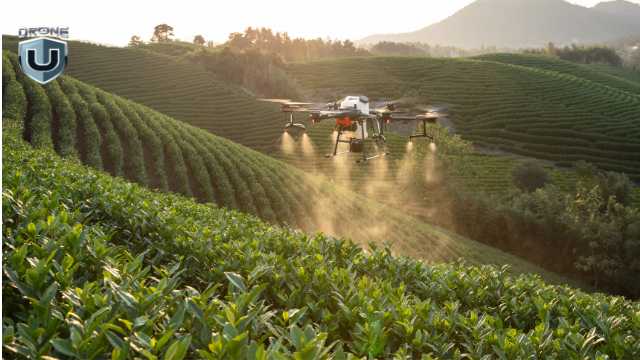
Crop Analysis: Top Drone Works in Rural Areas
You don’t need to chase city contracts to run a successful drone business.
In fact, many pilots earn a solid income from drone work in rural areas, often with less competition and more creative freedom. The key is knowing which jobs are in demand and how to position yourself for them.
This is a list of 7 proven drone jobs helping pilots make a mark and a buck out in the countryside.
1. Ranch & Farm Marketing
Ranch and farm marketing is one of the most profitable drone works in rural areas, but it’s often overlooked. In recent times, though, drone pilots are finding that farms and ranches have high value potential.
When it’s time to sell, owners and realtors want to show them off in the best possible light. That’s where your drone comes in. Where once tours on foot or in a vehicle were necessary to see these large properties, drones can map them quickly and cinematically.
This allows you to highlight:
- Water sources like lakes, ponds, or creeks
- Rolling terrain or wide pastures
- Livestock or wild game
- Barns, homes, and other structures
These videos help sell the lifestyle, peace, privacy, and open skies. With the right shots and music, your drone work becomes a powerful marketing tool.
In instances of multi-million-dollar properties, a well-shot drone video can help a ranch sell faster, which means huge commissions for the agent. If your work helps close the deal, your service becomes invaluable and worth a premium.
Pro Tip: Visit sites like LandWatch.com or Hayden Outdoors to see how rural land is marketed. Most listings still use basic photos. This is your opportunity to stand out.
If you can make flat farmland look cinematic, you’re ready. This niche takes creativity, but the payoff is worth it.
2. Home & Roof Inspections
Not all drone jobs in rural areas are flashy, but some are incredibly reliable. Home and roof inspections fall into this category.
In small towns or remote communities, there is a steady demand for high-quality aerial inspections, especially when properties are hard to access. With a drone, you can capture high-resolution images of:
- Roofs and chimneys
- Gutters
- Siding
- Foundation areas and surrounding structures.
These images are used by home inspectors, real estate agents, and insurance companies to assess property conditions safely and quickly.
Most inspection flights take less than an hour, but depending on your location and client, you can charge anywhere from $150 to $500 per job. Pilots working in larger rural zones often stack multiple inspections in a day, sometimes earning $1,000 or more.
This work becomes even more valuable and in demand after storms or natural events, when property owners need fast damage assessments for insurance claims.
Pro Tip: Reach out to local home inspectors and offer your drone as an add-on service. Many inspectors don’t fly drones or aren’t Part 107 certified, which gives you a relatively clear path forward.
If you’re looking for repeat business and consistent income, this is one of the most stable drone jobs in rural areas.
3. Utility & Infrastructure Inspections
Utility inspection is one of the fastest-growing drone works in rural areas, and it pays well. Power lines, pipelines, cell towers, water tanks, and wind turbines often stretch across remote, hard-to-reach places.
For utility companies, sending in a drone is far safer and faster than dispatching a crew to climb towers or navigate rough terrain.
As a drone pilot in this niche, you will capture detailed images and videos to check for:
- Damage, corrosion, or wear on structures
- Alignment on transmission lines
- Solar arrays’ efficiency and hotspots
- Pipelines and right-of-way conditions
These examples and other related tasks often require more precision and training, but the payoff can be significant.
Cell and utility providers still need inspections done regularly, but fewer pilots are willing to cover rural zones, which gives you an advantage.
Skilled drone pilots in utility inspection can earn $100K or more per year. This is especially true when they are contracted by large companies or work through subcontracting networks.
Pro Tip: If you’re new to this type of work, look into drone mapping or infrastructure inspection training. Some contracts also require safety certifications or specific hardware, but even basic visual inspections can help land your first contracts.
If you enjoy technical flying, structure, and systems, utility inspections offer a pathway into high-paying drone careers in rural markets.
4. Agricultural Mapping & Crop Analysis
If you live in a farming region, agriculture is one of the biggest opportunities for drone pilots. Farmers and agronomists are increasingly relying on drone data to manage crops, cut costs, and boost yields.
With the right tools, you can provide insights that help them make smarter decisions without setting foot on the field.
Using a standard or multispectral camera, drones can detect:
- Irrigation gaps and water stress
- Early signs of pests and disease damage
- Nutrient deficiency and soil health indicators
- Plant growth stages across large farms.
This type of work often involves creating:
- NDVI (Normalized Difference Vegetation Index) maps
- Field health reports
- Progress photos for insurance or farm planning
Many drone pilots start with basic orthomosaic mapping and gradually progress to more advanced crop analysis as they gain experience.
Pro Tip: Begin by collaborating with small farms or hunting preserves that need assistance with reclaiming or managing their land. Once you have examples/samples to show, it’s easier to land larger clients.
Agricultural drone work isn’t just about flying; it’s about delivering insights that drive results.
The niche can be highly profitable, but it rewards pilots who learn the tools and speak the farmer’s language.
5. Resort & Lodge Marketing
Rural areas aren’t just for farming; many are home to hunting lodges, lakeside cabins, glamping resorts, and remote getaways. These locations thrive on their natural beauty, and drone pilots can play a key role in bringing that beauty to the rest of the world.
High-quality visuals are essential for attracting guests. With your drone, you can create:
- Aerial video for promotional content
- Hero shots for websites and brochures
- Short social media clips (great for reels or ads)
- Seasonal update footage (fall colors, snowy cabins, summer lakes, etc.)
Many rural resorts don’t have in-house marketing teams, so they rely on freelancers for affordable, high-quality content. These places are often booked up during the summer or hunting season. Because of this, they usually need fresh visuals ready months in advance.
Pro Tip: Offer a seasonal package. For example, one flight in spring and another in fall, so they get year-round visuals, and you get repeat work.
If you enjoy visual storytelling, creative flying, and tourism marketing, this is one of the most fun and flexible drone niches. It can also lead to long-term partnerships with local tourism boards, travel brands, and resorts.
6. Real Estate & Land Listings
Rural land is often vast, remote, and hard to capture from the ground. That’s why agents, landowners, and brokers rely on real estate drone work to effectively showcase their listings. This creates opportunities for consistent income streams for a pilot.
Your services can include producing:
- Aerial video walk-throughs
- Wide-angle shots showing property lines
- Highlight reels of unique features (creeks, barns, tree lines)
- GPS-based flyovers for large acreage listings
These visuals help sell properties faster and at higher prices. In fact, listings with aerial photos consistently outperform those without.
Once you deliver a great first project, the clients will likely call you again when the next listing comes up.
Pro Tip: Check out sites like LandWatch.com or Lands of America for poorly marketed listings. Reach out to those agents and offer to upgrade their visuals. Share a reel of some of your work, and you stand a chance to turn a one-off job into a long-term contract.
While rural properties might take longer to sell, the payouts can be huge. One ranch drone job could lead to multiple listings, referrals, or even long-term media contracts with brokerages.
7. Banner Towing & Sightseeing Flights
If you’re a certified manned pilot or work with one, banner towing and sightseeing flights can be profitable add-ons to your drone business. This is especially true of areas with seasonal events or tourism traffic.
Local businesses, festivals, and even political campaigns often look for cost-effective aerial advertising. Flying banners over lake events, country fairs, festivals, etc., grabs attention like nothing else.
In scenic rural areas, mountains, lakes, farmland, or wildlife preserves, there’s growing demand for aerial tours. These could be marketed to tourists, real estate buyers, or even locals looking for a unique experience.
Offering 20–30 minute flights with a local guide can be both fun and profitable. If you’re already a manned pilot, adding these to your services could bring in seasonal but profitable gigs.
Pro Tip: Even if you’re not a manned pilot, consider partnering with one. You can handle the drone media while they fly tours or tow banners. It’s a win-win that opens up more services.
Banner towing and sightseeing won’t replace your main income stream, but they are a smart way to diversify revenue and tap into seasonal tourism markets and unexplored niches.
Conclusion
Rural areas are bursting with opportunity. Whether it’s real estate, tourism, agriculture, or marketing, there are multiple ways to cash in with drones outside metropolitan areas. In fact, you deal with less competition and fly in more open spaces, giving you better margins and more flexibility than in an urban environment.
The key is to choose the right niche, build a small but impressive portfolio, and start reaching out to local landowners, realtors, and businesses. Your camera drone can be a business tool that opens doors to steady income and long-term opportunities.
1
Best Drones for Wedding Photography: Pro Drone Pilot Edition
The wedding day is a once-in-a-lifetime event, and every couple dreams of capturing it in a way that feels just as magical as the moment itself.
While traditional wedding photography will always have its charm, drones have opened up a whole new world of possibilities for discerning couples.
These days, drone photography in weddings is no longer a “nice-to-have”. It’s actually a must-have for couples seeking cinematic, immersive storytelling. After all, who would want to miss out on those incredible aerial shots?
From dramatic venue reveals to sweeping group captures, drones bring a dynamic perspective to a wedding, something that can’t be done otherwise.
If you’re reading this, you’re probably looking for equipment that’s safe to fly and capable of capturing stunning, broadcast-quality footage.
In this guide, we’ve done the heavy lifting for you. Based on the latest releases, we’ve curated the best drones for wedding photography, organized by shooting style, budget, and operational needs.
First, let’s dive into what makes a drone truly wedding-worthy and which features will give you the edge in your next shoot.
What to Look for in a Wedding Photography Drone
Choosing a drone for wedding photography is more than picking the latest model. You need a machine that can deliver stunning visuals while staying reliable in unpredictable conditions.
Here are the key features to focus on:
- Camera Quality: Look for at least a 4K camera with a large sensor. Bigger sensors capture more light, which means sharper images and better low-light performance. This is essential for sunset shoots or dimly lit venues.
- Zoom: The ability to keep a good distance away from guests, and of course, the main characters, is critical to ensuring the drone is not a distraction.
- Stabilization System: A 3-axis gimbal is non-negotiable. It keeps your footage smooth, even in windy conditions. This is critical for capturing cinematic shots without jitters.
- Flight Time: Aim for a drone with a minimum of 25 minutes of flight time per battery. Weddings are long events, and you don’t want to miss a moment while swapping batteries too often.
- Obstacle Avoidance: Smart sensors prevent crashes in crowded areas. They’re instrumental when flying close to guests or buildings.
- Quiet Operation: Drones with low-noise propellers reduce distractions during the ceremony. No one wants buzzing sounds ruining the vows.
- Portability: If you’re traveling to the wedding location, a foldable and lightweight drone will make transport easier.
- Smart Shooting Modes: Features like ActiveTrack, Point of Interest, and QuickShots help create professional shots with minimal manual control.
- Reliability in Low Light: Some drones struggle when the light fades. Check reviews for performance in dusk or indoor settings.
Pro Tip: Always carry extra batteries and memory cards. Weddings are once-in-a-lifetime events; there’s no chance for a retake.
Top 5 Drones for Wedding Photography – By Style, Budget & Needs
We’ve categorized the best drones for wedding photography based on three key considerations: shooting style, budget, and operational flexibility. Each drone gets a quick intro followed by a specs table so you can compare easily.
A. For High-End Cinematic Wedding Filmmaking
These drones are built for professionals who prioritize visual storytelling, dynamic range, and top-tier footage quality. Ideal for luxury weddings, commercial-grade shoots, or teams with a dedicated pilot and camera operator.
1. DJI Inspire 3
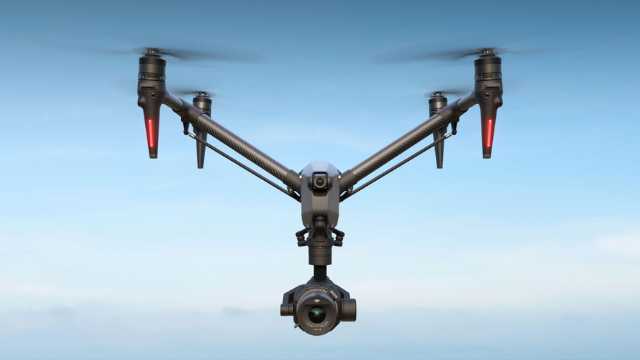
Source: DJI
The DJI Inspire 3 is a professional-grade drone designed for high-end wedding cinematography.
It comes with an FPV camera, supports 8K video, interchangeable lenses, and full-frame imaging, perfect for luxury weddings where clients expect movie-like footage.
Its dual-operator mode allows one person to pilot while another controls the camera for ultimate creative control.
Specifications:
| Feature | Detail |
| Camera Sensor | Full-frame Zenmuse X9-8K Air |
| Photo Resolution | 45MP |
| Video Resolution | 8K at 75fps (ProRes RAW) |
| Max Flight Time | 28 minutes |
| Transmission Range | Up to 15 km |
| Obstacle Avoidance | Omnidirectional |
| Weight | 4 kg (approx.) |
B. Best All-Rounders (Versatility + Performance)
These drones strike a balance between pro-level camera performance and portability, making them ideal for most wedding photographers and hybrid shooters.
2. DJI Mavic 4 Pro
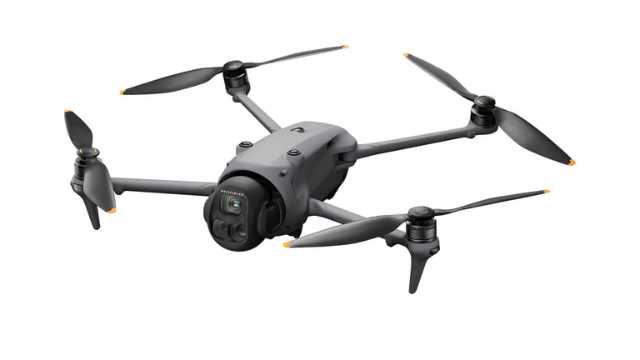
Source: DJI
Mavic 4 Pro is a top-tier flagship drone for solo wedding professionals. It features a 100MP Hasselblad camera and a 360° rotating gimbal. This allows for creative shots and unique angles during ceremonies and receptions.
Its triple-camera system captures sharp stills and cinematic 6K video. Low-light scenes, like golden hour or indoor receptions, look stunning.
With long flight time and advanced obstacle avoidance, it’s perfect for capturing safe, smooth, and professional wedding footage.
Specifications:
| Feature | Detail |
| Camera Sensor | 4/3 CMOS Hasselblad + Dual Tele cameras |
| Photo Resolution | Hasselblad Camera: 4/3 CMOS, Effective Pixels: 100 MP Medium Tele Camera: 1/1.3-inch CMOS, Effective Pixels: 48 MP Tele Camera: 1/1.5-inch CMOS, Effective Pixels: 50 MP |
| Video Resolution | Up to 6K at 60fps (HDR) |
| Max Flight Time | 51 minutes |
| Transmission Range | Up to 30 km (O4+ Transmission) |
| Obstacle Avoidance | Omnidirectional with LiDAR and low-light sensing |
| Weight | 1,063 g |
Note: If the Mavic 4 Pro is too expensive for you, the Mavic 3 Pro is still a solid option. It delivers excellent image quality and reliable performance for professional work.
3. DJI Air 3S
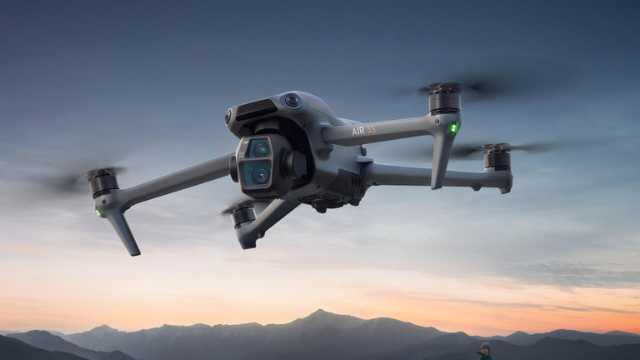
Source: DJI
The DJI Air 3S is a strong choice for those who travel often or prefer a smaller drone without losing quality.
The DJI Air 3S combines pro-grade camera specs with excellent flight performance and smarter safety features.
For wedding creatives who want a strong balance of image quality, low-light capability, and intelligent flight features, this drone checks all the boxes.
The upgraded 1-inch 50 MP main camera sensor delivers an ideal setting for golden hour portraits, shaded ceremonies, or low-light receptions.
The enhanced LiDAR-based obstacle sensing system helps you fly more confidently in tight or busy wedding environments.
You also get 4K slow motion up to 120fps, and 42GB of internal storage, which comes in handy if you ever forget an SD card or run out of space mid-event.
Specifications:
| Feature | Detail |
| Camera Sensor | 1″ CMOS (Wide, 50 MP) + 1/1.3″ CMOS (Tele, 48 MP) |
| Video Resolution | Up to 4K @ 120 fps / 1080p @ 240 fps |
| Dynamic Range | Up to 14 stops |
| Photo Resolution | 50MP (wide) / 48MP (tele) |
| Max Flight Time | 45 minutes |
| Transmission Range | Up to 20 km (O4 Transmission) |
| Obstacle Avoidance | Omnidirectional with forward LiDAR |
| Internal Storage | 42 GB |
| Weight | 724 g |
C. Budget-Friendly or Lightweight Options
If you’re starting or want something lightweight for spontaneous shoots, these models offer great performance at a lower price point.
4. DJI Mini 4 Pro
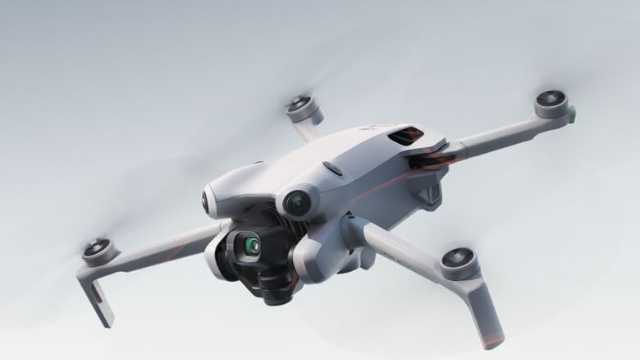
Source: DJI
The DJI Mini 4 Pro is a lightweight powerhouse, weighing under 249g.
Despite its size, it delivers excellent low-light performance, perfect for capturing romantic evening receptions.
Its portability makes it a primary or great backup drone for quick, candid wedding shots.
Specifications:
| Feature | Detail |
| Camera Sensor | 1/1.3″ CMOS |
| Photo Resolution | 48MP |
| Video Resolution | Up to 4K at 100fps |
| Max Flight Time | 34 minutes |
| Transmission Range | Up to 20 km (O4 Transmission) |
| Obstacle Avoidance | Omnidirectional |
| Weight | <249 g |
5. Autel EVO Lite+
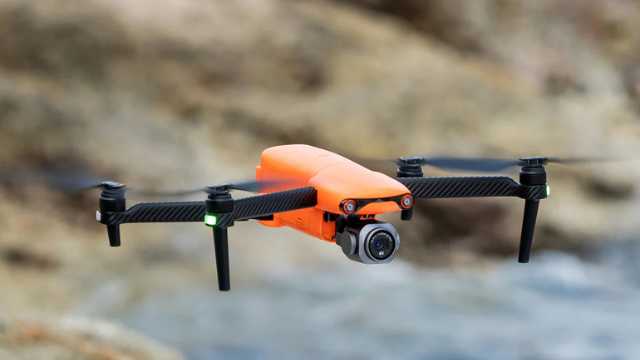
Source: Autel
The Autel EVO Lite+ is an excellent alternative to DJI models.
It offers a large 1-inch CMOS sensor and adjustable aperture for versatile shooting in changing lighting conditions.
It’s convenient for outdoor weddings with bright midday sun or low evening light.
Plus, Autel drones don’t have geo-fencing restrictions, giving you more flexibility in certain locations.
Specifications:
| Feature | Detail |
| Camera Sensor | 1-inch CMOS |
| Photo Resolution | 20MP |
| Video Resolution | 6K at 30fps |
| Max Flight Time | 40 minutes |
| Transmission Range | Up to 12 km |
| Obstacle Avoidance | 3-way (Forward, Backward, Downward) |
| Weight | 835 g |
Drone Comparison Table: Best Drones for Wedding Photography
To help you quickly evaluate which drone best suits your wedding photography needs, here’s a side-by-side comparison of all the models featured in this guide.
| Drone | Camera Sensor | Photo Resolution | Video Resolution | Max Flight Time | Obstacle Avoidance |
| DJI Inspire 3 | Full-frame Zenmuse X9-8K Air | 45MP | 8K at 75fps (ProRes RAW) | 28 minutes | Omnidirectional |
| DJI Mavic 4 Pro | 4/3 CMOS Hasselblad, 1/1.3″ & 1/1.5″ CMOS Dual Tele | 100MP / 48MP / 50MP | Up to 6K at 60fps | 51 minutes | 0.1-Lux Nightscape Omnidirectional |
| DJI Air 3S | 1″ CMOS (Wide, 50MP) + 1/1.3″ CMOS (Tele, 48MP) | 50MP (wide) / 48MP (tele) | 4K @ 120fps / 1080p @ 240fps | 45 minutes | Omnidirectional + Forward LiDAR |
| DJI Mini 4 Pro | 1/1.3″ CMOS | 48MP | Up to 4K at 100fps | 34 minutes | Omnidirectional |
| Autel EVO Lite+ | 1-inch CMOS | 20MP | 6K at 30fps | 40 minutes | 3-way (Forward, Backward, Downward) |
Conclusion & Recommendations
If you’re aiming for the best all-around drone for wedding filmmaking, the DJI Mavic 4 Pro stands out. It’s a workhorse for solo shooters and small creative teams who need cinematic quality without the bulk.
For creators who prioritize portability and flexibility, the DJI Air 3S offers an ideal middle ground. With its upgraded camera, smart LiDAR obstacle sensing, and generous internal storage, it’s perfect for dynamic wedding days.
If you’re just starting or want a lightweight, discreet option for capturing candid shots, the DJI Mini 4 Pro can be the choice.
Whatever drone you choose, don’t forget the essentials: FAA compliance, venue permissions, and client privacy are non-negotiable.
Fly smart. Stay focused. And always deliver something unforgettable.
0

The 7 Best Thermal Drones to Buy [2025]
Imagine a team of firefighters searching for a missing person in a smoky, dense forest. The situation feels hopeless until a thermal drone flies up above the chaos. Its thermal camera cuts through the smoke, revealing a faint heat signature hidden beneath the trees. In seconds, what seemed impossible turns into a life-saving rescue.
Thermal drones offer a powerful technological edge in mission critical search and rescue operations.
From finding a lost hiker in the woods to identifying crop problems before they become visible, thermal drones are revolutionizing the way we observe and interact with the world.
Thermal drones aren’t just your average flying cameras. These drones reveal a whole new world of heat and energy that our eyes simply can’t detect.
In this comprehensive guide, we’ll explore the best thermal drones to buy and help you choose the right one based on your specific needs and challenges.
Let’s dive in!
What are Thermal Drones?
Thermal drones are like flying tech superheroes. These unmanned aerial vehicles (UAVs) are equipped with infrared sensors that can detect heat signatures invisible to human eyes.
The thermal cameras on these drones pick up infrared signals and convert them into a visual image, creating a “heat map”. This heat map depicts the temperature distribution across objects or the landscape below.
This quality makes thermal drones useful for a variety of applications, such as:
- Search and Rescue: Thermal drones help in locating lost individuals in challenging conditions, such as at night, in dense forests, or after a disaster. Their ability to detect heat signatures can help rescue teams find survivors much faster than traditional search methods.
- Firefighting: Thermal drones identify hotspots within a fire, allowing firefighters to target their efforts more effectively and locate people who may be trapped in a burning building.
- Inspections: Thermal drones inspect buildings and infrastructure for heat loss, detect potential equipment failures, or identify damage after a storm. They can also be employed in agriculture to monitor crop health and irrigation needs.
- Agriculture: Thermal drones can monitor crop health, detect pests and diseases, and optimize irrigation and fertilization practices.
While thermal drones are still relatively new, they’re already making a big impact across industries due to their versatility and effectiveness.
Factors to Consider While Choosing a Thermal Drone
While evaluating thermal drones, we considered key factors such as sensor resolution, image quality, flight time, control range, and overall ease of use:
- Sensor Resolution: This refers to the detail and sharpness of the thermal images you capture. Higher resolution means you’ll see smaller temperature differences and get a clearer picture.
- Image Quality: This goes beyond just resolution and considers factors like how well the camera handles different temperatures and variations in light. A good thermal camera will produce clear, accurate images even in challenging conditions.
- Flight Time: This indicates how long the drone can stay in the air on a single charge. If you need to cover large areas or complete long inspections, you need a drone with a longer flight time.
- Control Range: The distance you can operate the drone from before the signal weakens. This is important for maintaining control and safety during flights.
- Ease of Use: This means how easy it is for you to fly and operate the drone. Consider your piloting experience and look for a drone with intuitive controls and features that make data collection efficient.
These factors can help you choose a thermal drone that delivers the required performance and functionality
The Best Thermal Drones: Our Top Picks in 2025
While there are over a dozen thermal drones available in the market, we found these 7 to be the best of the lot.
| Drone Model | Weight in grams | Flight Time | Thermal Camera Resolution | Price (USD) | Features |
| Autel Robotics Evo Max 4T XE | 1640 | 42 | 640X512 | $8,999 | 720° obstacle avoidance, A-Mesh system, SLAM Navigation |
| DJI Mavic 3T | 920 | 45 | 640×512 | $7,865 | Omnidirectional obstacle avoidance, compact foldable design |
| DJI M30T | 3770 | 41 | 640×512 | $13,907 | IP55 weather resistance, 7 km range, laser rangefinder |
| Autel EVO II Dual 640T V3 | 1209 | 38 | 640×512 | $4,799 | 360° obstacle avoidance, 50MP camera |
| Parrot Anafi USA | 500 | 32 | 320×256 (FLIR Boson) | $7,000 | NDAA-compliant, 32× zoom, portable design |
| Skydio X2E Color/Thermal | 1325 | 35 | 320×256 (FLIR) | $14,499 | AI autonomy, GPS-denied navigation, rugged build |
| Skydio X10 (Thermal) | ~2110 | 40 | 640×512 (FLIR Boson+) | $17,791.99 | AI autonomy, IP55 rating, modular payloads, 360° obstacle avoidance |
1. Autel Robotics Evo Max 4T XE
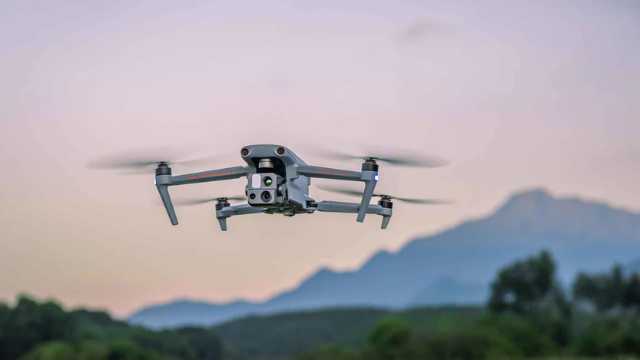
Source: Autel Robotics
The Autel Robotics Evo Max 4T XE is the next-generation successor to the original EVO Max 4T, released in early 2025. It packs a host of upgrades that make it one of the most advanced enterprise thermal drones available today.
The Evo Max 4T XE boasts a four-camera system. This includes a thermal camera with a resolution of 640×512, alongside a high-resolution wide camera, a powerful zoom camera with 10x optical zoom (and a maximum hybrid zoom of 160x), and a laser rangefinder. With this versatility, you can capture clear visual images and thermal data at the same time. This is useful in search and rescue missions, inspections, and firefighting.
Autonomy is where the XE shines. It can navigate using SLAM mapping, even in environments with no GPS. The improved A-Mesh networking system allows multiple drones to work together without losing communication.
The Evo Max 4T XE comes with a 720-degree obstacle avoidance system that combines special vision with radar technology. This allows it to detect and avoid obstacles even in low-light conditions or when the GPS signal is weak.
The XE can stay in the air for up to 42 minutes on a single battery. It also offers robust construction, better low-light performance, and stronger weather resistance than the older version. This makes it an ideal choice for professionals who need a reliable thermal drone in rugged real-world conditions.
Features of Autel Robotics Evo Max 4T XE
| Weight | 1640 grams |
| Dimensions | 576 x 660 x 149 mm (with propellers) |
| Max Flight Time | Up to 42 minutes |
| Operating Temperature | -20°C to 50°C |
| GNSS | GPS, Galileo, BeiDou, GLONASS |
| Zoom Camera | 1/2″ CMOS, Effective pixels: 48M |
| Wide Camera | 1/1.28 CMOS, Effective pixels: 50M, Night mode: 12.50M |
| Thermal Camera Resolution | 640 x 512 px |
| Thermal Imager | Uncooled VOx Microbolometer |
| Temperature Measurement Range | -20°C to 150°C, 0 to 550°C |
| Obstacle Avoidance | 720° |
| Remote Controller | Autel SkyLink 3.0 |
Pros
- Handles complex, high-risk missions with a multi-sensor payload.
- 720° obstacle avoidance increases safety in cluttered spaces.
- Works reliably in GPS-denied or low-signal environments.
- Long flight time supports extended inspections or search missions.
- Rugged build withstands dust, light rain, and temperature extremes.
Cons
- High cost (~$8,999) puts it out of reach for casual operators.
- Heavier and bulkier than portable thermal drones like the DJI Mavic 3T.
- Advanced features (SLAM, mesh networking) require skilled operators.
- Not NDAA-compliant, which may be an issue for U.S. government buyers.
2. DJI Mavic 3T
 Source: DJI
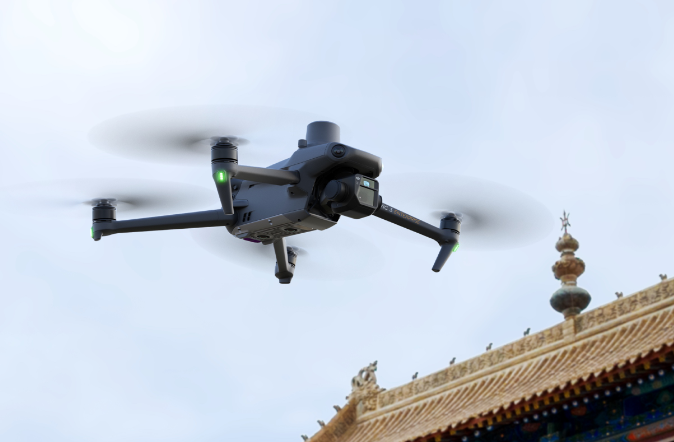
The DJI Mavic 3T stands out as a compelling option for professional thermal drone applications. It packs a 12 ?m thermal camera with a detailed 640 x 512 resolution, perfect for capturing precise thermal images. It also includes point and area temperature measurement, high-temperature alerts, and isotherms. These tools help pilots quickly locate targets and make fast decisions in critical situations.
Beyond thermal imaging, the Mavic 3T features a 48MP wide camera and a 12MP telephoto camera. This setup gives users multiple options for capturing both photos and videos.
Features of DJI Mavic 3T
| Weight | 920 grams |
| Dimensions (Folded – Without Propellers) | 221 × 96.3 × 90.3 mm |
| Max Flight Time | 45 minutes |
| GNSS | GPS, Galileo, BeiDou, GLONASS |
| Operating Temperature | -10°C to 40°C |
| Wide Camera | 1/2-inch CMOS, Effective pixels: 48 MP |
| Tele Camera | 1/2-inch CMOS, Effective pixels: 12 MP |
| Thermal Camera Resolution | 640 x 512 px |
| Thermal Imager | Uncooled VOx Microbolometer |
| Temperature Measurement Range | -20°C to 150°C, 0 to 500°C |
| Obstacle Avoidance | Omnidirectional |
| Remote Controller | DJI RC Pro Enterprise |
Pros
- Compact and portable design.
- Strong 640×512 thermal sensor with measurement tools.
- Long 45-minute flight time.
- Omnidirectional obstacle avoidance.
- Affordable compared to larger enterprise drones.
Cons
- Not weather-sealed (no IP rating).
- Limited zoom and sensor size vs. M30T.
- Fewer industrial features (no rangefinder).
- May face limited availability as newer DJI models arrive.
3. DJI M30T
 Source: DJI
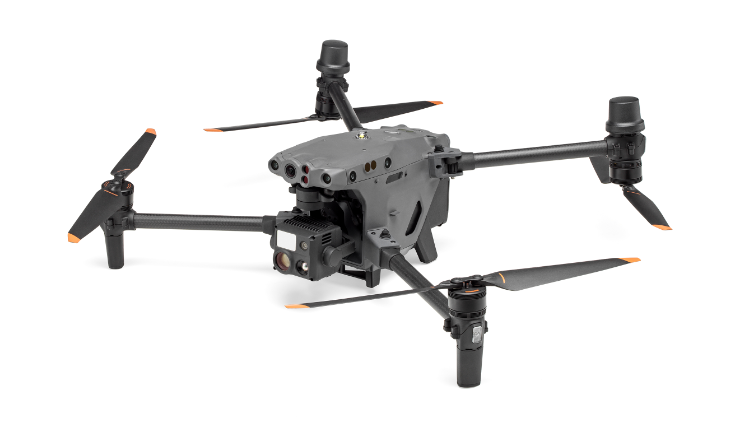
The DJI Matrice 30T (M30T) stands out as a powerful thermal drone for many reasons. First, it integrates a high-resolution thermal camera alongside regular high-megapixel visible cameras. This lets you capture detailed imagery in both spectrums, providing valuable data for various applications.
With an IP55 weather resistance rating, it can handle rain, snow, dust, and other challenging conditions.
The M30T boasts an impressive maximum operation range of 7 kilometers and a long flight time. This allows you to cover large areas efficiently, making it ideal for tasks that require extensive ground coverage.
Features of DJI M30T
| Weight | 3770 grams |
| Dimensions (Folded) | 365×215×195 mm |
| Max Flight Time | 41 minutes |
| GNSS | GPS, Galileo, BeiDou, GLONASS |
| Operating Temperature | -20°C to 50°C |
| Zoom Camera | 1/2″ CMOS, Effective pixels: 48M |
| Wide Camera | 1/2″ CMOS, Effective pixels: 12M |
| Thermal Camera Resolution | 640 x 512 px (Normal mode), 1280 × 1024 px (Infrared) |
| Thermal Imager | Uncooled VOx Microbolometer |
| Temperature Measurement Range | -20°C to 150°C, 0 to 500°C |
| Obstacle Avoidance | Omnidirectional |
| Weather Resistance | IP55 |
| Remote Controller | DJI RC Plus |
Pros
- Multi-sensor payload with thermal, zoom, wide, and rangefinder.
- Thermal features (isotherms, alarms) improve field efficiency.
- Rugged IP55 weather resistance for outdoor operations.
- Reliable 41-minute flight time and strong transmission range.
- Ideal for critical industries like energy, firefighting, and public safety.
Cons
- Heavier and bulkier than smaller enterprise drones.
- Expensive (around $13,000+).
- Requires two-operator workflows in some cases for best results.
4. Autel EVO II Dual 640T V3
Source: Autel Robotics
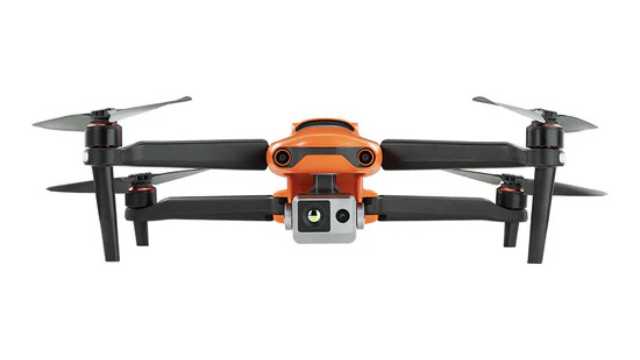
The Autel EVO II Dual 640T V3 is a versatile and more budget-friendly option compared to larger enterprise drones.
It boasts a powerful one-two punch with a high-resolution visual camera (50MP) and a thermal imaging sensor (640 x 512 resolution). This lets you capture regular and thermal images at the same time, which is useful in search and rescue or inspection scenarios.
The V3 upgrade also delivers good image quality. The thermal sensor’s high resolution and good sensitivity translate to capturing detailed thermal images even in low-light conditions.
An additional perk is the 360-degree obstacle avoidance system, which helps prevent crashes in tight environments. With a maximum of 38 minutes of flight time, it gives you solid coverage for mid-sized missions without frequent battery swaps.
At a lower price point than many competitors, the 640T V3 is aimed at professionals who want strong imaging without investing in a top-tier enterprise drone.
Features of Autel EVO II Dual 640T V3
| Weight | 1209 grams |
| Dimensions (Folded) | 230 x 130 x 108 mm |
| Max Flight Time | 38 minutes |
| GNSS | GPS, Galileo, BeiDou, GLONASS |
| Operating Temperature | -10°C to 40°C |
| Camera | 1/1.28″(0.8″) CMOS; 50 MP |
| Thermal Camera Resolution | 640 x 512 px |
| Thermal Imager | Uncooled VOx Microbolometer |
| Temperature Measurement Range | -20°C to 150°C, 0°C to 550°C |
| Obstacle Avoidance | Omnidirectional |
| Remote Controller | Autel Smart Controller V3 |
Pros:
- Dual-camera system makes it easy to capture thermal and visual data in one flight.
- Thermal resolution (640×512) is strong for its price class.
- 360° obstacle avoidance provides safer flying for less experienced pilots.
- Lighter and more portable than heavier enterprise drones.
Cons:
- Shorter flight time (38 minutes) compared to premium enterprise drones.
- Fewer advanced autonomy features than flagship models.
- Better suited for small-to-mid inspections, not for large-scale industrial projects.
5. Parrot Anafi USA
Source: Parrot
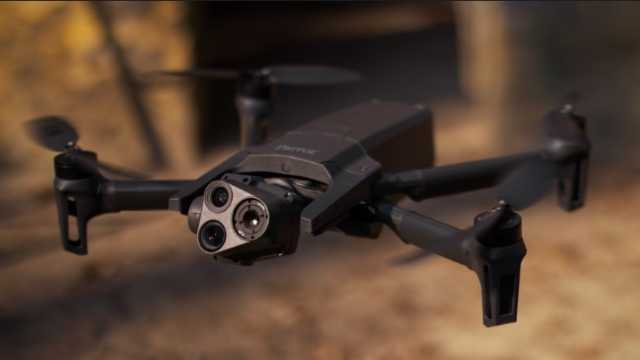
The Parrot Anafi USA steps in as the successor to the discontinued Anafi Thermal. It is built to meet both professional and government needs.
It features a FLIR Boston thermal camera with 320×256 resolution, paired with two 21 MP cameras (wide and telephoto). The telephoto option allows up to 32x zoom, helping spot details from long distances. This combination lets you capture both detailed images and heat signatures in the same flight.
The FLIR Boson sensor detects temperature differences with precision, making it valuable for search-and-rescue, building inspections, and environmental monitoring. With compatible software, you can also generate thermal maps of the surveyed area for analysis.
The Anafi USA is lightweight and compact. You can fold it up and carry it easily, making it perfect for teams that need to deploy quickly. It’s widely used by first responders, inspection crews, and defense organizations.
With a flight time of up to 32 minutes, it balances portability with reliable performance. While it doesn’t have the same ruggedness as larger enterprise drones, it remains a solid option for fast, mobile missions.
Features of Parrot Anafi USA
| Weight | 500 grams |
| Dimensions (Folded) | 252 x 104 x 84 mm |
| Max Flight Time | 32 minutes |
| GNSS | GPS, GLONASS, GALILEO |
| Operating Temperature | -10°C to 40°C |
| Camera | CMOS 1/2.4″, 21MP |
| Thermal Camera Resolution | 320 x 256 px |
| Thermal Imager | 9 Hz FLIR Boson Microbolometer |
| Temperature Measurement Range | -40°C to 150°C |
| Remote Controller | Parrot Skycontroller 4 or the optional Skycontroller USA |
Pros:
- NDAA-compliant and secure for government and defense work.
- Portable and lightweight; very easy to transport.
- Dual 21 MP cameras with up to 32× zoom.
- Quick setup and user-friendly operation.
- Trusted FLIR thermal sensor for reliable heat detection.
Cons:
- Lower thermal resolution (320×256) compared to Autel and DJI competitors.
- Average flight time (32 minutes).
- Limited weather resistance (not built for harsh rain or dust).
- Better suited for fast deployments than large-scale industrial projects.
6. Skydio X2E Color/Thermal
 Source: Skydio
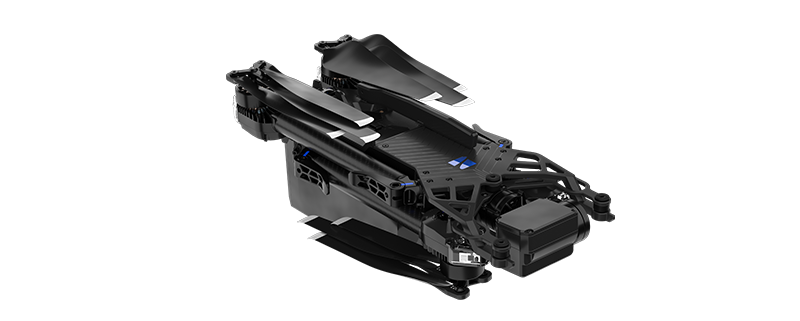
The Skydio X2E Color/Thermal can take search and rescue missions to the next level, thanks to its revolutionary Autonomy Enterprise technology.
The X2E is a game-changer when it comes to autonomous flight. Its AI-driven flight engine delivers unparalleled 360-degree obstacle avoidance, allowing the drone to navigate complex environments with ease. It can also automatically track targets and perform GPS-denied navigation, thus becoming an indispensable drone for search and rescue operations.
The X2E is much more than it meets the eye.
It isn’t just smart, it’s also built to last. The ruggedized, foldable airframe is designed to withstand demanding conditions, while the GPS-based night flight and strobing lights (in both visible and infrared wavelengths) ensure you can operate effectively around the clock.
Equipped with a dual sensor payload, the X2E combines a high-resolution 12MP color camera and a FLIR® 320×256 thermal imager. It also gives you the flexibility to seamlessly switch between visual and thermal imaging, providing a comprehensive view of any situation.
Features of Skydio X2E Color/Thermal
| Weight | 1325 grams |
| Dimensions (Unfolded) | 66 x 56 x 20 cm |
| Max Flight Time | Up to 35 minutes |
| Operational Temperature Range | -10°C to 43°C |
| Camera | Sony IMX577 1/2.3” CMOS; 12.3MP |
| Thermal Camera Resolution | 320×256 px |
| Thermal Imager | FLIR Uncooled VOx Microbolometer |
| Obstacle Avoidance | Omnidirectional |
| Remote Controller | Skydio X2 Controller |
Pros:
- Exceptional autonomous navigation — flies safely even without GPS.
- AI-driven obstacle avoidance in 360°.
- Rugged design with night flight lights for all-day missions.
- Portable, foldable design for quick deployment.
- Reliable dual-sensor setup for thermal + visual data.
Cons:
- Thermal resolution (320×256) is lower than Autel or DJI competitors.
- Flight time (35 minutes) is decent but not class-leading.
- More expensive than drones with similar thermal specs.
- Slowly being phased out and not available for individual customers. It is still supported but may be limited to existing stock.
7. Skydio X10 (Thermal)
Source: Skydio
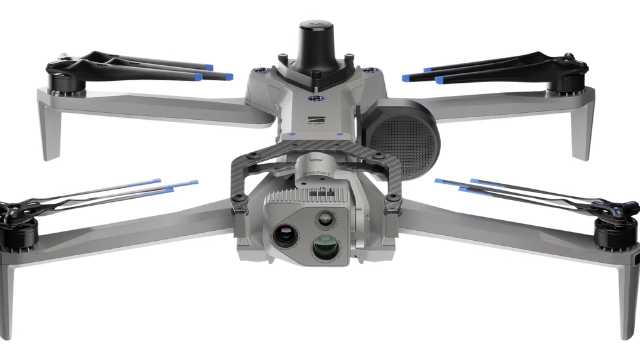
The Skydio X10 is the next-generation replacement for the X2E. It’s built for enterprise and public safety missions where autonomy, imaging, and ruggedness are critical.
The X10 can be equipped with a dual thermal/visual payload. It carries a 640×512 thermal sensor (an upgrade over the X2E’s 320×256) and high-resolution RGB cameras. The system also supports zoom options, giving operators both detailed thermal imaging and sharp color video in one flight.
Like its predecessor, the X10 uses Skydio Autonomy, an advanced AI engine that allows full 360° obstacle avoidance, subject tracking, and GPS-denied navigation. But the X10 packs faster processing, stronger low-light sensing, and more accurate object detection.
The X10 is rugged and field-ready. It features IP55 weather resistance, strobe lighting for night flights, and foldable arms for portability. With around 40 minutes of flight time, it’s designed for long missions in search-and-rescue, inspection, and defense work.
Features of Skydio X10 (Thermal)
| Weight | 2.11 Kg |
| Dimensions (Folded) | 13.8? × 6.5? × 4.7? (35.05 cm × 16.51 cm × 11.94 cm) |
| Max Flight Time | Up to 40 minutes |
| GNSS | GPS, GLONASS, Galileo, BeiDou |
| Operating Temperature | –20°C to 45° C |
| Camera | Samsung 1/2.8″ 32MP color CMOS |
| Thermal Camera Resolution | 640 × 512 px |
| Thermal Imager | Radiometric FLIR Boson+ |
| Temperature Measurement Range | –40 °C to 350 °C,-40° C to 150° C |
| Obstacle Avoidance | Omnidirectional |
| Remote Controller | 6.6? Dynamic AMOLED touchscreen controller |
Pros:
- Radiometric FLIR Boson+ thermal sensor for precise temperature mapping.
- Upgraded autonomy with AI-driven 360° obstacle avoidance.
- Rugged IP55 build — handles rain, dust, and wind up to 28 mph.
- Long flight time (~ 40 min) and quick deployment (< 40 s).
- Modular payloads (VT300-Z) great for inspections or public safety.
- Secure, encrypted comms and NDAA-compliant.
Cons:
- Weight (~2.1 kg) makes it heavier than many foldable drones.
- Premium price — enterprise-grade cost and availability.
- Advanced modular system may need operator training and integration planning.
- Radiometric thermal payload adds cost compared to simpler configurations.
Choosing the Right Thermal Drone for Your Specific Application
Choosing the right thermal drone depends largely on your needs, experience, and budget. Whether you’re just getting started or managing complex operations, there’s a drone designed to fit your mission.
Let’s break down some of the top thermal drones we’ve covered in this article:
For hobbyists or those on a budget: The Parrot Anafi USA is a great starting point. It’s portable, easy to fly, and NDAA-compliant. While its thermal resolution (320×256) is lower than others, it’s an affordable way to get started with thermal imaging.
For portability and balanced performance: The DJI Mavic 3T is compact and easy to carry. It delivers excellent 640×512 thermal imaging and long flight times. It’s a good choice for operators who want both mobility and professional results.
For advanced professional use: If you’re working on more serious projects, the DJI M30T and Autel EVO II Dual 640T are the ones to watch. The M30T offers rugged IP55 weather protection and a laser rangefinder, making it ideal for inspections and public safety. The 640T V3 provides high-resolution thermal imaging at a more accessible price, making it the best option for smaller teams.
For cutting-edge autonomy and industrial work: The Autel Evo Max 4T XE and Skydio X10 stand out. The Evo Max 4T XE is built for complex, large-scale operations that demand reliability and coordination. The Skydio X10 shines in challenging environments where advanced autonomy and rugged design are critical.
Choosing the right drone is only the first step. Software compatibility, payload flexibility, and reliable warranty support are just as important for long-term success.
With the options in this guide, you can confidently pick a thermal drone that matches both your mission needs and your budget.
Frequently Asked Questions
1. Can thermal drones be used for commercial inspections?
Yes, thermal drones are widely used in commercial inspections to detect heat anomalies in buildings, electrical systems, and solar panels.
2. What accessories are essential for thermal drone operations?
Essential accessories include extra batteries, carrying cases, ND filters for cameras, and thermal analysis software.
3. How do I maintain thermal sensors?
Regularly clean the lens with a microfiber cloth, calibrate sensors as per manufacturer guidelines, and store the drone in a protective case when not in use.
4. How much does a thermal drone cost?
Thermal drones vary widely in price depending on features and use case:
- Entry-level models start around $500 to $5,000 (e.g., DJI Mavic 2 Enterprise Dual, Autel EVO II Dual 640T)
- Professional mid-range drones cost $5,000 to $15,000, offering higher-resolution cameras and better flight performance.
- Industrial-grade systems with advanced payloads typically range from $15,000 to $30,000+ (e.g., DJI Matrice 350 RTK, Skydio X2E).
5. Can thermal drones see through walls or glass?
No. Thermal cameras detect surface temperatures and heat differences. They cannot see through walls or glass, but they can reveal hot spots, leaks, or insulation problems on surfaces.
2
Class G Airspace: A Comprehensive Guide for Drone Pilots (2025)
Ever felt grounded by FAA red tape when all you wanted was a quick recreational drone flight? That’s exactly where Class G airspace comes into play.
It’s the one airspace where drone pilots have the most freedom. Simply because it is the only category of airspace where you don’t need prior FAA authorization or LAANC approval. Just take off and fly.
Isn’t that great?
But here’s the catch. “Uncontrolled” doesn’t mean “unrestricted”. Even in Class G, you still need to follow safety rules and FAA requirements, including Remote ID, to keep your flights safe and legal.
In this comprehensive guide, we’ll explain what Class G airspace is, how to identify it, and the key regulations every drone pilot needs to know before flying.
Let’s get started.
What is Class G Airspace?
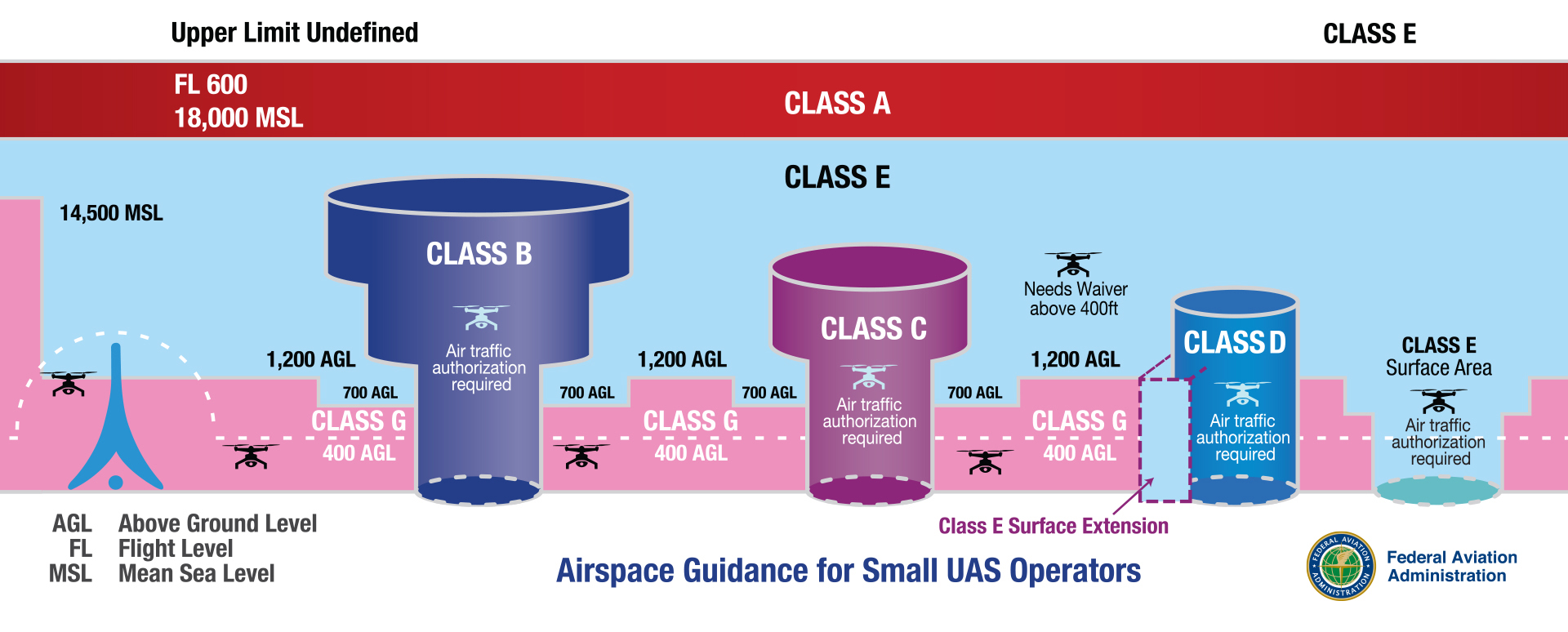
Class G (Golf) airspace is the only uncontrolled airspace in the United States. This means that air traffic control (ATC) does not manage or control aircraft in it.
But “uncontrolled” does not mean “no rules.” It simply means ATC does not actively direct traffic in Class G airspace.
They can provide traffic advisories or flight information if requested, but they have no authority to manage aircraft in this airspace.
So, no radar coverage, no control tower giving instructions, and no FAA authorization required. As long as you follow the FAA’s Part 107 rules, or recreational flyer rules, you’re clear to fly.
Class G isn’t just for hobbyists. Many Part 107 commercial operations, like agriculture, real estate photography, and land mapping, also take place in this airspace.
Where is Class G Airspace Located?
Class G airspace fills in the gaps where controlled airspace doesn’t exist. In other words, it’s the space outside of Class B, Class C, Class D, or Class E airspace.
You’ll typically find Class G airspace at lower altitudes, close to the ground, and often in sparsely populated areas. It covers rural areas, farmlands, remote valleys, forests, deserts, and even stretches along coastlines.
If you’re flying in the middle of nowhere, and far from airports or major cities, you are in Class G airspace.
Not sure how Class G compares to other types? Our full guide to U.S. airspace classes breaks down the differences.
Now that you know what Class G airspace is, let’s talk about what matters when you’re flying a drone in this airspace.
Rules for Flying a Drone in Class G Airspace
Just because you don’t need air traffic control (ATC) clearance doesn’t mean Class G is a free-for-all.
The FAA still expects drone pilots to follow standard safety guidelines, altitude limits, and visibility requirements.
Here are a few baseline safety regulations every drone pilot should know:
1. Visibility and Cloud Clearance Requirements
Even in uncontrolled airspace like Class G, you must meet specific visibility requirements. These are designed to keep you and other aircraft safe in the sky.
When flying in Class G airspace below 1,200 feet AGL (during the day):
- Stay 500 feet below the clouds
- Stay 2,000 feet horizontally away from clouds
- Maintain 3 miles of visibility (that’s about 4.8 km or 50 football fields)
If flying above 1,200 feet AGL and at or above 10,000 feet MSL:
- Maintain 5 miles of visibility
- Stay 1,000 feet above clouds
- Stay 1,000 feet below clouds
- Stay 1 mile horizontally from clouds
Why does this matter?
Low-flying manned aircraft, like helicopters, crop dusters, or medical transport flights, also use this airspace. Good visibility and separation from clouds help you see them (and let them see you) before it’s too late.
2. Maximum Altitude and Line of Sight
In Class G airspace, you have more freedom, but that doesn’t mean you can fly as high as you want. The FAA sets a hard limit: you must keep your drone at or below 400 feet AGL.
There’s only one exception: When near a structure, you can fly up to 400 feet above it.
For example: If you’re inspecting a 300-foot radio tower, you can fly up to 700 feet AGL, but only while staying close to the tower.
In addition to the height limit, you must also keep your drone within your visual line of sight (VLOS). You must see your drone with your own eyes the whole time, not through goggles, screens, or binoculars.
If you lose visual contact, even for a second, you’re out of compliance. So avoid flying behind hills, buildings, or trees that might block your view.
Together, the altitude and line-of-sight rules help prevent drone accidents and mid-air conflicts with low-flying manned aircraft, which often operate in Class G airspace.
Another rule worth noting here is Remote ID. Even though Class G doesn’t require FAA authorization, most drones still need to broadcast identification and location while flying. This ensures accountability and helps authorities keep the skies safe.
Alright, so now that you know the rules for flying safely in Class G airspace, the next big question is:
How to Identify Class G Airspace on Sectional Charts?
Sectional charts are a primary tool to identify controlled airspace classes (like B, C, D, and E) with various lines, shadings, and symbols. However, Class G airspace doesn’t get the spotlight because it exists wherever controlled airspace doesn’t.
If you’re looking at a piece of land on a sectional chart and don’t see any shaded rings or special markings, that area is likely Class G airspace.
In other words, from the surface up to the next controlled layer, you’re in Class G airspace.
However, you can still use a sectional chart to identify class G airspace. Here’s how:
1. Shaded Magenta Rings
A fuzzy magenta ring on a chart indicates that Class E airspace starts at 700 feet AGL. Everything below that ring is Class G.
2. Shaded Blue Rings
A fuzzy blue ring means that Class E airspace starts at 1,200 feet AGL. Again, everything below that is Class G.
3. Hard Magenta or Blue Lines
Solid lines (magenta or blue) often outline Class C or D airspace. These zones typically sit around towered airports, and Class G airspace exists outside these zones.
4. No Ring or Marking?
If you see no rings or shading, and you’re looking at a remote or rural area, it means the airspace is Class G from the surface to either 700 or 1,200 feet AGL.
In extremely remote areas (like forest zones, deserts, or mountainous regions), Class G airspace may extend all the way up to 14,500 feet MSL. This situation is rare and usually happens only where no other controlled airspace exists above it.
Tools like SkyVector, VFRMap, and ForeFlight let you view sectional charts online and zoom into specific areas. But for most drone pilots, FAA-approved apps like B4UFLY or Aloft(Kittyhawk) are the simplest way to confirm whether you’re in Class G.
Why Class G Airspace is Ideal for Drone Pilots
If you’re just starting with drones or are an experienced pilot under Part 107, Class G airspace gives you the most flexibility. It’s the zone where the FAA steps back, and you take full responsibility for flying safely.
Here’s why Class G airspace is often the easiest and most flexible space for drone pilots to work in:
1. No Authorization Wait Times
In controlled airspace like Class B, C, D, or surface-level Class E, you must get FAA authorization before you fly. That usually means using LAANC or going through the FAA’s DroneZone, which can take time, especially for manual approvals.
In Class G, there’s no waiting. You can launch your drone immediately.
No need to file any permit requests. As long as you’re following Part 107 rules (or flying recreationally under the Exception for Limited Recreational Flyers), you’re clear for takeoff.
2. Fewer Air Traffic Conflicts
Controlled airspace usually surrounds busy airports, major cities, and high-traffic corridors. That’s where you’ll find more manned aircraft, planes, helicopters, and even emerging air taxis flying. As a drone pilot, that creates risk and extra pressure to stay aware.
Whereas, Class G airspace usually covers remote and rural areas, far away from commercial airports. This makes it less likely you’ll encounter frequent low-flying aircraft.
This combination of freedom and reduced risk is what makes Class G so appealing to drone pilots.
Conclusion
Class G airspace offers something every drone pilot values most: the freedom of flying. But with that freedom comes responsibility. Even though Class G airspace is uncontrolled, it’s not unregulated.
ou hold full responsibility for flying safely, spotting other aircraft, and knowing where you can and cannot fly. It also means recognizing Class G airspace on a sectional chart so you don’t accidentally drift into restricted airspace.
Want to learn more about airspaces and how to fly a drone like a pro?
Explore our drone pilot training programs here.
Frequently Asked Questions
1. Do I need FAA permission to fly in Class G airspace?
No. You don’t need FAA authorization to fly in Class G airspace. Just follow Part 107 rules, and you’re good to go.
2. Can I fly above 400 feet in Class G airspace?
Yes, but only when flying near a structure. You can go 400 feet above the structure’s height, as long as you stay close to it.
3. What apps can help me find Class G airspace?
For FAA-backed guidance, use apps like B4UFLY or Aloft (formerly Kittyhawk), which provide real-time “Can I fly here?” information.
If you want to study airspace in more detail, tools like SkyVector and VFRMap are excellent for reading sectional charts.
4. Is it safe to fly in Class G airspace?
Yes, as long as you stay alert. Class G is low-traffic, but watch for helicopters and crop dusters flying low and fast.
5. Can I use LAANC in Class G?
No. LAANC is required when you fly in controlled airspace. That means Class B, Class C, Class D, and Class E airspace that starts at the surface.
Anywhere an airport control tower manages flights, you’ll likely need LAANC. It’s not required in Class G or uncontrolled Class E.
6. Do I still need Remote ID in Class G?
Yes. Remote ID is required even in uncontrolled (Class G) airspace.
The only exceptions are if your drone weighs under 250g and is flown recreationally, or if you’re flying inside an FAA-Recognized Identification Area (FRIA).
2
The Best Drone Mapping Classes — Why Drone U Stands Out
You’ve probably heard other drone pilots say, “There’s real money in drone mapping.” And it’s true.
Construction, infrastructure, film, or agriculture, nearly every industry is looking for accurate aerial insights.
The demand is only growing. According to Verified Market Reports, the drone surveying and mapping services market is projected to reach $14.5 billion by 2033, growing at a compound annual growth rate (CAGR) of 9.8%.
With the right training, you’re not just flying a drone, you’re solving real problems from the sky.
But figuring out where to start and what actually works on real jobs can be overwhelming.
You’ve flown a few mapping missions and even tested out DroneDeploy or Pix4D. But turning that raw footage and data into something accurate and usable for the clients feels like a challenge.
You’re not alone. Many pilots hit the same wall between learning the tools and delivering results that the client can trust.
Before building mapping workflows that earned six figures, I was just like you. Hunting for resources, flying test missions, and trying to learn from YouTube tutorials and forum threads. That’s why this course was created.
In this article, we’ll break down what makes a good drone mapping course useful in the field. We’ll also explore why Drone U’s mapping course is the go-to option for working pilots across the U.S.
What Makes a Great Drone Mapping Class?
Most mapping courses just teach you the basic controls, not how to solve real problems. You might learn how to set up a flight or run a mission in Pix4D. But these courses fail to help you understand what’s happening behind the scenes or what to do when things don’t go as planned.
Let’s say you’ve learned how to fly a basic grid pattern and generate a 2D map
But then a real work comes up and the client says, “Can you also provide us a volume calculation and an annotated orthomosaic?”
Suddenly, you go blank.
The bigger issue is that you present a map or model to a client, and the deliverable doesn’t actually align with real-world coordinates. Your elevations are 1 foot off, and you can’t figure out why.
Georeferencing is where most people fail. If you don’t understand geoid vs. ellipsoidal heights, orthometric heights, or coordinate systems, you’ll run into problems. Without that knowledge, your maps won’t align with the real world.
That’s when doubt creeps in. You’re not sure if you captured the right data. You doubt your overlap settings. You switch to YouTube videos, googling workflows, and wondering ways to fix the gap.
This is where many pilots get stuck. This happens not due to a lack of effort. This is because the pilots were never taught how to handle real-world challenges.
Things like site constraints or unexpected data gaps can throw the project off track. Mapping training is not just about learning to fly or using the best software. It helps you to think quickly through mapping missions, under pressure, and still deliver clean results.
That’s where most mapping training falls short. This is exactly what makes the Drone U course different.
Great training guides you to the right questions:
- What kind of map or deliverable does the client need?
- What’s the right acquisition plan or map path to get that result?
- How do you spot errors in the field before they ruin your outputs?
- And how do you troubleshoot when things go wrong (because they will)?
This kind of skill only comes from learning the mapping process from end to end. That’s what the best drone mapping courses are designed to address.
Most importantly, a great course gives you context and the full picture. They teach you how to plan, fly, understand the process, mission type, and workflow, confidently with the ned result in mind.
So, what do we cover in this hands-on training? We’ll explore that in the next section.
What You’ll Learn in Drone U’s Mapping Course
Over the past 8 years, Drone U’s mapping course has evolved with the drone industry itself. Rather than just focusing on theory, the course covers practical, field-tested workflows, from mapping active construction sites to navigating complex industrial environments.
The goal of this course is to show how to think like a mapping pilot, so that you understand why you’re flying the mission a certain way. It’s a complete toolkit for pilots to capture, process, and deliver high-quality mapping data that the clients can use.
Here’s the breakdown of Drone U’s Mapping course:
1. Real-World Flight Acquisition
You’ll learn how to fly the right mission for the job.
For example, you’re shooting a construction site.
If the client wants a clean top-down view for documentation, you’ll fly a standard 2D grid. If they’re asking for accurate measurements or want to model walls and slopes, you need to switch to a double grid or add obliques.
However, if they need a full 3D model to visualize site progress, you’ll capture orbits and use smart oblique flights.
What we want to emphasize here is that each flight has a purpose. This course shows you how to plan a flight based on the deliverables, rather than on guesswork.
This training gives you a repeatable system, so you don’t have to re-fly or fix mistakes later.
Whether you need to create life-like 3D models with our proven orbital capture system or you need to learn how to create large-scale georeferenced 2D maps, you’ll learn the systems necessary to always get it right.
2. Geo-Accuracy Without Guesswork
Real-Time Kinematic(RTK) and Ground Control Points (GCPs) are how you ensure your map is not only pretty but also accurate and precise enough for real-world decisions.
Picture this: A client needs to measure slope grades for a drainage plan. After the mission, you realize that your model is off by 6 inches because you skipped geo-referencing. This can end up as a costly mistake.
This course walks you through how to capture accurate, aligned data, whether you’re using RTK or flying without it.
You also understand the level of accuracy required for different jobs and learn what to say when a client asks.
You’ll finally understand how to:
- Set up RTK and PPK (Post-Processed Kinematic) correctly
- Place and process GCPs with confidence
- Geo-reference your data to match client coordinates and project baselines
Even if you’ve struggled with this stuff before, we break it down simply.
3. Cloud-Based vs Desktop Processing
Not all data can be processed on your laptop, and not all cloud platforms provide high-quality results. You’ll compare workflows using tools like Pix4D, droneDeploy, and Esri SiteScan to figure out what’s best for your business.
You learn to use powerful tools to clean up point clouds, align models, and fine-tune your outputs. This course also helps you build a repeatable, scalable workflow that fits your business needs.
For instance, a client needs inspection results on the same day. In that case, you can use cloud-based services for quick delivery. But for high-resolution 3D mesh work, like modeling a telecom tower, it’s best to process everything locally on your computer. You have full control over the data and preserve all the details in your model.
4. Orthos, DSMs, Splats, and 3D Meshes
Just creating a map won’t be enough. You have to deliver the right format that solves a specific problem.
You’ll learn:
- How to create clean, aligned orthomosaics for construction progress reports.
- The difference between a DSM (Digital Surface Model) and a DTM (Digital Terrain Model), for site modeling and grading. Also, when each matters.
- 3D Mesh for asset visualization or inspection.
- Point clouds for volume calculations and CAD overlays for different industries
You won’t just generate data. You’ll learn how to make it useful.
5. Interpret, Analyze, and Deliver Usable Insights
At the end of the day, drone mapping is about solving real business problems. You’ll learn to extract real insights from your data and turn them into clear client reports.
You’ll learn how to present your results clearly and confidently, even to non-technical clients.
Because in the real world, delivering valuable insights is what gets you hired again. This is what separates professionals from hobbyist pilots.
So, how do we learn all of this? With the Drone U method. This drone mapping course is designed to give pilots real-world confidence, not just theoretical knowledge.
Inside the Drone U Mapping Course
Real success in mapping comes down to what you do before and after the flight, especially in environments that rarely go according to plan.
That’s why Drone U’s mapping course trains you to think and fly like an active pilot and deliver high-value results and maps.
Here’ how:
1. Real-World Mapping
You’ll watch real pilots fly real missions in stadiums, construction sites, and even in complex locations. Locations with no ideal conditions and unpredictable requirements that clients will throw at you.
Instead of a clean, empty park, imagine mapping a large stadium with changing lights or flying a job site with trucks constantly obstructing your mission path.
Drone U prepares you for these kinds of hands-on challenges because that’s what clients expect. You’ll be prepared to solve problems in the field and thrive where others fail. You’ll understand the pivotal relationship between the acquisition of data and the processing of data.
2. Hands-on Learning
You don’t know whether your mapping workflow is solid until you’ve used it in the field or when things don’t go as planned.
For instance, say you’re halfway through mapping a construction site, and the wind suddenly picks up. Instead of canceling the flight, you’ll know how to adjust your flight path or altitude and still collect clean and usable data.
You’ll learn quick decision-making from this course, the kind that keeps the job on track and makes you reliable in the clients’ eyes.
You’ll learn how to process maps on desktop software through Pix4D and how to process data on the cloud. That way, if you’re going to end up scaling your drone mapping, you’ll know how to complete small missions and missions at scale.
Understand the deliverables that your clients want and how to deliver them based on the provided guidelines. Learn the hidden menus of Pix4d and the hidden features of other cloud software.
You’ll learn how to measure from the sky, linear measurements, elevations, area measurements, annotations, and volumetric measurements.
3. Troubleshoot Problems
Most issues in drone mapping don’t show up until you have finished the mission or landed.
Say, for instance, after mapping the grid, you found out that the ortho is blurry. This can be due to poor camera angles or bad overlap due to a setting in your processing software. But you’re unsure.
This course helps you understand why these problems happen and how you can fix them quickly. We help you diagnose
4. Mentorship and Community
One of the best parts of the Drone U course is that you’re never doing this alone. You get access to hands-on training from our private community of pilots, experienced instructors, working pros, and other learners.
Let’s say you’re stuck on your first paid mapping job. You can post your ortho or 3D model in the community and ask for input from experienced instructors. On top of that, you can rewatch lessons any time you need a refresher.
But this course is not for everyone. Let’s explore who this course is designed for and whether it’s the right fit for your goals.
Who This Course is For
Whether you’re new to mapping or just looking for ways to enhance your workflow, this course is designed to help active drone pilots who want real results.
This course is for:
- You’re new to mapping and unsure if your workflow is ‘client-ready’.
- You have taken a mapping course before, but still struggle with inconsistent results.
- You keep getting deliverable issues, including warped models, bad alignment, or unclear outputs, and need help with troubleshooting.
- You want to learn what works on real job sites, instead of just learning theory.
- You’re ready to increase the value of your deliverables and confidently charge higher rates.
Actually, it’s the course Paul wishes he had when he was getting started, practical, hands-on, and rooted in real job site experience.
How to Join the Drone U Mapping Class
There are two flexible ways to start learning Drone mapping. You can either attend a live public class or bring the Drone U team directly to your job site for custom training.
Here’s how:
1. Join a Public Class
Drone U hosts live, in-person training events throughout the year.
These 2-day intensive events are held at active inspection or construction sites. This helps you fly real missions and process deliverables under the expert guidance.
You can view upcoming classes and register here
2. Custom Training for Your Team
If you’re a business or agency looking for private, location-specific training, you can opt for custom workshops. These sessions are designed according to your work site, deliverables, and skill level.
Contact Paul directly to discuss a custom mapping workshop for your organization at [email protected].
What You Get When You Register
Once you register, you’ll receive:
- A detailed agenda and packing list of gear you need to bring for the workshop.
- Access to pre-course prep materials
- On-site instruction from Paul and the Drone U team
- Follow-up resources to continue your learning even after the class ends
With this course, you’re not just learning, you’re preparing to lead real projects with confidence.
The ROI of Serious Mapping Training
Mapping mistakes are expensive and common. Small errors can have big consequences.
If you cut corners on drone mapping, you might have to pay for it later.
One missed control point or bad overlap setting can mean you have to spend hours on reprocessing or unusable deliverables. In real-world jobs, you don’t get second chances, and sloppy results can cost you the job.
When you know what and why you have to do a mission a certain way, you:
- Deliver clean, professional outputs faster.
- Avoid expensive mistakes before they happen. Even if they occur, you know what to do next.
- Build trust and credibility with high-paying clients.
So, this hands-on mapping course is not an expense. Think of it as an insurance against failed deliverables, missed opportunities, and costly rework.
It’s an investment in your skills, reputation, and long-term income.
Drone U mapping course is leading the industry because the instructors and coaches don’t just guess, they know exactly what to do in unexpected situations. They are confident because they’ve hours of training experience in the field, solved real problems, and consistently deliver value.
If you’re ready to take drone mapping seriously and start getting paid like a professional.
Join the Mapping Course and turn your drone skills into a stable income.
0
U.S. Drone Executive Order 2025: Impact on DJI and Domestic Industry
What if the drones you use today weren’t available in the U.S. next year? It sounds dramatic, but it’s exactly what could happen under the new rule.
In June 2025, President Trump signed the “Unleashing American Drone Dominance” Executive Order (EO). This order will support the use of U.S.-made drones and eliminate the use of foreign drone technology.
The EO and the 2025 National Defence Authorization Act require the authorities to complete a national security review of DJI by December 2025. If DJI is deemed a threat to U.S. national security, new models could be blocked from sale in the U.S.
Whether you’re a commercial drone pilot or a hobbyist, you need to be prepared for a future where purchasing DJI drones may become difficult or impossible.
In this article, we’ll break down what the executive order means, what it means for DJI, and how drone pilots and businesses can stay ahead of the changing rules.
Let’s start with the executive order itself.
Executive Order – The New Drone Playbook
Trump’s executive order is a blueprint for two major goals: accelerating drone innovation in the U.S. and ensuring that most drones are manufactured domestically, not overseas.
The key elements include:
1. Pushing for Faster Integration
The FAA must propose rules for Beyond Visual Line of Sight (BVLOS) flights within 30 days and finalize them within 240 days. This offers a huge advantage for commercial pilots and public safety teams.
In simple terms, this executive order allows drone pilots to run more routine, long-range operations without waiting years for regulatory updates.
2. Cutting Through Red Tape
The order encourages the FAA to use Artificial Intelligence (AI) to speed up Part 107 waiver approvals, which previously took weeks or months.
By identifying common scenarios and automating those approvals, pilots can spend more time flying and less time waiting.
3. Investing in Advanced Air Mobility
The order launches an Electric Vertical Takeoff and Landing (eVTOL) pilot program for air taxis and rapid cargo delivery. But here’s the catch: only U.S.-developed technology can be used in these projects.
This indicates that the government wants to build the future of aviation domestically rather than import it.
4. Prioritizing U.S.-Made Drones
Section 7 of the order conveys the government’s clear intention. It directs federal agencies to source drones from U.S. manufacturers “to the maximum extent permitted by law”.
It also intends to reduce high dependence on foreign supply chains that could lead to national security risks.
5. Strengthening the Defense Side
According to this executive order, the Department of Defense must expand its “Blue UAS” list of approved, secured drones and update it every month.
The list already excludes DJI. Also, adding new U.S.-made drones to the list will serve to further eliminate Chinese-made models from defense contracts.
The aim is clear: create a homegrown and secure drone network while simultaneously keeping foreign-made models, particularly from China, on the sidelines.
But one section of the order stands out for its high impact on the drone industry. We’ll explore that in the next section.
Section 7 – The Foreign Drone Flashpoint
Section 7 of the executive order highlights one of the most immediate changes for the U.S. drone market. It directs all federal agencies to prioritize U.S.-manufactured drones and instructs the Federal Acquisition Security Council (FASC) to publish its Covered Foreign Entity List within 30 days.
Both DJI and Autel are strong candidates for inclusion as they are also included in the Commerce Entity List and the DoD’s 1260H List.
Once listed, agencies must immediately stop buying from these companies. On top of that, by December 22, 2025, they must end operations of their drones under the FY24 NDAA’s American Security Drone Act.
This creates a high-stakes “flashpoint” where policy, commerce, and technology collide.
1. Why Foreign Drones Face Scrutiny
Federal agencies worry that some foreign drones, especially those manufactured by Chinese brands, could transmit sensitive data to servers outside U.S. Government authorities repeatedly flag DJI, the world’s largest drone manufacturer, for national security risks. This has led to an increase in government monitoring of certain manufacturers.
2. Commercial Implications
These security risks reach far beyond government contracts. Regulators increasingly limit the use of foreign drones in critical areas like infrastructure, energy, and public safety missions. Companies that keep using listed drones risk stricter regulations, higher insurance costs, or project disqualification.
3. Building a Domestic Drone Industry
Cutting out foreign UAVs gives US manufacturers room to innovate while keeping security standards high.
This also encourages investment in local production, American-made drones. Today, domestic drones are used for mapping, logistics, search and rescue, and defense missions.
4. The Bigger Picture
The “foreign drone flashpoint” doesn’t just ban products from the market. Policymakers want to protect national security, safeguard sensitive data, and build a domestic industry that can compete globally. With Section 7 in place, the next question is how these policies will lead to actual legal action against specific foreign drones.
We’ll examine that in the upcoming section.
From EO to Possible DJI Ban – The Legal Path
The EO doesn’t ban DJI outright. It sets the legal and policy framework for such a ban to happen. The legal path unfolds in several steps.
Where We Are Now
Congress already prohibited federal agencies from buying or operating DJI drones through the FY24 NDAA. Several states, including Florida and Arkansas, have passed similar laws that ban or restrict Chinese-made drones for government agencies.
NDAA Connection
The FY25 NDAA gives federal agencies until December 2025 to determine if DJI drones are a security risk. If a security risk is found or the review isn’t completed, the FCC can add DJI to the Covered List.
FCC Covered List Impact
The FCC Covered List prevents DJI from getting approvals for new drones in the US. Once that happens, no new DJI drone models can get FCC equipment authorizations, effectively blocking future sales in the US.
Existing models can still fly, but with fewer firmware updates and limited support over time. This could create operational issues for current DJI drone owners.
DJI’s Response
DJI has publicly welcomed a security audit and says its drones are safe, affordable, and don’t pose a national security risk. They argue that removing DJI from the US market would harm industries from public safety to agriculture, with limited domestic alternatives.
While there’s no doubt the removal of Chinese-made drones, DJI in particular, would harm many industries in the US, national security is a concern and must be addressed.
As of the writing of this article, the review mandated by the NDAA for 2025 is underway as a Section 232 national security investigation.
Impact on U.S. Drones
The new executive order and NDAA deadline are changing the U.S. drone market. It affects how drones are bought, used, and supported in the U.S.
From federal procurement to consumer purchases, the impact touches every level of the drone industry. Here’s how:
1. Federal Level- Domestic Brands Only
Federal agencies are accelerating the adoption of U.S.-made drones from companies such as Skydio, Teal Drones, and Quantum Systems. New government rules and the ongoing DJI review are forcing agencies to move away from Chinese drones, creating new opportunities for domestic manufacturers.
2. State and Local Ripple Effect
Many states follow the same buying rules as the federal government. As states adopt bans, police departments, utilities, and universities will have to replace Chinese-made drones.
3. Commercial and Consumer Uncertainty
If the FCC includes DJI on the Covered List, future models may not be available or sold in the U.S. This will make it more difficult to obtain insurance, loans, or favorable resale prices for your drones. So, as buyers, you may have to think twice before investing in DJI drones.
4. Industry Dynamics and Technology Gap
U.S. drone manufacturers are winning sales, but they still can’t match DJI’s price and performance. Also, scaling U.S. manufacturing to compete with DJI’s 85% U.S. market share will take time.
For now, industries that need affordable high-capability drones, like farming, construction, and real estate, may have to pay more or work with drones that have limited features.
Action Plan for Drone Operators
The rules for drone use in the U.S. are rapidly changing. This shift in the drone policy creates both challenges and opportunities for drone pilots. To keep your operations running smoothly and avoid costly surprises later, you need to plan.
Here’s how you can prepare:
1. Immediate Actions
The goal here is to protect your current operations from sudden disruptions.
- Check your DJI fleet now. Make a list of every drone, controller, and accessory you own.
- Buy spare parts and batteries. These items may not be available once restrictions increase.
- Test other drone brands. Try domestic models so you have an alternative option or backup if you can’t use your DJI drones.
2. Preparation for 2026
The main objective of understanding the executive order is to prepare your fleet and business for the changes following the drone security investigation.
To build long-term resilience:
- Add U.S.-made drones to your fleet. Limit your dependence on DJI models in the event of a ban.
- Watch FCC and FASC updates. Stay alert for changes that could affect drone use or sales.
- Join industry groups like Drone U’s Drone Pilot community. Get real-time policy updates, connect with top drone professionals, and influence decisions that shape the industry.
3. Compliance
Don’t get caught off guard by rule changes. This is about being able to prove you’re operating by the book if anyone asks.
- Check your FAA Part 107 status and make sure renewals are up to date.
- Keep records of flights, maintenance, and waivers in case audits come knocking.
- Pay attention to local and state restrictions too; they can change faster than federal rules.
4. Business & Client Strategy
Your clients care about results, not which drone you’re flying. But they will care if your work gets disrupted.
- Be upfront with clients about the DJI situation and let them know you have a plan B.
- Adjust your contracts so you’re covered if equipment becomes unavailable.
- Start diversifying into services that can be done with non-DJI gear, like mapping or inspections with U.S.-made drones.
5. Training & Adaptation
Switching to a new gear always takes longer than you think. The last thing you want is to be learning a new controller on a job site.
- Get your team hands on time with different drone brands now, not later.
- Test out flight software that works across multiple platforms so you’re not locked in.
6. Financial & Insurance Planning
Money is where most operators get blindsided. Budgeting ahead means you won’t be scrambling if bans or restrictions hit.
- Start setting aside funds for fleet upgrades or replacements.
- Review your insurance – some policies don’t automatically cover new drone models.
- Look into financing or leasing options so you’re not draining cash reserves all at once.
Conclusion
The June 2025 executive order marks a major shift in U.S. drone policy. The focus is on building a self-reliant drone industry, reducing security risks, and creating space for domestic manufacturers to grow.
The December 2025 NDAA deadline can be a defining moment. If DJI drones face restrictions, the market will further move toward American drone platforms.
This shift brings the policy, technology, and market forces together in a way rarely seen. Adopting compliant platforms, building strong teams, and securing supply chains will define the next phase of the U.S. drone industry.
Stay ahead of these changes.
Join Drone U today and prepare your business for the future.
1
Role of Drone Delivery Services in The New Economy
Drone delivery is no longer a futuristic concept. It’s here and scaling fast. Drone delivery services are rapidly changing how goods move across the world.
According to PwC Drone Powered Solutions’ global report, by 2034, drones are expected to deliver goods worth over $65 billion. From blood deliveries in remote African clinics to package drop-offs in suburban Dallas, drones are reshaping how we move things.
Drones represent the cutting edge of technology that was once reserved for the military. Today, they are a vital layer in the modern logistics landscape and could drive the new economy. As we look ahead, drone delivery services are set to redefine how businesses and communities connect.
In this article, we’ll explore how drone delivery is transforming customer behaviour, last-mile logistics, and rural access. We will also look into the impact across industries, from healthcare and retail to construction, agriculture, and public safety.
The Rise of Drone Delivery Services
Not long ago, drones were niche tools for hobbyists or toys for people with disposable income or the brains to build one. Today, they are seen as serious infrastructure.
The drone robots market is even bigger, expected to reach $5.2 billion by 2032, growing at a remarkable compound annual growth rate (CAGR) of 28.95%, according to a recent SNS Insider Report.
What do these numbers tell us? Drone delivery is moving beyond test pilots and into profitable, mainstream use.
Take Zipline, for example. What started as a medical mission in Rwanda delivering blood and vaccines to remote clinics has grown into one of the world’s most advanced drone logistics networks.
It has now completed over 1.4 million deliveries and logged more than 100 million flight miles across four continents. Its client list includes both healthcare providers like Intermountain Health and retail giants like Walmart.
Amazon Prime Air started its pilot programs in California and Texas back in 2022. The company is now preparing to expand internationally, with planned launches in the UK and Italy.
There’s also Wing, owned by Alphabet (Google’s parent company). Since 2019, it has been delivering coffee and small goods in Virginia. They’re now growing their operations in the Dallas–Fort Worth Metro through partnerships with DoorDash.
Put simply, drone delivery is no longer experimental and is now seen as a core function of modern logistics. But where drones are making the biggest difference is the last mile. This last stretch of the delivery journey is where we are headed next.
How Drone Delivery Reinvents the Last Mile
If you’ve ever tracked a package and watched it stall just a few miles away, then you experienced the side effect of the complex steps involved in the last miles. These are the most expensive and unpredictable part of the logistics process.
It can impact schedules, increase fuel costs, and multiply inefficiencies. This is precisely where drones shine. Rather than replacing trucks or delivery vans, drones are redefining how that final stretch is covered by making it cleaner, faster, and more reliable.
How Drone Delivery Works
Most drone deliveries follow a standard workflow. Let’s break it down:
- Order placed: A customer places their order online.
- Drone launch: The item is packed at a nearby micro-warehouse or fulfillment hub, then loaded onto a drone at a rooftop station, mobile van, or standalone dock.
- Autonomous flight: The drone navigates a preset route using GPS, onboard sensors, and real-time obstacle detection.
- Package drop-off: Depending on the provider, the drone may lower the package via tether, land for a brief drop off, or deliver the package via a drop box system.
- Return to base: Once the delivery is complete, the drone flies back for charging or a battery swap.
The Two Key Delivery Models
Companies are experimenting with different operational strategies, including:
1. Hub-and-Spoke (e.g, Walmart, Zipline)
Drones launch from local hubs, such as distribution centers, store rooftops, or mobile stations, serving a delivery radius of 10 to 15 miles. This model reduces the need for long-distance trucking and slashes fuel consumption on short, repetitive routes.
2. Point-to-Point (e.g., Wing)
Drones are deployed from smaller neighborhood hubs or directly from a retailer, like restaurants or pharmacies. Each drone has a predefined flight corridor and delivers straight to the buyer, skipping the inconvenience of traffic.
Both models bypass congested routes and allow for fast, localized delivery, making same-day drop-offs a standard instead of a luxury.
What Makes Drone Delivery a Logistics Breakthrough
What makes drones such a game-changer for logistics? A few reasons stand out.
- Speed: Drones skip over traffic and congestion, completing deliveries in a fraction of the time.
- Access: Drones can access rural areas, disaster zones, islands, and other areas that ground vehicles struggle to reach.
- Cost efficiency: Drone trips cost less than van deliveries, especially for lightweight, high-frequency orders.
- Sustainability: Electric drones reduce fuel usage and lower emissions in the last mile.
- Technology: Modern drones come with autonomy, sensors, and the capability to adapt to dynamic environments in real time.
In the past, deliveries required a van, a driver, and route scheduling. Now, compact battery-powered aircraft complete traffic-free routes in minutes. The result is a shift from expensive infrastructure to scalable efficiency. Drones are moving from futuristic tools to practical solutions in the present.
Impact of Drone Delivery Services on Consumer Behavior
Drone delivery is changing not only how we receive packages but also how we shop. Think about your last online order. Did you expect it in a few days or a few hours? As drones make it possible to get prescriptions, groceries, or even hot meals in 15 minutes or less, customer expectations are changing.
People are no longer planning large, weekly orders. Instead, they are making smaller, more frequent purchases because they can. Businesses watching this trend can spot an opportunity, especially in ultra-fast fulfillment.
Consumers are now willing to pay a premium for speed, convenience, and precision. That’s not just a logistics improvement, but also a revenue stream. Same-day and even same-hour delivery windows are a competitive advantage in retail, healthcare, and food services.
The Bigger Impact: Economic Inclusion
While cities benefit from faster service, the most transformative impact of drone delivery is happening in rural and underserved areas.
Historically, rural or remote businesses have struggled with long shipping times, high transportation costs, and limited access to logistics infrastructure. Now, rural drones are changing how rural pharmacies reach patients, how small grocers fill same-day orders, and enabling health clinics to send lab samples or critical medications in minutes.
By launching directly from local hubs or mobile stations, drones extend economic access to areas that were previously out of reach. What used to take two days by truck now happens in a 20-minute drone flight. They connect overlooked communities with essential goods and open doors to economic participation.
Drones at Work: Transforming Industries
Drones have moved beyond being cool gadgets that drop off packages. Today, industries harness them to enhance safety, cut labor demands, increase speed and efficiency, and gain better control and visibility.
Let’s explore how these industries are embracing drone technology.
1. Logistics & Retail
Companies like UPS, FedEx, and Walmart are experimenting with drone fleets to move lightweight packages to rural and remote locations. They typically operate from a micro-hub, bypassing traffic congestion and reducing fuel costs, especially for low-weight, high-frequency deliveries.
2. Agriculture
In agriculture, drones are used for crop monitoring and precision spraying of seeds, pesticides, and fertilizers.
DJI’s Agras T50, for example, brings terrain-adaptive radar and fine atomization, enabling rapid response to crop threats.
According to the DJI 2024 Agricultural Drone Industry Insight Report, over 400,000 DJI agricultural drones are in use globally, highlighting a remarkable 90% increase since 2020.
In Brazil and Turkey, Agras units helped farmers and corn growers increase yields and manage disease control in Swiss vineyards.
3. Construction & Infrastructure
Companies use drones for aerial inspections, lightweight deliveries of materials and tools, and site surveys. Skydio’s autonomous drones can fly on predetermined paths and generate detailed 3D models.
For example, Sundt Construction reduced its site inspection time by 90% after switching to Skydio 2 with 3D scan software. Meanwhile, Caltrans uses Skydio drones to monitor 2,200+ highway projects, capturing high-resolution data quickly and safely.
4. Energy & Utilities
Drones now inspect power lines, solar farms, pipelines, and wind turbines using visual and thermal imaging. Tools like Skydio X10 allow safe inspection of energized lines from the ground. According to a recent report by The Business Research Company, the global drone inspection market is expected to reach $15.6 billion in 2025 and double to $31.65 billion by 2029.
5. Public Safety & Emergency Response
Drones are reshaping the nature of emergency services and healthcare support and response.
Some of the standout examples in recent times include:
-
AED Delivery
Since around 2020, drones equipped with AEDs have been deployed in places like Gothenburg. One study reported that in over half of the cases, drones arrived three minutes ahead of ambulances, allowing bystanders to use defibrillators more quickly.
Additionally, Drone-Enhanced EMS is a rapidly growing innovation where BVLOS drones deliver medical supplies to emergencies to improve outcomes.
-
Thermal Imaging
A newly launched program in Manistee, Michigan, uses high-tech drones with thermal imaging, speakers, mapping lasers, spotlights, strobes, and auto-landing to support police and fire departments during active incidents. The drone is capable of deploying in under two minutes and flies up to 7 miles.
Similar use cases can be found in the UK Maritime and Coastguard Agency, locating lost walkers in the Scottish Highlands through thermal footage, and in Italy, where, in July 2025, rescue teams used AI to scan 2,600 drone images and successfully spot a missing biker’s helmet, allowing them to recover his remains.
-
Early Warning and Disaster Mapping
In the Athenian suburbs, Greek residents pooled $14k to $15k per month to buy and operate long-range drones to discover fires early and contain them before they spread. Beyond firefighting, drones serve as rapid-assessment tools in emergencies. They can also help locate missing people, map a disaster’s scope, and much more.
-
Disaster Zones and Humanitarian Relief
In disaster zones, drones bypass blocked roads to deliver aid, survey damage, and guide relief efforts. During Hurricane Harvey, drones delivered medical supplies to flooded Houston neighborhoods where roads couldn’t be accessed.
Following Storm Daniel in Libya and the earthquake in Morocco, both of which happened in 2023, drones mapped destruction, assessed damage, and supported search-and-rescue and utilities repair.
In Ukraine, Draganfly drones deliver medical supplies (including temperature-sensitive insulin and vaccines) to areas where roads are unsafe or inaccessible.
With every mission, drones close the access gaps and extend the reach of public services.
Of course, none of this works without the invisible systems supporting drones in the air and on the ground.
What Makes Drone Delivery Possible
Drone delivery looks simple on the ground, but it relies on an invisible foundation that encompasses regulation (UTM), BVLOS operations, and ground-based infrastructure. These elements ensure safety, scalability, and efficiency.
Let’s break down how.
1. Airspace Integration
Scalable drone delivery relies on the concept of a unified sky where drones and other aircraft share corridors, real-time traffic awareness, and robust fail-safes. This is made possible by Unmanned Traffic Management (UTM), which orchestrates flight planning, geofencing, congestion control, and dynamic re-routing.
According to Market Press Release, the UTM market is expected to reach $3.3 billion by 2030 with a compound annual growth rate (CAGR) of 19-23%. This growth highlights that autonomous drone flights have become essential tools of aerial logistics.
2. The BVLOS Breakthrough
Allowing drones to fly Beyond Visual Line of Sight (BVLOS) dramatically increases what they can do. With FAA approvals, like Amazon’s BVLOS allowance and Part 135 certification for Zipline, Wing, and others, commercial drone delivery is entering a new era of scalability.
3. Infrastructure on the Ground
Successful drone delivery demands more than in-air coordination and depends on a supportive ground ecosystem. These include:
- Delivery nodes– This includes drone hubs placed on rooftops or mobile vehicles, stations for quick battery changes, automated loading systems, and innovative delivery lockers or vertiports for efficient pickup and dispatch.
- Navigation precision– High-accuracy GPS, including Real-Time Kinematic (RTK) technology, allows for accurate landings and precise drone control.
- Connectivity backbone– Ultra-low latency networks like 5G facilitate near-instant communication between drones and operators for enhanced real-time fleet control and emergency response.
The combination of these three elements has laid the foundation for drone delivery to scale commercially and sustainably.
Barriers Slowing the Adoption of Drone Delivery
Drone delivery has shown considerable promise, but several systemic challenges continue to slow its widespread rollout in both rural and urban regions.
1. Regulatory Complexity
While BVLOS operations have made progress to become more reliable, most US drone operators still need individual FAA waivers for long-range flights. These waivers come with complex safety requirements, location-specific review, and pilot supervision, creating a bottleneck.
A coalition of industry groups and even federal lawmakers has criticized the waiver system, calling it inefficient, not scalable, and uneven. They argue it hinders expansion and innovation.
Congress, through the FAA Reauthorization Act of 2024 (Section 930) , directed the FAA to issue a BVLOS rule that replaces the waiver-based approach with consistent, rule-based regulation. It is still in the works.
2. Infrastructure Gaps
Drone delivery depends on coordinating physical infrastructure, such as hubs, swap stations, secure drop zones, automated systems, and UTM, for both takeoff and landing. However, most communities lack these foundational elements needed.
Building this support network needs significant investment, planning, and collaboration among local authorities, aviation partners, retailers, and other relevant stakeholders.
3. Technical Limits
With all the advancements made, drones still have some limitations that factor heavily into operations, including:
- Battery life and range- Today’s drones typically have short flight times.
- Weather sensitivity- Rain, wind, and extreme temperatures can ground operations.
- Payload capacity- Most consumer and delivery drones carry under 5 pounds, limiting them to lightweight, high-frequency deliveries like small parcels, prescriptions, etc.
These constraints make drone delivery most viable for niche use cases rather than broad, heavy-duty logistics. Still, drones could contribute significantly to enhanced delivery times for important items and potentially decongest streets.
4. Public Trust and Perception
New technologies take time to be widely accepted by the public. Surveys indicate that a majority of Americans distrust drones, particularly when it comes to noise and privacy.
A June 2024 Vanderbilt University survey found that 66% of Americans don’t like the idea of drones filming or capturing images of their homes. Almost 70% are concerned that more drones in their neighborhood could compromise safety.
Public apprehension persists despite pilot programs showing some success. However, visible benefits alone won’t do much to convince them. The industry needs clear communication and education programs to speed up drone adoption.
Conclusion
Drone delivery is no longer a novelty. It is rapidly evolving into a systemic player in moving goods, delivering services, and responding to emergencies. This is especially true in rural, remote, and underserved areas.
The benefits are clear. But achieving the true scale and potential of drone delivery services depends on:
- Clear and harmonized regulation (esp. BVLOS rules)
- Public trust and acceptance
- Continued infrastructure development
- Strategic policymaking supporting unification nationally
- Investments in safety, cost-effectiveness, and reliability studies and implementations
How we address these challenges will shape the future of drone delivery services.
And for those who want to be part of this powerful shift, now’s the time to get skilled.
Join Drone U and get hands-on training, industry insight, and expert support to launch your career in the drone economy.
1
How to Start a Drone Business Even If You’re 35+ and Starting Fresh
Imagine this: dawn at a job site, rotors spinning, and your drone lifts off into clean morning air. On the screen, a real estate client watches crisp aerials of the property and nods. You’re not just flying. You’re running a business.
That’s what drones are today. Real projects, real invoices, real momentum. You don’t need a tech degree, a big budget, or to be fresh out of college to get started. In fact, many pilots start after 35 using life experience, attention to detail, and business sense as their edge.
The timing is good. Industry analysts project the US drone services market will be worth $57.8 billion by 2028, so new operators with professional habits can still carve out space.
If you’re serious, you can turn skill into revenue. Get certified, pick a niche that fits your strengths, invest in good gear, and set up a simple client pipeline. Let’s discuss exactly how to go from your first flight to your first paying job.
Step 1: Get Licensed and Certified
Before you launch your drone, you need to do the one thing that legally allows you to earn money with a drone in the U.S, and that is getting your FAA Part 107 Remote Pilot Certificate.
What is the FAA Part 107 License?
Think of this as your driver’s license for commercial drone flying. The Federal Aviation Administration (FAA) mandates that anyone who wants to operate a drone for commercial purposes (real estate, mapping, inspections, events, etc.) must pass the Part 107 exam.
And yes, this applies even if you’re doing a few paid gigs on the side.
How to Get a Remote Pilot Certificate
To become a certified remote drone pilot, you need to:
- Be at least 16 years old
- Pass an aeronautical knowledge test at an FAA-approved testing center
- Go through a TSA background check
- Be fluent in English and in a physical/mental condition to operate a drone safely
However, many people fail because they try the DIY route using scattered YouTube videos.
If this is not something you want to waste your time on, I recommend structured programs like the Part 107 Certification Course. This provides you with all the necessary information and preparation you need to pass your Remote Pilot Test.
Additionally, if you want more details about the Part 107 drone license, check out this guide.
And since laws are always changing, especially in the U.S., staying updated is crucial. Here’s the latest USA drone laws guide to help you stay compliant with federal and state regulations.
And to know where you are allowed to fly, read this airspace classes guide.
Once you become a certified drone pilot, you will eventually need to settle into a niche. You can pursue various verticals at first, but eventually you’ll need to become an expert at one or two facets of the industry.
Step 2: Define Your Niche
Getting certified is your first step, but to turn your drone license into a real business, one that pays the bills or even replaces your 9-to-5 job. You need to decide on your drone business niche.
This is where many aspiring drone entrepreneurs get stuck. They buy a drone, get licensed, and then… float around, unsure of what exactly to offer or who to serve.
When people think of drone work, they often imagine wedding shoots or real estate listings. But that’s just scratching the surface.
Some of the best options to consider are drone mapping projects and creative drone videography, among many others.
Let’s first understand how you can find the right niche.
How to Find the Right Niche for Your Drone Business
Think of your niche as your zone of expertise, the industry or use case you will focus on.
You don’t need to lock yourself into one path forever, but having this focus is going to help you streamline your learning curve and ramp-up period.
Here’s a simple framework you can follow:
1. Match Your Interests with Market Demand
The number one thing you need to ask yourself when choosing a niche for a drone business is which niches see the greatest market demand.
Any business is, of course, about making money. A drone business is no different. Therefore, there must be demand in the marketplace. That said, you must also have an interest in that specific niche. The greater your interest and skills related to said niche, the more advantage you can take of current market demand.
Ask yourself:
- What industries am I curious about?
- Where can I add value using my drone skills?
- What’s growing in my area or region?
- Who do I know that I can tap into for potential business opportunities?
For example:
- In rural areas, agriculture or infrastructure inspections may be in demand.
- In urban or suburban areas, real estate, roof inspections, or event videography might dominate.
If you’re offering inspections or survey-based work, you might want to check out our drone inspection guide, topographic surveying, or LiDAR surveying to understand what skills and equipment are required.
If you have an interest in the real estate business, you might want to read our real estate photography guide.
2. Check the Competition and Spot the Gaps
Starting a drone business means doing something that none of the competitors do – filling gaps that your competition has left wide open. It’s about providing unique services that others can’t match. This can also mean providing an experience that your competitors are not providing. Sometimes, even if you’re moving into a niche that appears to be saturated, you can quickly rise to the top simply by being creative, attentive to needs, and communicative.
See how your top competitors operate and what services they offer, and then aim to differentiate your drone business to stand out in a space that’s quickly growing. Your goal is to outclass your competition at every turn.
Go to Google or Yelp and search:
- “Drone services near me”
- “Real estate drone photography [your city]”
- “Construction drone inspections [your city]”
Look at what others are offering.
Is there a saturated market? Or is there a missing service no one else seems to provide?
For example, you might find that thermal imaging for roof inspections or mapping for land developers is an untapped niche in your region.
3. Factor in Your Skillset
Some niches are plug-and-play. For example, real estate photography mainly requires strong visual shots and basic editing, making it a great starting point for those who may have limited technical skills. Although even in a so-called “low-hanging fruit” niche like real estate, there are plenty of ways to rise above the competition.
Others require specialized knowledge:
- Surveying and mapping may require familiarity with GIS software
- Search and rescue or public safety might involve working alongside law enforcement or fire departments
- Utility inspections often require knowledge of safety regulations and thermal sensors
If you’re still unsure where to start, this article on the best drone business ideas will give you clarity and help you brainstorm based on your interests and skills.
You don’t need to know everything from day one. However, the more you specialize, the more you can earn.
Step 3: Develop a Business Plan
Now that you’re licensed and have chosen your niche, it’s time to build the foundation of your drone business and its plan.
Don’t worry, this doesn’t need to be a 40-page pitch deck with pie charts and projections.
You just need a clear, written roadmap that answers these three questions:
- How will your business make money?
- What do you need to get started and stay compliant?
- How will you find and serve your clients?
Let’s walk through the essentials one by one.
1. Choose a Legal Structure
One of your first decisions will be how to legally set up your business. This impacts your taxes, liability, and how seriously clients take you.
Here are the most common options for solo drone operators:
- Sole Proprietorship: Easiest and cheapest to start, but you’re personally liable if anything goes wrong.
- LLC (Limited Liability Company): Offers legal protection for your assets and adds credibility. It’s the most popular choice for freelance drone pilots.
You can register your business with your state’s Secretary of State website. In most cases, setting up an LLC costs between $50-$300, depending on your location.
You can also use services like ZenBusiness, LegalZoom, or your state’s own portal to guide you through it.
2. Open a Business Bank Account
This might sound like a small step, but it’s huge. It is important to keep your personal and business finances separate, as this:
- Makes tax season easier
- Builds credibility with clients
- Helps you track profits and expenses clearly
Once your LLC is approved, take your EIN (Employer Identification Number) to a local bank or credit union and open a dedicated account.
Even if you’re starting small, treat it like a real business from day one.
3. Get Insured Before You Fly for Clients
Drones are machines, and accidents, while rare, do happen.
A strong client will often ask: “Do you have liability insurance?”
If you don’t, it could cost you the job.
So, here’s what to consider:
A) Liability Insurance: It covers property damage or injury if your drone causes harm. It could cost you around $30–$75/month, or you can also go with hourly coverage via platforms like SkyWatch.ai or Verifly.
B) Hull Insurance: Optional, but it covers damage to your actual drone. It is especially helpful if you’re flying higher-end gear.
C) General Liability Insurance: This is essential for any business as it covers damages and injuries that occur in the normal course of business, i.e., other than flying.
Having drone insurance is not just for protection; it’s professionalism. Some companies won’t even let you fly on-site unless you show proof of insurance.
If you’re unsure how to get started, read this drone insurance guide to learn the types of coverage and how to get it without breaking the bank.
4. How Much Can You Actually Charge?
Drone service pricing varies based on your niche, region, and experience, but here’s a rough starting range for common services:
| Service Type | Typical Starting Rate |
| Real estate photography | $150 – $350 per property |
| Roof inspections | $200 – $500 per job |
| Construction documentation | $400 – $1,000+ per project |
| Mapping & surveying | $75 – $200/hour |
| Event or wedding coverage | $300 – $800+ per day |
Many pilots earn $500 to $2,000+ per month when starting part-time, and scale up to $5K–$10K/month as full-time operators with steady clients.
The more specialized and valuable your work, the more you can charge. And here is proof of that. Check out our experience in making 46K US Dollars in just one day.
Contracts, Licensing, and Payment Terms
Flying the drone is the easy part – getting the business side right is what keeps you profitable. Every project should have a written agreement, even for small jobs.
At a minimum, your contract should cover:
- Scope and Deliverables: Exactly what images, video, or maps you’ll provide, including file types and resolution.
- License Terms: Does the client own the footage outright or have a license to use it for specific purposes (e.g., marketing, internal reports, resale restrictions)?
- Timeline: Set deadlines that you and the client agree on ahead of time.
- Payment Schedule: Deposit amount, due dates, late fees, and final usage rights depend on full payment.
- Reschedules and Weather Delays: How you’ll handle cancellations or weather-related changes and any associated fees.
- Change Orders: What happens if the client adds requests mid-project?
Having these terms in writing prevents scope creep, avoids disputes, and ensures you get paid on time. It also makes you look like a pro instead of “just a guy with a drone.”
5. Create a Simple Marketing Strategy
Using a simple but effective marketing strategy will help generate business as you’re trying to get off the ground.
That said, you don’t need to go viral to get clients; you just need to be discoverable and trustworthy.
So, start with:
- A one-page website that includes the services, pricing, contact info, and a few sample videos/photos.
- A Google Business Profile so people can find you easily in their region.
- Social media presence on platforms where your target audience hangs out the most
Most drone operators get their first few clients through word of mouth or local networking, not ads, so stay visible and proactive in your community.
Step 4: Acquire Equipment and Software
By now, you’ve got your license, picked your niche, and mapped out a business plan.
The next big step? Getting the right gear to do the job well.
You don’t need the most expensive drone on the market to start a drone business.
You just need the right drone for your niche and the software to support your workflow.
Let’s discuss in greater detail.
1. Choosing Your Drone
Your drone is your tool. It should match your service offering.
Not sure which one to pick?
We’ve already created in-depth guides to help you decide:
| Best Drones Under $200 | Best Drones Under $500 | Best Thermal Drones |
| Best Camera Drones | Best Long-range Drones | Best Waterproof Drones |
| Best Professional Drones | Best Follow-me Drones | Best American Drones |
If you’re targeting a specific market or service, you’ll find what suits you best in one of those articles.
Read more: Drone Buying Guide for Beginners
2. Drone Accessories
To work professionally, you’ll eventually need more than just a drone, but you don’t have to buy everything on day one.
Some good-to-have accessories include:
- Extra Batteries: At least 2-3 spares
- ND Filters: For smooth, cinematic footage
- Memory Cards: Fast, high-capacity (UHS-I or II recommended)
- Hard Case or Backpack: For safe transport
- Tablet or Phone Mounts: If you prefer larger screens
- Landing Pad: Protects from dirt and debris
- Propeller Guards: Some projects may require these
That said, if you’re just starting, buy only what seems essential for your niche and flying style.
As your projects grow, you can upgrade and expand your toolkit.
3. Remote ID, Registration, and Marking
Before you ever fly your drone, make sure your aircraft is legal to operate. The FAA now requires all drones to comply with Remote ID rules.
This means your drone must either:
- Be manufactured with a Standard Remote ID built in, or
- Use a broadcast module attached to the aircraft and listed in your registration.
Every drone you fly for work – even a sub-250 g model – must be registered under Part 107. Label your registration number somewhere on the aircraft and keep proof of registration with you at all times.
Skipping this step can mean fines, grounding, or even losing client trust. Treat it as the foundation of your business – just like carrying a driver’s license when you’re behind the wheel.
4. Software You May Need (Based on Your Services)
Just like your drone, the software you choose depends on what you offer.
| Service Type | Recommended Software | Purpose |
| Real Estate | Adobe Premiere Pro, DaVinci Resolve | Video editing |
| Mapping/Surveying | DroneDeploy, Pix4D, QGIS | 2D/3D maps, models, measurements |
| Construction | Propeller Aero, DroneDeploy | Site mapping, progress tracking |
| Inspections | DJI Thermal Analysis Tool, FLIR Tools | Analyze thermal or structural data |
| Marketing/Content | Canva, CapCut, Final Cut Pro | Social posts, quick edits |
5. Flight Logging & Compliance Tools
Staying compliant is part of doing business. These tools help:
- AirData UAV – Flight logs, battery tracking, maintenance
- Kittyhawk (Aloft) – LAANC authorization, airspace alerts
- B4UFLY App – FAA’s official app to check fly zones
They also build credibility. Clients feel more confident when they see you’re flying safely and smartly.
If you want to fly in restricted zones, this LAANC authorization guide explains how to get real-time airspace approvals.
Note: Focus on delivering results, not flexing gear. Use what gets the job done well for your niche, and reinvest in upgrades as you grow.
Step 5: How to Land Your First Clients
Getting your first few clients is the hardest part. You’re new. You’ve got no fancy showreel. No testimonials. Maybe even zero social media presence.
But guess what? That’s not a dealbreaker; everyone starts there.
Here’s how to break through that wall and start getting paid:
1. Start with Service, Not Sales
Your mindset is key here.
Instead of thinking, “How do I get someone to pay me?”, ask: “Who can I help right now with my drone skills, even in a small way?”
That small shift opens doors.
Offer a free or discounted shoot for a local real estate agent, construction site, or business that could benefit from aerial content. Tell them up front it’s to build your portfolio. People respect the hustle.
One well-executed free gig often turns into referrals, content, and confidence.
2. Post, Even if No One’s Watching (Yet)
Start posting short reels, clips, or behind-the-scenes shots of your process.
Why? Because when someone Googles your name or checks your Instagram, they want to see activity, not perfection.
One simple post idea:
| “Test flight today over [spot]! Practicing tracking shots + getting smoother with the gimbal. Can’t wait to start offering this to local brands.” |
That builds trust.
And the key here….be consistent!
3. Ask for Referrals Even from Non-Clients
This one’s overlooked.
Tell your family, neighbors, friends, and followers:
| “Hey, I’ve just launched my drone services business, and I’m looking to work with local businesses or creators who might need aerial content. If you know someone, I’d love an intro.” |
People love helping, but they can’t refer you if they don’t know what you do.
Wrapping Up
If you’re still reading, you’re not just curious – you’re ready to take drones seriously as a business.
We’ve covered the basics: business models that work, the gear to get you started, how to position yourself in the market, and the first steps to finding clients. None of this requires being the best pilot or owning the most expensive camera. What matters is steady action, consistent practice, and solid guidance.
These are insights from real-world experience helping new pilots turn interest into income. You don’t have to figure it out on your own. If you want to shorten the learning curve and build with confidence, take the next step: join our drone training courses and in-person events for beginners who are ready to build a business the right way.
See you on the inside.
0
The Best In-Person Drone Flying Classes: Why Flight Mastery is Unlike Any Other
So you’ve passed your Part 107 exam and spent some time with the joysticks.
What’s next? Mastering flight with confidence. You need to build the skills to fly smoothly, efficiently, and in close proximity.
First of all, let me tell you something about the drone industry. If you are serious about building a career with drones – it could be a part-time hustle, full-time job, or a drone service business- we are in one of the most exciting times.
But you need the right direction, the right systems, and the right approach towards advancing in your drone career. And that’s why you need the best in-person training to get ahead, faster.
Not just faster, but also setting the right foundations to build upon. There are hacks, and with gamified training, you can master flight much faster.
And that’s the reason why you need the right drone training provider in the first place. You need an instructor who has flown in numerous environments, faced challenges in mountains, and on beaches. You need someone who can relate why the basics are important and relate them to the drone life.
So, how do you identify the right drone flying class? What qualities or attributes will ensure that your training is top-notch and grounded in practical reality?
These are some of the questions we will answer in this article. And a lot more.
The #1 Quality of a Drone Pilot
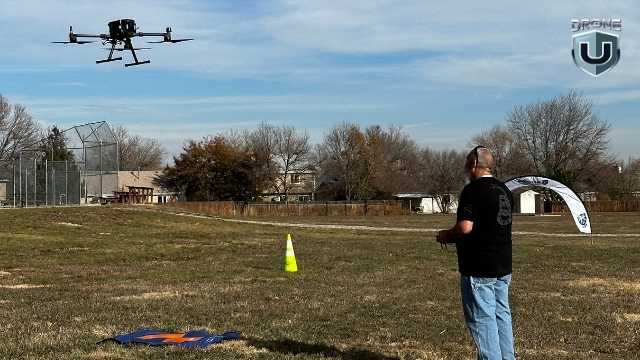
Hands-on Training: #1 Quality of a Drone Pilot
If you ask me, what’s the number one quality that separates real pros from rookies, it is this: The way a pilot reacts or takes action quickly to an emergency. Do they panic when an emergency strikes, or do they calmly enact a plan?
It’s true, if you can handle problems, even software glitches, with patience, you will succeed in this industry.
And this kind of readiness or prompt decision-making doesn’t come from watching videos or making casual decisions.
It comes from real-world practice, or in simple terms, from hands-on Flight Mastery training. Learning to fail in a controlled environment allows you to build the necessary habits and face problems with confidence in the field.
Flight Mastery was born to make pilots overcome their fears, build confidence, and competence through a systematic progression of flight exercises.
In this article, we’ll walk through how Flight Mastery works and what sets it apart from other drone courses. We’ll also look into why both solo pilots and enterprise teams rely on it to reach the next level.
Let’s dive in.
What is Flight Mastery?
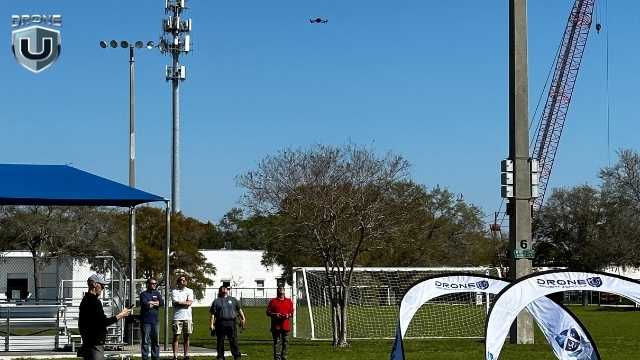
Hands-on Flight Mastery Training
Flight Mastery is not your usual drone class. It’s a structured, step-by-step system designed to help you fly. You’re not just learning how to take off and land. You’re learning how to be a professional pilot. The course builds the systems of operation you follow every time you fly, no matter the drone.
It is a relaxed group flying session that provides hands-on, focused training to help you fly with confidence and precision. In short, every drill, routine, and challenge is designed to build habits that work when you’re flying for real.
At its core, Flight Mastery is about intentional flying. Visualizing the flight before takeoff. It is also about training your mind how to think when flying. You have to understand remote spatial awareness, and we can help train your brain for just that.
That means:
- Reacting fast, without flinching, because you’ve practiced for it. Practiced hand-eye coordination
- Controlling momentum, both with the sticks and with spatial awareness
- Flying through tight spaces with confidence
This kind of muscle memory only comes with repetition and guided feedback, and that’s exactly what Flight Mastery is built to provide. There are two ways to train:
1. 1-day Core Course
Perfect for solo pilots or those who are ready to take the next step after passing their Part 107. You might know all the rules and basics, but still feel unsure flying around people, buildings, or tight spaces.
That hesitation is normal. And it’s exactly what this course helps you overcome.
It helps enhance your flight skills, allowing you to fly with greater control and precision in real-world situations.
It is the quickest way to level up your skills and gain the confidence you need to fly professionally or start taking on paid projects.
2. 3-day Intensive Training
Designed for enterprise drone programs and pilots working in a team, this longer format course offers more time for group practice where you train alongside other pilots and instructors. These sessions are built for serious pilots, especially those pursuing commercial jobs or running their drone business.
What makes both versions different is their structure. You’re not just practicing flight patterns; you’re learning an entire system, from pre-flight checks to post-flight reviews.
Every session is designed to eliminate guesswork that holds most pilots back. Whether it’s how much to brake or how to maintain smooth control during complex missions.
For example, take obstacle navigation. Instead of just telling you to “fly around an obstacle”, Flight Mastery teaches you how to read the wind and plan your path accordingly. You’ll also learn ways to manage orientation and recover safely if something goes wrong.
To put it simply, Flight Mastery trains you to make quick decisions during real client jobs or emergencies.
This foundation is what makes Flight Mastery more than just a training day. It’s a method and knowledge that you carry with you every time you fly a drone.
Let’s explore more about this in the next section.
Inside Flight Mastery and What Sets it Apart
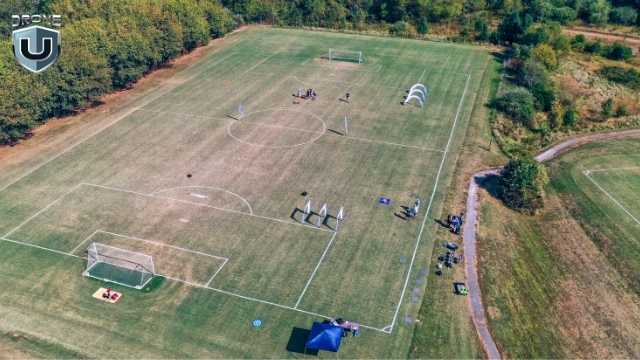
Drone Pilots Practicing in a Live Obstacle Course
Flight mastery is a proven, repeatable training framework that is tested by thousands of pilots in real-world conditions.
Here’s what it includes:
1. The Flight Mastery Method
This is the core of the program. We are going to put you through the hard stuff, so when you’re in the field, you can confidently react without panicking.
Every lesson follows a simple, field-tested framework:
Brief –>Fly–>Debrief
Before each drill, you’ll assess your environment, define your goal, and set an intention. Then, you’ll fly a focused drill to develop control.
This method rewires how you think and operate in the air, replacing your hesitation with clear instructions, discipline, and skill.
Just like a video game, we start small to help you learn depth perception, controlling the active brake, and setting orientation intentionally. While we start with linear motions, we slowly add more and more complexity to each drill.
Do you know how most airplane pilots judge each other? Typically with how smooth their banking turns come out by adding yaw and roll together.
You’ll learn to:
- Predict flight patterns before takeoff
- Use muscle memory to refine your control inputs
- Reduce wasted time and battery cycles
- Build well-practiced habits that you can rely on under pressure.
- What to do when you’re getting too close
- How to stop a flyaway
- How to discern if the flight will be safe every time.
- How to bring the drone down in an emergency
- How to fly the drone home without telemetry or a screen
It’s similar to the flight training style used in professional aviation. Except here, it’s applied to drones for VLOS and real-world manual flight.
To sum it all up, you won’t just learn how to fly. You’ll learn to think while flying, which is a major difference between amateurs and true professionals.
We are also going to force you to learn how to fly without sensors. No GPS, no VPS… just flying. Why? Because there will come a day when your drone takes off, flying back to China.
We’re going to teach you how to fly in Attitude mode, a common sensor-denied flight mode. When you learn how to fly in Attitude mode, no emergency can stop you. You’re able to fly in any environment and have absolute and total control of the aircraft.
2. Emergency Readiness Drills
No matter how experienced you are, every pilot faces moments of panic.
A bird flies in out of nowhere. You lose orientation, or your drone drifts far away.
That’s why Flight Mastery includes specific drills to prepare you for such emergencies. So that your reaction is calm and automatic in real-world flights.
You’ll practice how to:
- Recover from loss of orientation
- Land safely under low-battery stress
- React to flyaways or mechanical failure
- Handle unexpected aerial interference
Each drill uses field-tested routines that build sharp instincts and dependable muscle memory.
3. 12 Core Flight Exercises
These drills are not random. Each one targets one key skill. It builds critical muscle memory to help you fly with confidence, even under pressure.
Here’s how:
| Drill | Skill Focus | Why It matters |
| Hover Accuracy | Maintain a stable hover in place. Mastering wind bias. | Helps keep control if the GPS signal drops. |
| Yaw Control | Rotate precisely without drift. | Essential for framing, orientation, and filming. |
| Reverse Orientation Drill | Understand limitations of VLOS flights. | Builds understanding of why orientation is everything. |
| Orientation Loss Drill | Know how to fly when emergencies hit, your screen goes dark. | Teaches students emotional control, remote spatial awareness. |
| Depth Perception drill | Find out by going to Flight Mastery. | Master flying in tight spaces. |
| Hover drills | Find out by going to Flight Mastery. | Master wind bias. |
| Orbits | Master proportional movements for rotating about a point. | Master the most valuable shots used for storytelling or mapping and modeling. |
| Proximity drills | Find out by going to Flight Mastery. | Master flying in close proximity to objects. |
| Obstacle Navigation | Fly through small gates or gaps. | Sharpens precision and decision-making under constraints. |
| Stopping Flyaways | Learn how to stop a flyaway from a drone. | Improves ability to handle emergencies. |
| Emergency Braking | Practice rapid stop-and-hover maneuvers. | Helps avoid collisions and regain control in emergencies. |
| Emergency Landings | Land on precise targets with accuracy. | Prepares you for landing in complex or moving environments, avoiding vortex ring state. |
Whether you’re flying for real estate, inspecting a site, or doing creative work, these skills directly apply to real missions.
4. Obstacle Course Finale
After the 12 drills, the training culminates in a live obstacle course.
You’ll fly through tight gates and turns, under time pressure, and with full manual control. No GPS, no shortcuts. The goal is to complete the full obstacle course in under 2 minutes, proving your efficiency and real-world readiness.
It’s not about memorizing the course. It’s about proving to yourself that you can fly smoothly, using every skill you just built through the training.
How to Join a Flight Mastery Class?
In-Person Bootcamps
At DroneU, we offer Flight Mastery in two formats:
1. In-Person Bootcamps
Join us for a full day of practical experience with real-time coaching, drills, and feedback. You’ll fly the full course alongside experienced instructors and other pilots in a controlled training environment.
Imagine flying with experienced pilots all day, learning critical nuances of aircraft control and situational awareness.
On top of that, being able to ask questions and clear all your doubts about in-flight procedures. Isn’t that a unique opportunity?
So, what all do you need:
- A drone you’re comfortable flying (DJI Mavic, Air, or Phantom series work best)
- Extra batteries (at least 3–4)
- A good attitude and a readiness to be challenged
If you’re serious about improving your flight skills, check the upcoming schedule and register.
2. Online On-Demand Course
If you can’t make it in person, you can also access the entire Flight Mastery curriculum online. It includes video walkthroughs, obstacle setup guides, and coaching tips. Perfect for practicing on your own time.
Conclusion
Most drone pilots can fly. But not all of them can fly with confidence, precision, and purpose, especially when the unexpected happens.
Drone pilots need the right systems and operational standards to maintain confidence and systematically limit liability.
Flight Mastery is built to close this gap between knowing how to fly and how to stay in control when it counts.
It’s not about flashy tricks or checking boxes. It’s about building the instincts and reactions every drone pilot needs to handle real-world missions.
If you’re tired of guesswork and want to make every flight count, Flight Mastery gives you a true foundation.
If you’re ready to improve your skills like professionals, take the next step and join Drone U’s Flight Mastery course.
After Flight Mastery, you’ll not only walk away with smoother stick control. You’ll have the confidence to take command of your drone, no matter the weather, the obstacles, or the mission.
0

-
 Brinc Admits, We Caused the DJI Drone Ban! EXCLUSIVE
-
 Brinc Admits they're behind DJI Ban | Auterion Creates Drone Swarm Brain
-
 Trump Card on the DJI Ban, May be Best drone news of 2025. Will he tiktok DJI?
-
 This Drone Trick Makes Real Estate Videos Awesome!
-
 Exploring Drone Security: Opportunities and Challenges
More on Hot Topics